Choosing an AI tool for Blender MCP: Claude Code, Codex, Antigravity, Kimi, and local AI compared
Once installed, the official Blender MCP works with many AI apps. This guide compares Claude Code, the Claude desktop app, Codex, Antigravity CLI, Kimi Code CLI, local AI, and ChatGPT on the web by account, cost, how to register, and wait-time setting, then walks through how to choose.
한국어English
ON THIS PAGE
- 011. What changes and what stays
- 022. The comparison table
- 033. How far each app guide actually tested
- 044. How to choose
- 055. Whatever the app, Blender uses the same tools
- 066. Checking the versions installed on your PC
- 077. When you mix several apps
- 08Practice
- 09Common mistakes and fixes
- 10In one line
- 11Read next
- 12References
Based on: Blender Lab MCP add-on and server 1.0.3, Blender 5.2 LTS, the official MCP docs of each AI app (Claude Code, Codex, Antigravity CLI, Kimi Code CLI, llama.cpp, OpenAI custom MCP servers). Checked in November 2026. All figures are real PowerShell and Blender screens.
Search for Blender MCP and you get Claude Code, Codex, Gemini, Kimi, and local AI all mixed together. One thing to know first: the Blender side is one, and the AI app can be swapped.
Think of a wall socket. Once the socket (Blender's MCP add-on and server) is installed, it stays put, and you can plug in any appliance (AI app), a vacuum or a fan, because the plug standard is the same. What MCP is, is explained in What is MCP?.
This guide compares the AI apps you can use with Blender MCP in one table and explains how to choose for your situation. How to actually connect each app is in the app-by-app guides linked here.
1. What changes and what stays
| Part | Where it runs | When you switch AI apps |
|---|---|---|
| MCP add-on | Inside Blender | Stays. Install once |
| MCP server (blender-mcp) | Outside Blender, on your PC | Stays. Just register the same server in each app |
| 26 tools (scene summary, screen capture, code execution, and more) | Inside the server | Stay. Same tools whichever app calls them |
| AI app | Your PC or the internet | This is what changes. Registration, account, and cost differ |
So the Blender side is done once you follow Installing the official Blender MCP. This guide only compares the last row, the AI app.
This guide is based on the official MCP made by Blender Lab. For how it differs from the similarly named community version (MCP for Blender), see The official Blender MCP vs. the community MCP for Blender.
2. The comparison table
| AI app | Where it runs | Account and cost | Registering Blender MCP | Server wait-time setting | Guide |
|---|---|---|---|---|---|
| Claude desktop app | Your PC (app) | Claude account. The Blender connector is available on all plans, including free | Add Blender under Customize > Connectors | None (the app handles it) | Installing the official MCP, Section 5 |
| Claude Code | Your PC (terminal) | Sign in with a Claude account. What you can use depends on the plan | claude mcp add <name> -- <command> | Environment variable MCP_TIMEOUT (ms, default 30 s) | Adding it to Claude Code |
| Codex | Your PC (terminal) | Sign in with a ChatGPT account. What you can use depends on the plan | codex mcp add <name> -- <command> or config.toml | startup_timeout_sec (s, default 10 s) | Working in Blender with Codex |
| Antigravity CLI (agy) | Your PC (terminal) | Sign in with a Google account | agy mcp add or mcp_config.json | timeoutSeconds (s) | Connecting Blender MCP to agy |
| Kimi Code CLI | Your PC (terminal) | Sign in with a Kimi account (OAuth). Depends on the plan | .kimi-code\mcp.json | startupTimeoutMs (ms) | Working in Blender with Kimi Code CLI |
| Local AI (llama.cpp) | Your PC (including the model) | No subscription. Needs a graphics card and memory instead | Register the server address in the web UI (server runs in web mode) | None | Driving Blender with AI on your own computer |
| ChatGPT on the web | OpenAI's servers | ChatGPT account, workspace permissions | Cannot start the server on your PC. Needs a public HTTPS address or Secure MCP Tunnel | Not applicable | Using Blender MCP with ChatGPT |
In the registration commands, <command> is the same server start command. For example, if you downloaded the server to C:\blender_mcp, it is uv --directory C:\blender_mcp\mcp run blender-mcp. This part stays the same whatever the app.
The "server wait-time setting" is how many seconds the app waits for the server to start. The Blender server can take tens of seconds to start on some PCs, so if connections keep dropping, check this setting first. Codex in particular has a short default of 10 seconds, so on a PC where the server takes about 20 seconds to start, Codex may fail first. If you use Codex, add startup_timeout_sec = 30 to the server entry in config.toml to raise it to 30 seconds. Details are in Section 5 of When Blender MCP won't connect.
3. How far each app guide actually tested
The app guides were not all written the same way. Some actually drove Blender; some follow the official docs. Keep this in mind when choosing.
| AI app | What its guide did |
|---|---|
| Claude Code | Registered, checked the connection, summarized a scene, and got a preview render |
| Claude desktop app | Connector steps follow Claude's official tutorial |
| Codex | Install and registration steps follow OpenAI's official docs. The Blender figures were taken with the same server connected through another app |
| Antigravity CLI | Installed, registered, saw the 26 tools under /mcp in a chat, and ran a read question |
| Kimi Code CLI | Install, sign-in, and MCP registration follow the official docs. The check skill was run directly in Blender, not through Kimi |
| Local AI | Ran a small and a large model on a laptop with an 8 GB graphics card and compared them |
| ChatGPT on the web | Follows OpenAI's official docs. ChatGPT itself was not tried |
4. How to choose
Answer these questions in order and most choices make themselves.
- Do you already pay for an AI subscription? If so, start with that company's tool: Claude Code or the Claude desktop app with a Claude plan, Codex with a ChatGPT plan, Antigravity CLI with a Google account.
- If the terminal (the black window) is new to you, the Claude desktop app is easiest. You just add a connector, no commands.
- If you want to use "GPT", pick Codex, not ChatGPT on the web. ChatGPT on the web cannot start the server on your PC.
- If you want no subscription and want the scene to stay on your PC, pick local AI. With an 8 GB graphics card, though, small models often made mistakes when changing the scene.
- Once you choose, learn that one app for a while. The Blender side stays the same, so switching later only means one registration line.
| Who | App to pick |
|---|---|
| New to this and want a chat window | Claude desktop app |
| New, but willing to learn the terminal | Claude Code or Antigravity CLI |
| Already on a ChatGPT plan | Codex |
| Want to try at no cost and have a graphics card | Local AI (llama.cpp) |
| Want to compare several apps | Leave the Blender side alone and register the apps one by one |
5. Whatever the app, Blender uses the same tools
Starting point: a new file (File > New > General) with the default cube.
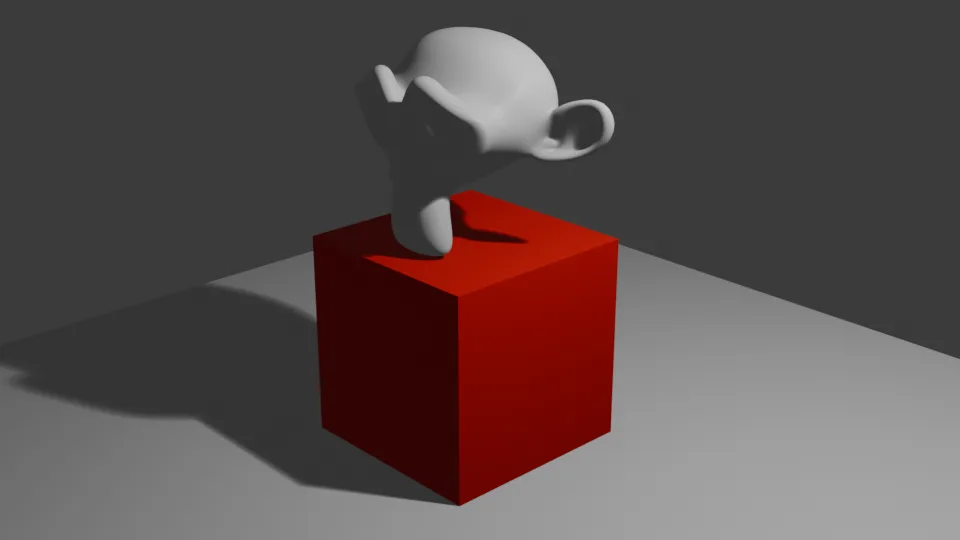
Whatever the AI app, the tools that drive Blender are the same 26. The figure below is the result of asking Claude Code for a floor plane, a monkey head, a red material, and a camera, one after another. Other apps connected to the same server can do the same job with the same tools. The tone of the answers and the order of work differ by model.
Steps:
- Register Blender MCP in the app you chose (app guides in the Section 2 table).
- Open a new file and send "Tell me which objects are in the open Blender scene. Don't change anything."
- If the answer lists Camera, Cube, and Light, you are connected.
- For the next prompts, follow Ten first prompts for Blender MCP.
- Once the first prompts feel familiar, move on to the hands-on examples: modifiers, lights and materials, a low-poly room, and turntable renders, in that order. How much the AI uses per job is in Measuring Blender MCP token use.
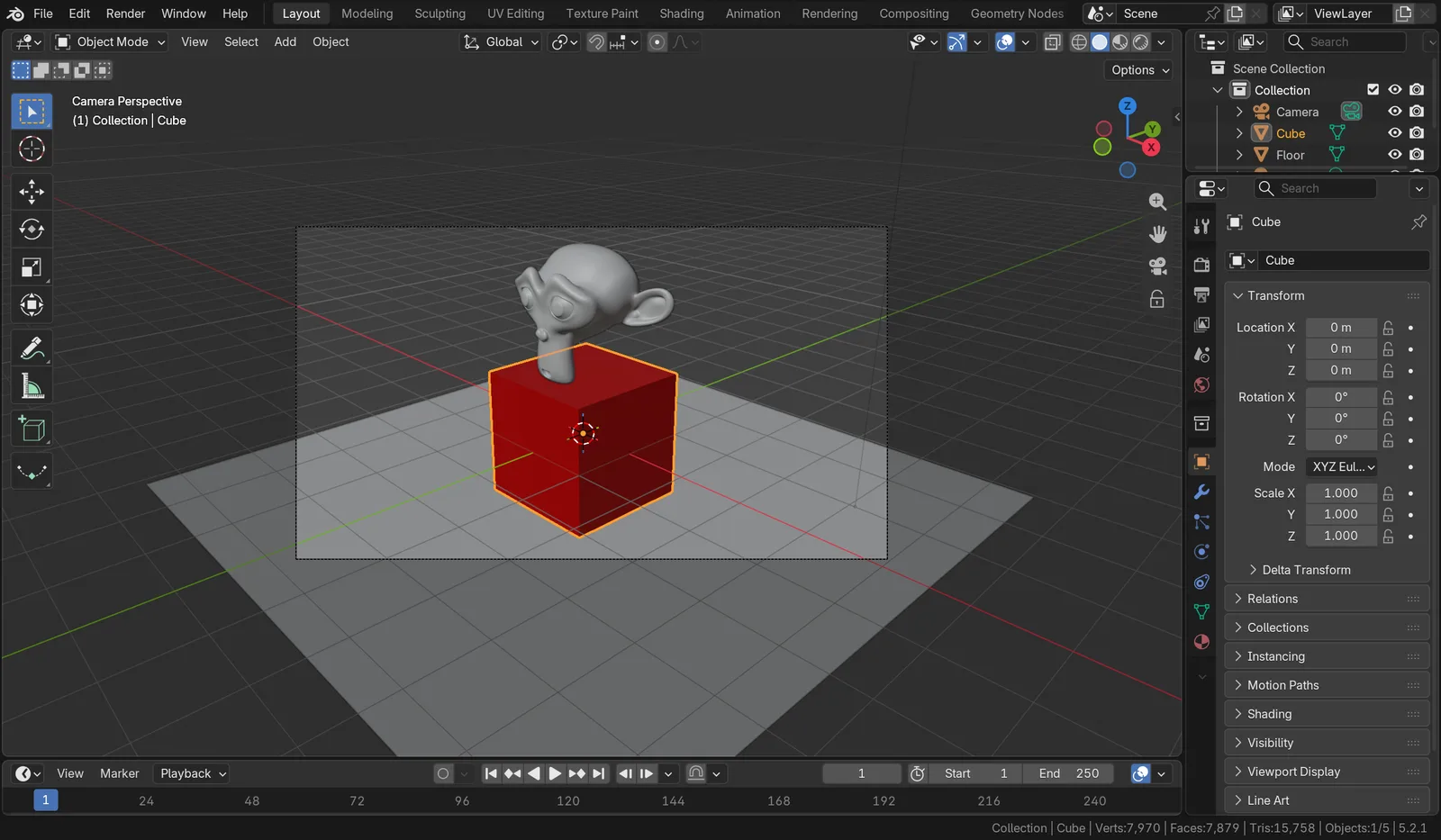 Figure 1. A scene Claude Code built with the official MCP tools. Floor plane, a Cube with a red material, a smooth Suzanne, and the camera view (Blender screenshot)
6. Checking the versions installed on your PC
Starting point: a PC with at least one app installed.
If you have several apps installed, it helps to check their versions in one go. Each app guide was written for the version of its time, so if your version is very different, menus or commands may have changed.
Steps:
- Open PowerShell.
- Type the version command for each app you have installed.
claude --version
agy --version
kimi --version
uv --version
- If you see "not found" instead of a version number, that app is missing, or you did not open a new window after installing it.
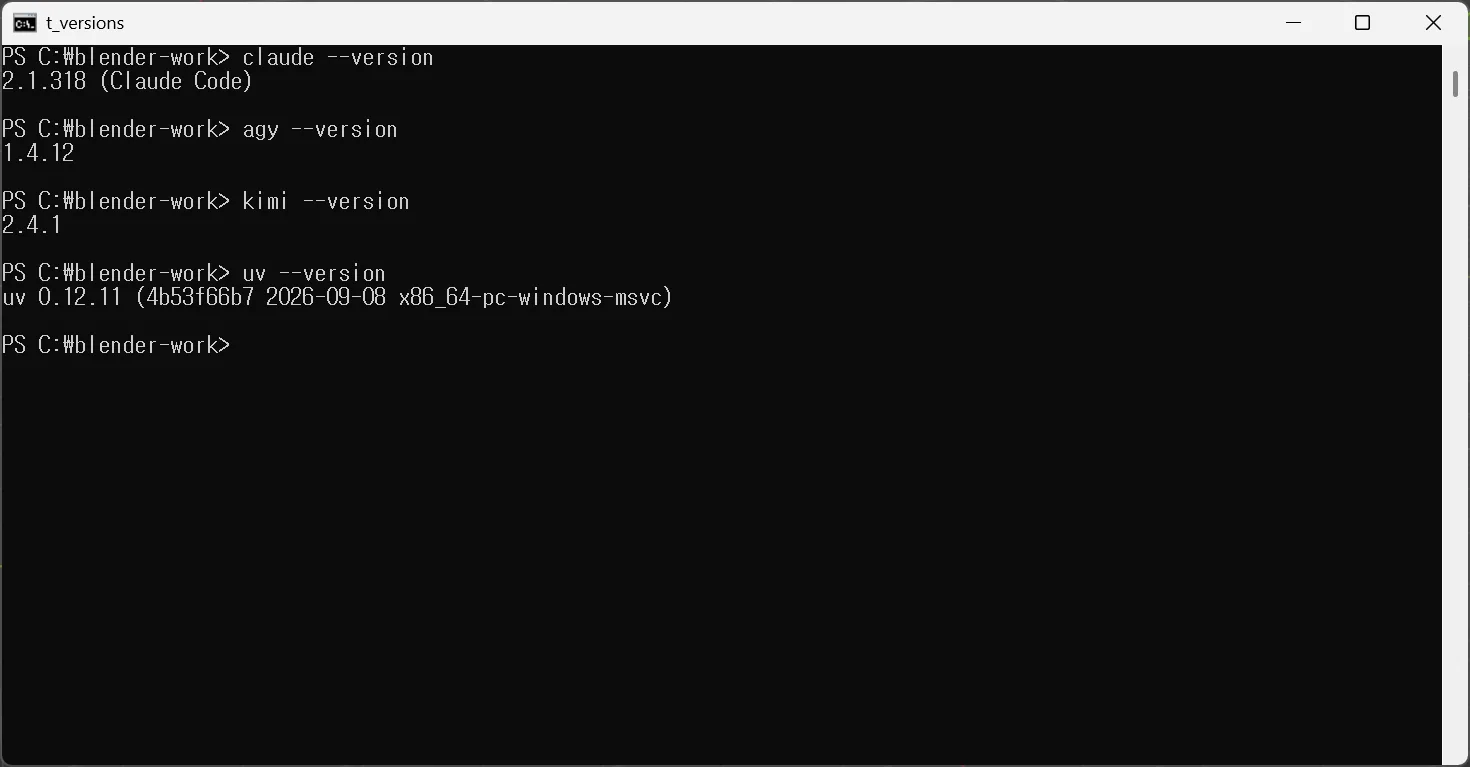 Figure 2. AI app and uv versions on one PC. From the top: Claude Code 2.1.318, Antigravity CLI 1.4.12, Kimi Code CLI 2.4.1, uv 0.12.11 (terminal screenshot)
uv is not an AI app; it is the tool that starts the Blender server. Every app starts the server through uv, so check it as well.
7. When you mix several apps
| Do this | Why |
|---|---|
| Give work to one app at a time | If two AIs change the same scene at once, it is hard to tell whose result is whose |
Register the server under the same name (for example blender) in each app | Saying "use the blender server" stays clear |
| Keep only one Blender open | If two Blenders use the same port, connections go to only one of them |
| Save before giving work | In every app, the code execution tool really changes the file |
More safe habits are in Safety check before handing Blender to AI.
Practice
- Answer the five questions in Section 4 and pick one app that suits you.
- Check your versions with the commands in Section 6 and compare them with the versions in the app guides.
- Register Blender MCP in the app you picked, send the first prompt from Section 5, and check that the object names match the Outliner.
Common mistakes and fixes
| Symptom | Cause | Fix |
|---|---|---|
| Not sure whether to reinstall the Blender add-on after switching apps | Treating the Blender side and the app side as one thing | The Blender side stays. Only register the server in the new app |
| Blender is nowhere in ChatGPT on the web | ChatGPT on the web cannot start the server on your PC | Use Codex, or see the tunnel section in Using Blender MCP with ChatGPT |
| Connections work in some apps and not others | The server's start time is close to the app's wait time | Raise the "wait-time setting" from the Section 2 table |
| Other apps connect but only Codex fails at server start | Codex's startup_timeout_sec defaults to 10 seconds | Add startup_timeout_sec = 30 to the server entry in config.toml |
A command like kimi mcp is not found | Registration differs by app version | Use the settings file method from the app guide |
| Local AI says "done" but the scene is unchanged | A small model did not check its result | Use a larger model, or check the result on screen |
In one line
The Blender side (add-on, server, 26 tools) is one; swap the AI app. Easy start: the Claude desktop app. GPT: Codex. No subscription: local AI. Once connected, move on to Ten first prompts for Blender MCP.
Read next
- What is MCP?
- Installing the official Blender MCP
- The official Blender MCP vs. the community MCP for Blender
- Adding the official Blender MCP to Claude Code
- Working in Blender with Codex and GPT-6 Astra
- From Gemini CLI to Antigravity CLI: connecting Blender MCP to agy
- Working in Blender with Kimi Code CLI
- Driving Blender with AI on your own computer
- Using Blender MCP with ChatGPT
- When Blender MCP won't connect
- Ten first prompts for Blender MCP
- Letting AI build a modifier stack
- Letting AI set up lights and materials
- Building a low-poly room with Blender MCP
- Turntable renders with AI
- Measuring Blender MCP token use
References
- Blender Lab, MCP Server: https://www.blender.org/lab/mcp-server/
- Claude Code MCP docs: https://code.claude.com/docs/en/mcp
- OpenAI, Codex MCP (
startup_timeout_secdefault 10 s): https://learn.chatgpt.com/docs/extend/mcp?surface=cli - OpenAI, Add custom MCP server: https://developers.openai.com/api/docs/guides/custom-mcp-server
- Claude Academy, Using the Blender connector in Claude: https://academy.claude.com/tutorials/using-the-blender-connector-in-claude
- Figures: one real Windows PowerShell screen, one real Blender 5.2.1 screen