Measuring Blender MCP token use: the same job three times each, and how to save
With Claude Code and the official Blender MCP, we ran 'place five cylinders' in three question styles, three times each, nine runs in all. We measured input and output tokens, time, and estimated cost, and compared with real numbers how much it helps to skip screenshot checks and to give exact values.
한국어English
Based on: Claude Code 2.1.318 (model Claude Opus 5.5), Blender 5.2 LTS (screenshots from 5.2.1, English interface), the Blender Lab official MCP server and add-on 1.0.3, and the cost guide in the Claude Code Docs. Checked in November 2026. Figure 1 is a real Blender screen. Figure 2 is a chart drawn from the values measured for this guide.
Even for a tiny job like placing five cylinders with Blender MCP, the AI read 140,000 to 220,000 tokens per run. Most of that was the same content read again and again. In this guide, we ran the same job in three question styles, three times each, nine runs in all, measured the numbers, and used them to sum up how to save.
A token is the unit AI reads and writes in. Think of it as a small piece of text. AI tools count usage and price in these pieces. For more, see What tokens and context windows mean.
When you finish this guide, you will be able to do the following.
- Explain why one MCP job uses so many tokens.
- Get the token count of one run in Claude Code as numbers.
- Tell apart "input read from cache," "input written to cache," and "output."
- Use less by changing how you check and how you ask.
1. The reason it uses so many
Every time the AI calls a tool, it sends the whole conversation so far again and gets an answer. Each time Claude uses tools, another request goes out carrying the tool results. Placing cylinders calls tools a few times, such as "look at the scene → run code → check," so the system instructions, the tool list, and the earlier conversation are read again each time.
Luckily there is the prompt cache. It remembers the part already read for a while and counts it at a lower price when read again. It is like reopening a book you already borrowed instead of buying it again every time. So how much of the input is new matters more for cost than the total token count.
2. How to measure
2-1. During a conversation: /usage
Type /usage in a Claude Code conversation and the Session block shows the token count and estimated cost of the current session. This amount is an estimate computed on your PC from token counts at list price. On subscription plans such as Pro and Max, usage is included in the subscription, so this amount is not what you are billed, and the same screen shows plan usage bars separately.
The /usage screen also shows plan and account details, so cover them if you share the screen.
2-2. Measuring one run exactly: claude -p and JSON
To compare the same job several times, a mode that runs once and exits is easier than a conversation. claude -p "question" handles one question and exits, and adding --output-format json prints the token counts and estimated cost as JSON.
This is the shape of the command used in this guide (replace the work folder and config file name with your own).
claude -p "question" --output-format json `
  --strict-mcp-config --mcp-config blender_only.json `
  --allowedTools mcp__blender__execute_blender_code mcp__blender__get_objects_summary `
    mcp__blender__get_screenshot_of_window_as_image mcp__blender__get_screenshot_of_area_as_image
| Option | What it does |
|---|---|
-p | Handles one question and exits |
--output-format json | Prints the result as JSON with usage numbers |
--mcp-config | Reads the MCP servers for this run from a file |
--strict-mcp-config | Uses only the servers in that file and ignores servers registered elsewhere |
--allowedTools | Tools that may run without asking |
We used --strict-mcp-config because mixing in other MCP servers would change the conditions between runs. blender_only.json lists only the official Blender MCP server.
If the first run ends with a connection timeout: our first try ended with an answer saying the MCP server did not respond within 30 seconds. With -p, Claude Code waits for MCP servers to connect for up to MCP_TIMEOUT (30 seconds by default). After starting the server once in advance and raising the environment variable MCP_TIMEOUT to 90000 (90 seconds), all nine runs finished normally.
These are the fields to look at in the JSON (real values from run A1).
"total_cost_usd": 0.2088,
"num_turns": 5,
"duration_ms": 34833,
"usage": {
  "input_tokens": 12,
  "cache_creation_input_tokens": 17876,
  "cache_read_input_tokens": 161599,
  "output_tokens": 1671
}
| Field | Meaning |
|---|---|
input_tokens | New input not related to the cache |
cache_creation_input_tokens | Input newly written to the cache this time |
cache_read_input_tokens | Input read again from the cache |
output_tokens | The AI's answer and tool calls (including thinking) |
num_turns | Number of back-and-forth turns |
total_cost_usd | Estimated cost at list price (USD) |
3. The test: one job, three question styles
Starting point: before each run, Blender was reset to a new file (File > New > General).
The job is always the same: delete the default cube and place five cylinders along the X axis, 1 m apart. Only the question style changes.
| Style | Question sent |
|---|---|
| A: check with a screenshot | "In Blender, delete the default cube and place five cylinders in a row along the X axis, 1 m apart. When done, take a screenshot and check the result." |
| B: check with the object list | (Same start as A) + "Instead of a screenshot, check only names and positions with get_objects_summary." |
| C: exact values, short answer | "In Blender, delete the default cube and place five cylinders, radius 0.3 m and height 2 m, at X=0,1,2,3,4 m. Check only with get_objects_summary, not a screenshot, and answer in three lines or fewer." |
We ran A1, A2, A3, B1, B2, B3, C1, C2, C3 in that order, back to back. The questions were sent in Korean; the lines above are translations.
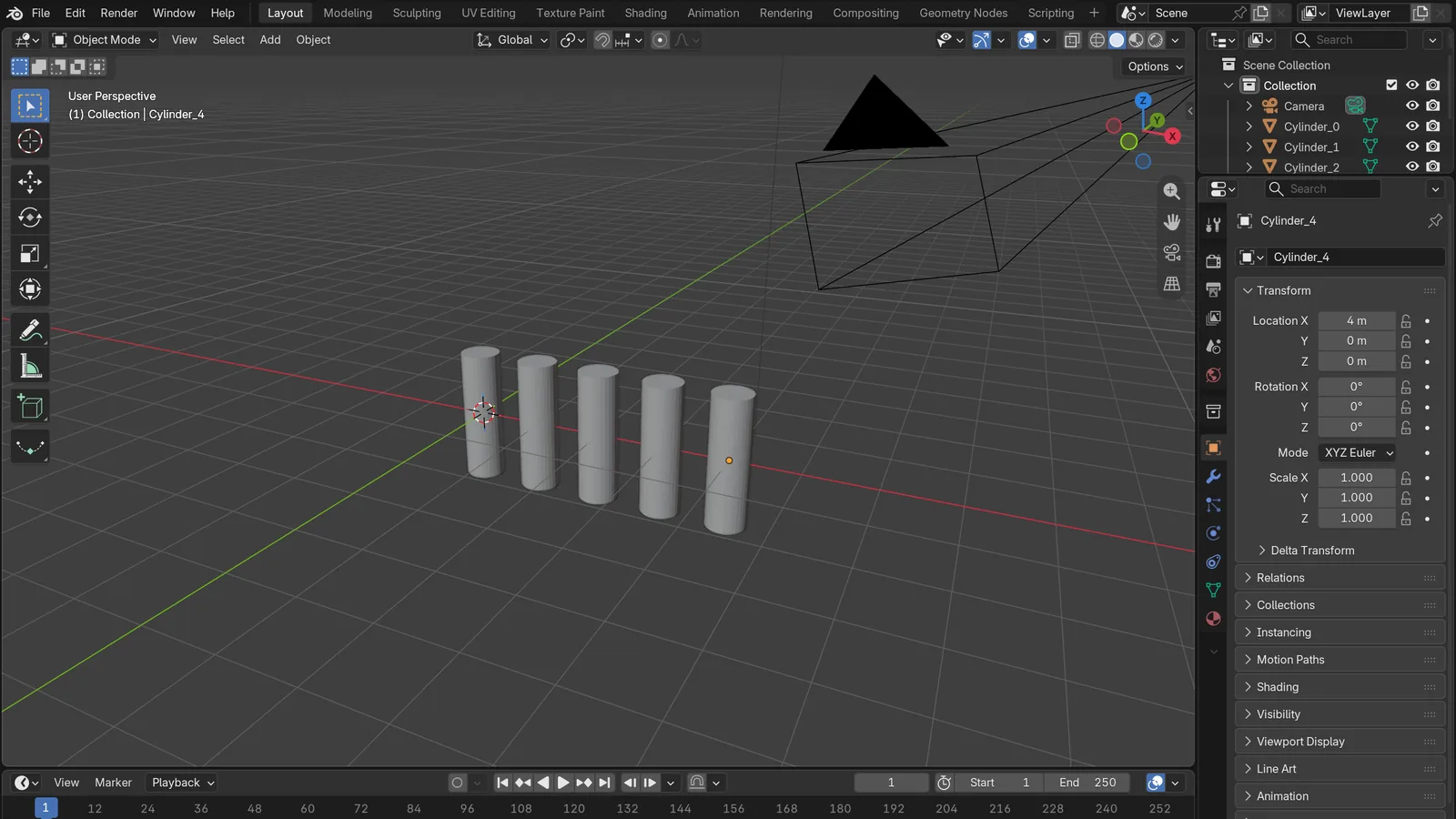 Figure 1. The result of run C3. Five cylinders placed at X 0 to 4 m (Blender screenshot)
Do this: pick one of the questions above, run it with the command in section 2-2, and compare the usage fields in the JSON with the table in this guide.
4. Results
| Run | Turns | Time (s) | Total input | Of which written to cache | Output | Estimated cost (USD) |
|---|---|---|---|---|---|---|
| A1 | 5 | 34.8 | 179,487 | 17,876 | 1,671 | 0.209 |
| A2 | 5 | 34.5 | 181,578 | 6,118 | 1,691 | 0.118 |
| A3 | 7 | 31.0 | 219,260 | 7,350 | 1,989 | 0.141 |
| B1 | 5 | 24.3 | 175,188 | 17,578 | 1,710 | 0.206 |
| B2 | 6 | 24.2 | 211,571 | 2,481 | 1,664 | 0.095 |
| B3 | 6 | 22.2 | 211,402 | 2,414 | 1,594 | 0.093 |
| C1 | 5 | 11.2 | 174,813 | 17,328 | 786 | 0.186 |
| C2 | 5 | 15.3 | 139,479 | 2,083 | 1,049 | 0.065 |
| C3 | 5 | 16.5 | 174,991 | 1,623 | 880 | 0.065 |
Total input is new input plus input written to the cache plus input read from the cache.
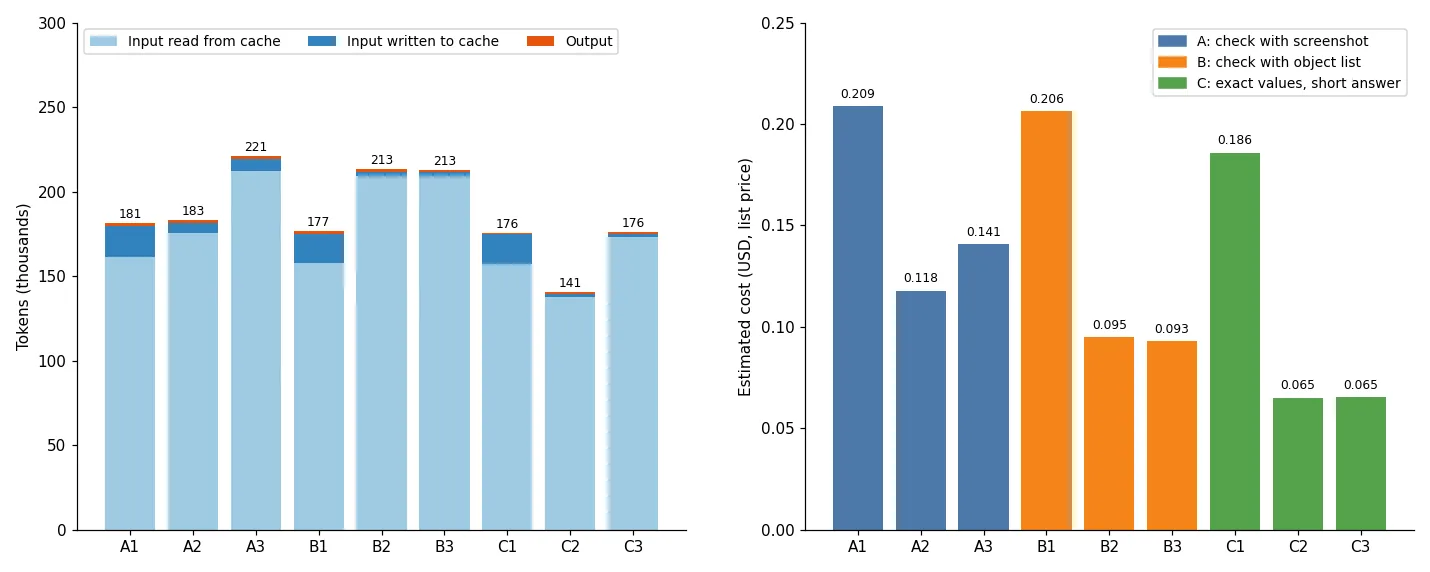 Figure 2. Tokens and estimated cost for the nine runs (chart)
Do this: in the left chart of Figure 2, look at how thick the dark blue part of each bar is, and compare it with the height of the same run in the right chart. The thicker the dark blue part, the higher the cost.
5. What the numbers say
5-1. Most input is re-read
All nine runs read 140,000 to 220,000 input tokens, and 130,000 to 210,000 of those came from the cache. The AI's output was only 800 to 2,000 tokens. MCP usage depends less on how long the AI answers and more on how many turns there are and how long the conversation is that gets re-read each time.
5-2. The first run of a group costs more
A1, B1, and C1 were the first runs after the question changed. Each wrote about 17,000 tokens to the cache and cost 0.19 to 0.21 dollars. In the second and third runs of the same question, input written to the cache dropped to 1,600 to 7,000 tokens, and cost dropped to 0.065 to 0.141 dollars. Doing similar work back to back keeps the cache warm and costs less. If you come back after a long break, the cache may have expired and it can cost more again.
5-3. Screenshot checks are expensive
Comparing the second and third runs, which had similar conditions:
| Style | Average estimated cost | Average time | Input written to cache |
|---|---|---|---|
| A: screenshot | 0.130 dollars | 32.8 s | 6,118 to 7,350 |
| B: object list | 0.094 dollars | 23.2 s | 2,414 to 2,481 |
| C: exact values + short answer | 0.065 dollars | 15.9 s | 1,623 to 2,083 |
A screenshot is an image, so it is new input every time. Switching to the object list cut cost by about 28% and time by about 10 seconds. C, with exact values and a short answer, cost about half of A.
5-4. Vague questions give shifting results
A1 shrank the cylinder radius to 0.3 m and placed them at X 0 to 4 m. A2 used a radius of 0.4 m and centered them at X −2 to 2 m. Same question, different results. With "1 m apart," default cylinders (2 m wide) would overlap, so the AI chose a size on its own each time. When the radius and positions were given, as in C, all three runs used the same radius of 0.3 m and X 0 to 4 m, and the answers were shorter. Only the height (Z) differed: C2 put them at 1 m (bottoms on the floor), while C1 and C3 used 0. Values you do not give are still chosen by the AI.
5-5. A limit of the list tool
B1's answer said that "get_objects_summary returns only name, type, selection, and visibility, not position." So it reported positions from the values it had put in the code. If you must check positions, ask for it separately, for example: "Read each cylinder's Location with code and tell me."
6. How to save, in short
| Method | Basis |
|---|---|
| Check with lists and numbers; use screenshots only when needed | 5-3: A → B about 28% less |
| Put values such as size and position in the question | 5-3 and 5-4: C is half of A, and results stay the same |
| Set the answer length, such as "three lines or fewer" | C's output is about half of A and B |
| Do similar work back to back | 5-2: cost drops a lot after the first run |
Use /clear when moving to unrelated work | Official guide: old conversation is re-read on every request |
Turn off unused MCP servers in /mcp | Official guide: server names and instructions enter the conversation |
Use /context to see what takes up space | Official guide |
MCP tool definitions are loaded only when needed by default, so at first only tool names and server instructions enter the conversation. Even so, many servers take up space with just their names and instructions.
A note on reading the numbers: these values were measured on one PC, on one day, with one model. If the model, the Claude Code version, the MCP servers you have on, or the order of questions changes, the numbers change too. Use them to compare methods, and measure in your own setup. Costs are estimates at list price, not the amount billed on a subscription plan.
Practice
- Run question C from section 3 twice in a row on your PC, and see whether
cache_creation_input_tokensis lower in the second run. - Run question A, take a break of more than an hour (the cache in this test lasted one hour), run the same question again, and write down how input written to the cache changes.
- Run question C without only "answer in three lines or fewer," and check how much
output_tokensgoes up.
Common mistakes and fixes
| Symptom | Cause | Fix |
|---|---|---|
A -p run ends with "the MCP server did not respond" | Server startup takes longer than the default 30 seconds | Start the server once in advance and raise MCP_TIMEOUT |
| Numbers vary a lot between runs | First runs, and runs after a break, write to the cache | Leave out first runs and compare back-to-back runs |
The /usage amount differs from the bill | It is a list-price estimate, and subscriptions are counted separately | On a subscription, look at the plan usage bars |
| Same question, different sizes in the result | No size or position in the question, so the AI chose | Put the values in the question |
| Tools from other MCP servers get called | All registered servers are on | Use --strict-mcp-config or turn them off in /mcp |
Summary
MCP usage grows with "number of turns × conversation re-read" → check with lists and numbers instead of screenshots, put values in the question and keep answers short, and do similar work back to back. The more repetition a job has, as in the previous guide Turntable renders with AI, the bigger this difference gets.
Further reading
- What tokens and context windows mean
- Trying the 26 tools of the official Blender MCP
- Adding the official Blender MCP to Claude Code
- Letting AI build a modifier stack
- Choosing an AI tool for Blender MCP
- Ten first prompts for Blender MCP
References
- Claude Code Docs, Manage costs effectively: https://code.claude.com/docs/en/costs
- Claude Code Docs, CLI reference: https://code.claude.com/docs/en/cli-reference
- Claude Code Docs, Connect Claude Code to tools via MCP: https://code.claude.com/docs/en/mcp
- Blender Lab, MCP Server: https://www.blender.org/lab/mcp-server/
- Images: real Blender 5.2.1 screen, and a chart drawn from the values measured for this guide