Using Blender MCP with ChatGPT: custom MCP servers in ChatGPT on the web, secure tunnels, and how Codex differs
What to know when you want to use Blender MCP with GPT: why the official Blender MCP cannot plug straight into ChatGPT on the web, the two routes OpenAI's docs describe (a public HTTPS address or Secure MCP Tunnel), and how they compare with Codex, the easiest way to drive Blender with a GPT model.
한국어English
ON THIS PAGE
- 011. The reason it does not plug in: where the server runs
- 022. Starting the server in web mode on your PC
- 033. OpenAI's docs: adding a custom MCP server to ChatGPT
- 044. Two routes for ChatGPT to reach a server on your PC
- 055. The easy way to drive Blender with GPT: Codex
- 066. Picking a route
- 07Practice
- 08Common mistakes and fixes
- 09In one line
- 10Read next
- 11References
Based on: OpenAI's official docs (Add custom MCP server, Secure MCP Tunnel, Connect and test your plugin), Blender Lab MCP server 1.0.3, Blender 5.2 LTS. Checked in November 2026. The figures are OpenAI's official doc pages and a real PowerShell screen. The ChatGPT steps follow the official docs only.
People often ask how to use Blender MCP "with GPT". Here is the short answer. ChatGPT on the web cannot start the Blender MCP server installed on your PC. ChatGPT runs on OpenAI's computers, and the Blender MCP server only answers inside your own PC. Joining the two needs a public address or a secure tunnel, and that is a developer setup.
The easiest way to drive Blender with a GPT model is Codex. Codex is OpenAI's coding agent. It runs on your PC, so like Claude Code it can start the Blender MCP server directly.
This guide explains why ChatGPT on the web does not connect, the two routes OpenAI's docs describe, and how to choose between them and Codex. We did not try the ChatGPT side ourselves. All ChatGPT steps here are taken from OpenAI's official docs.
1. The reason it does not plug in: where the server runs
There are two ways to run the Blender MCP server.
| Mode | Who starts the server | Who can reach it | Apps that use it |
|---|---|---|---|
| Standard input/output (stdio) | The AI app starts it on your PC | That one AI app | Claude Code, Codex, Kimi Code CLI, Antigravity CLI, Claude desktop app |
| Web (HTTP) | You start it yourself and leave it running | Apps that come to its address | Apps that run in a browser (for example the llama.cpp web UI) |
ChatGPT on the web cannot use the first mode. ChatGPT runs on OpenAI's computers, not yours, so it cannot start a program on your PC.
The second mode does not work as is either. By default, the official server's web mode only answers on 127.0.0.1, which means "this PC itself". It is like a home intercom. It works inside the house, but nobody outside can call the intercom number. OpenAI's computers are outside, so they cannot reach it.
2. Starting the server in web mode on your PC
Starting point: a PC where you have downloaded the Blender MCP server. How to download it is in Section 5 of Installing the official Blender MCP.
You can see for yourself that the web-mode server only answers inside this PC.
Steps:
- Open PowerShell.
- Type the command below. Change the folder path to where you downloaded the server.
uv --directory C:\blender_mcp\mcp run blender-mcp --transport http --port 9191
- Check that the last line shows
Uvicorn running on http://127.0.0.1:9191. - When you are done, stop the server with
Ctrl+C.
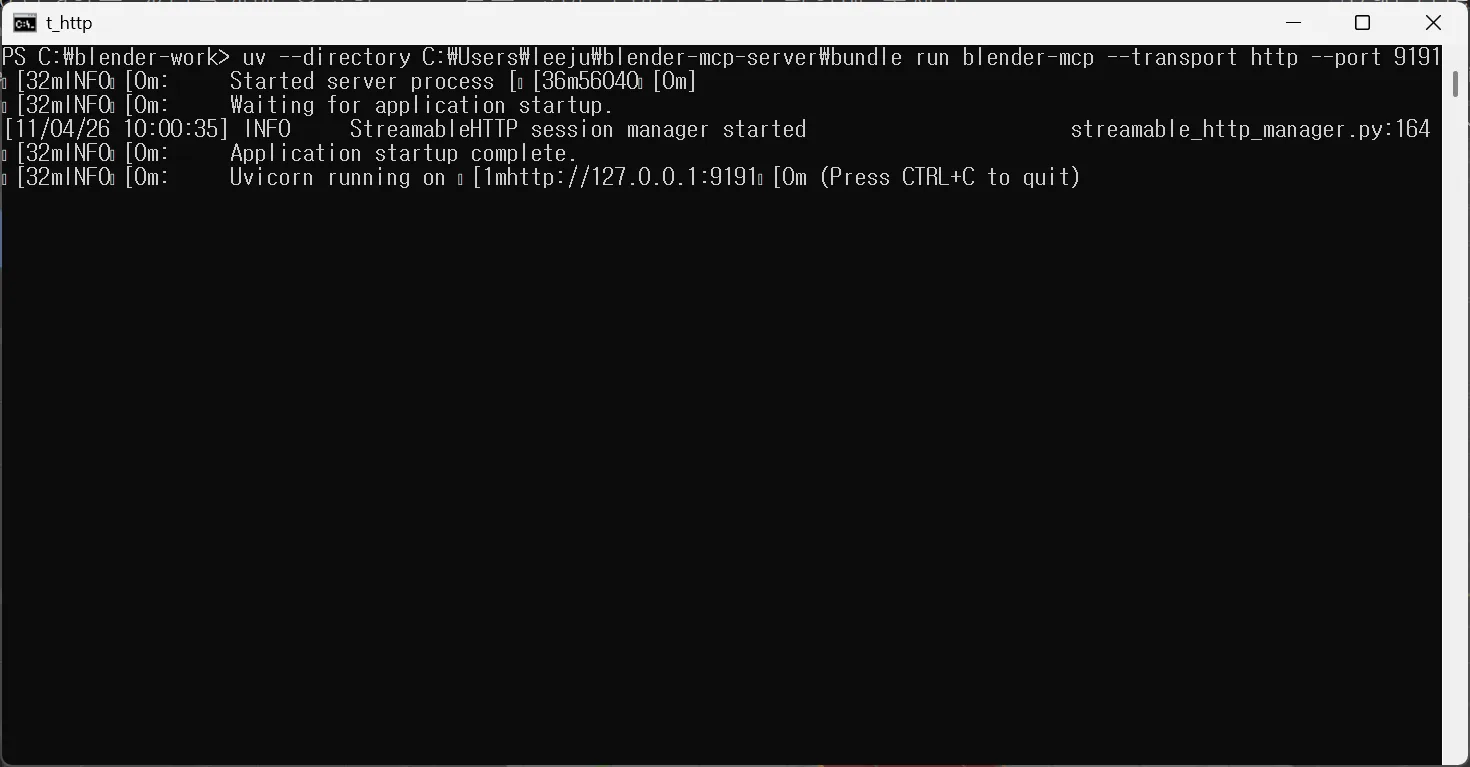 Figure 1. The Blender MCP server started in web mode. The address on the last line, http://127.0.0.1:9191, only answers inside this PC. The figure shows a server downloaded under the user folder (terminal screenshot)
StreamableHTTP refers to "streaming HTTP", one of MCP's web modes. It has the same name as one of the modes ChatGPT supports (Section 3). The mode matches; the problem is that the address is a home intercom that ChatGPT cannot reach.
This web mode is for browser apps on the same PC. A working example is in Driving Blender with AI on your own computer.
3. OpenAI's docs: adding a custom MCP server to ChatGPT
The "Add custom MCP server" page in OpenAI's developer docs describes how to add your own MCP server to ChatGPT.
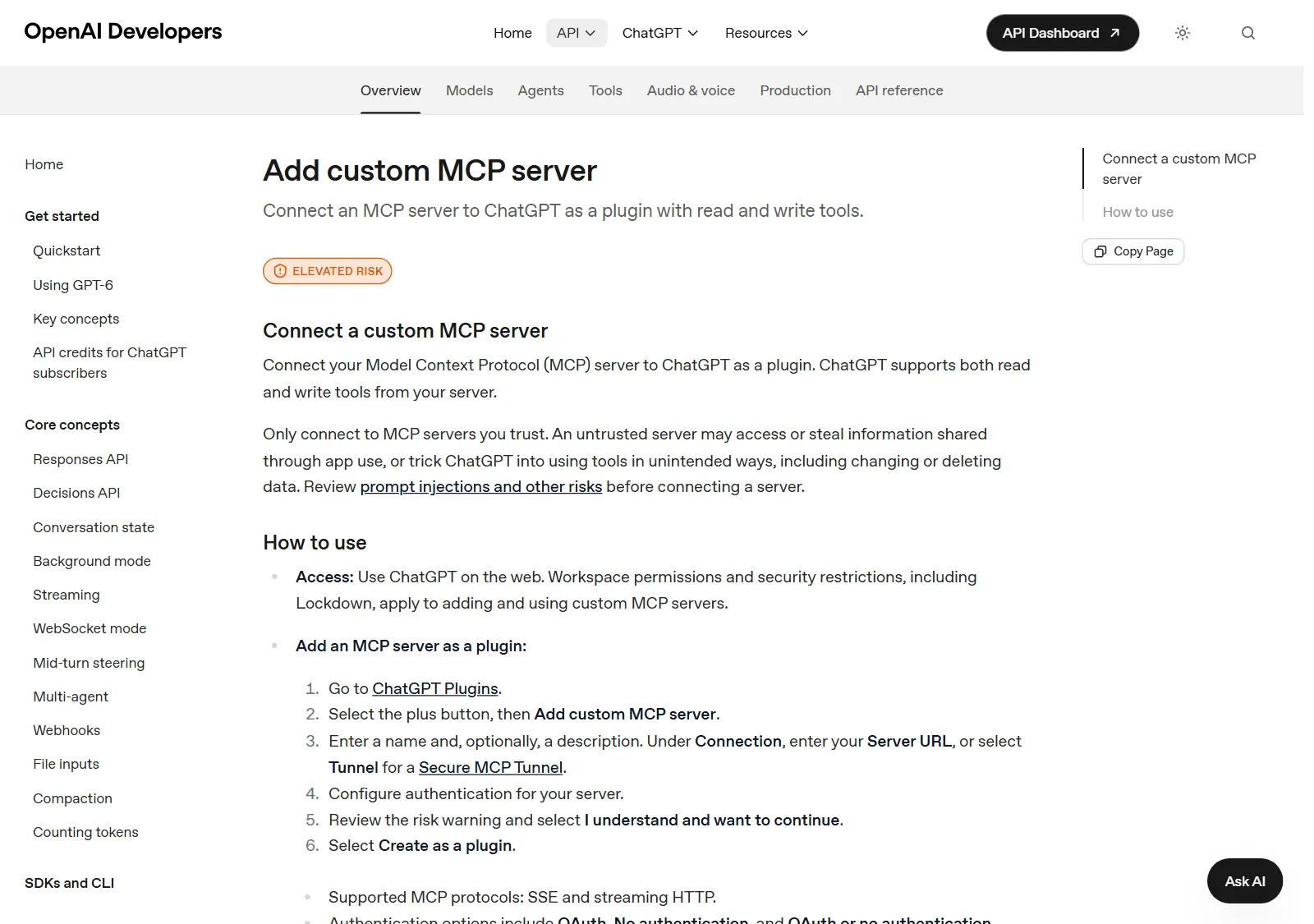 Figure 2. OpenAI's guide to custom MCP servers. The ELEVATED RISK label at the top, six steps in the middle, supported modes SSE and streaming HTTP at the bottom (OpenAI official docs screenshot)
What the page says:
| Item | From the docs |
|---|---|
| Where | ChatGPT on the web. Workspace permissions and security restrictions (including Lockdown) apply |
| Steps | ChatGPT Plugins → plus button → Add custom MCP server → enter a name → under Connection, enter a Server URL or choose Tunnel → set up authentication → review the risk warning (I understand and want to continue) → Create as a plugin → install it from your plugin list, then use it in a conversation |
| Supported modes | SSE, streaming HTTP |
| Authentication | OAuth, no authentication, or a mix of both |
| How to use | Type @ in the prompt box and pick the plugin |
| Tools that change things | Tools without a read-only hint (readOnlyHint) count as write actions and ask for confirmation by default. Within one conversation you can have it remember approve or deny per tool; a new conversation asks again |
That last row matters for Blender. In the official Blender server, reading tools such as the scene summary carry the read-only hint, while the code execution tool (execute_blender_code) is marked as a tool that can change the file. So in ChatGPT, a confirmation prompt appears before code runs. If you have it remember your approval in a conversation, it does not ask again there; a new conversation asks again.
The risk is real too. Connect only servers you trust. An untrusted server could take information or trick ChatGPT into using tools in unintended ways.
4. Two routes for ChatGPT to reach a server on your PC
The Connection field takes one of two choices.
| Route | How | For Blender MCP |
|---|---|---|
| A. Public HTTPS address | Put the server on an https:// address reachable from the internet | Not recommended. You would be opening a server with a code execution tool to the internet |
| B. Secure MCP Tunnel | tunnel-client on your PC opens an outbound connection to OpenAI, takes requests, and passes them to your server | The official way to connect without opening the server to the internet. A developer setup |
Route B is like this: instead of publishing your home intercom, someone inside calls OpenAI first and picks up the requests. No door into the house is opened from outside.
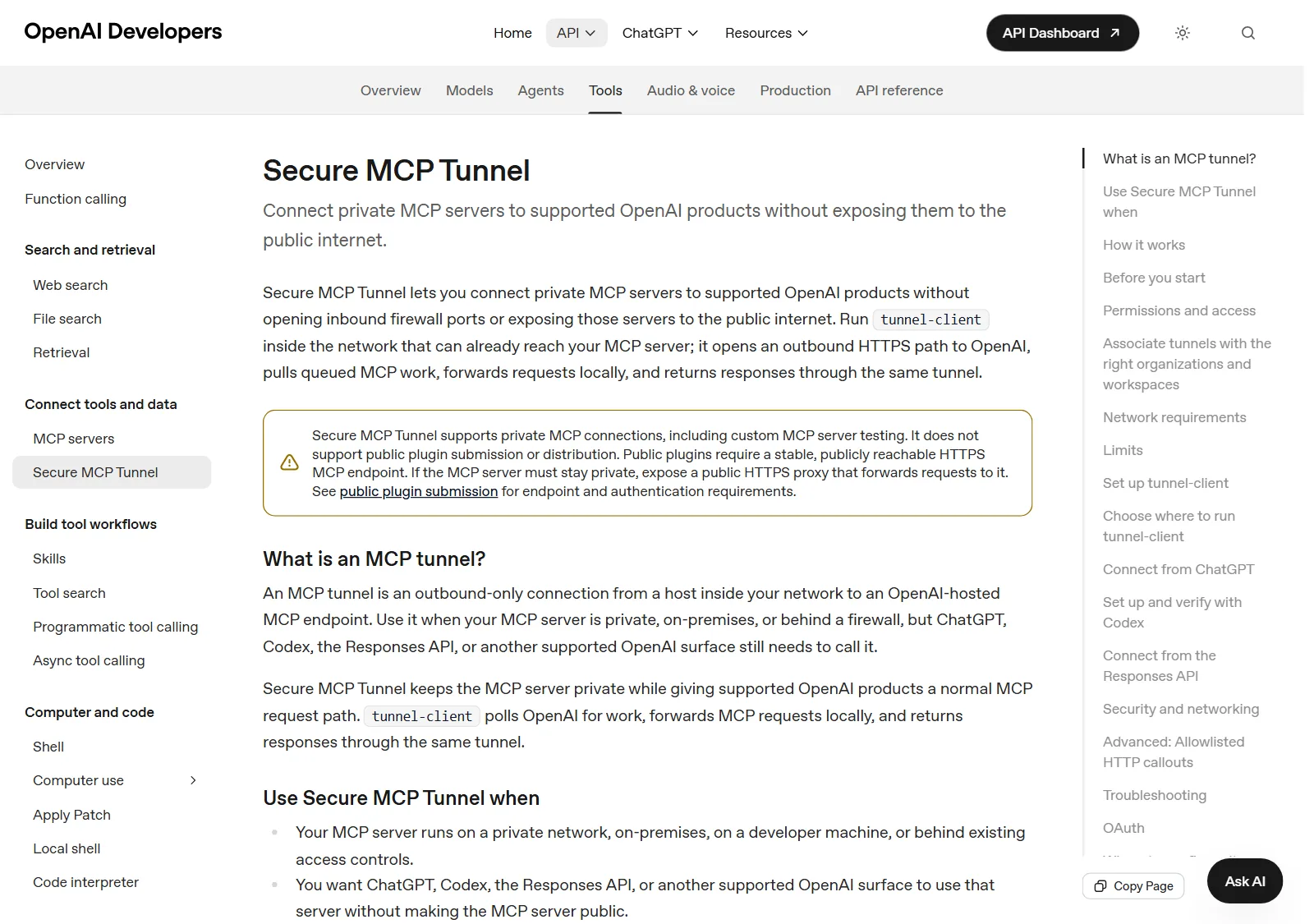 Figure 3. OpenAI's Secure MCP Tunnel guide. tunnel-client in the top paragraph, the yellow box excluding public distribution, and the What is an MCP tunnel section below (OpenAI official docs screenshot)
What the docs list as requirements:
| Requirement | From the docs |
|---|---|
| Tunnel ID | A tunnel_id from tunnel settings on the OpenAI Platform |
| Runtime API key | A key that tunnel-client uses |
| Your server | An MCP server that tunnel-client can reach over stdio or HTTP |
| Permissions | Tunnels Read + Manage to create a tunnel, Tunnels Read + Use to use one |
| Association | The tunnel must be associated with the ChatGPT workspace and Platform organization that will use it, or it will not show in ChatGPT |
| Network | Only outbound HTTPS from your PC to api.openai.com:443. No inbound ports |
The docs also show a tunnel-client setting (--mcp-command) that starts a stdio server directly. In theory the Blender MCP server could go there. We did not test this route. It needs an API key and permissions, and in the end it connects a door that runs AI-written code in your Blender to an outside service, so we do not recommend it for first-time users.
5. The easy way to drive Blender with GPT: Codex
If you want a GPT model with your ChatGPT account and you want to work in Blender, Codex is much simpler than ChatGPT on the web.
| Point | ChatGPT on the web + custom MCP server | Codex (CLI) |
|---|---|---|
| Where the server runs | Needs an address reachable from outside, or a tunnel | Your PC. Codex starts the server itself |
| Registering Blender MCP | Public address or tunnel + ChatGPT Plugins setup | One command (codex mcp add) or one block in a settings file |
| What you need | Workspace permissions; for a tunnel, Platform permissions and an API key | Sign in with a ChatGPT account |
| Confirming code runs | A confirmation for every write action | Follows Codex's approval settings |
| For a first-time user | Hard | Easy to follow |
How to register the official Blender MCP in Codex is in Working in Blender with Codex and GPT-6 Astra. Whether you use Codex or Claude Code, the Blender side (add-on and server) is the same, so once it is set up you only swap apps. App-by-app differences are in the comparison table of Choosing an AI tool for Blender MCP.
6. Picking a route
| What you want | Route |
|---|---|
| Build and edit Blender scenes with a GPT model | Codex (Section 5) |
| Drive your Blender from ChatGPT on a phone or another PC | Secure MCP Tunnel (route B in Section 4). A developer setup; read every code confirmation carefully |
| Share one server with several people in a company workspace | Decide the tunnel and permissions with your workspace admin |
| Try it without a subscription | Driving Blender with AI on your own computer |
Practice
- Start the web-mode server with the command in Section 2 and check that the address on the last line starts with
127.0.0.1. Then stop it withCtrl+C. - From the table in Section 3, write one sentence about which tools ChatGPT asks to confirm before running.
- Write down why you want to use GPT with Blender, and pick the matching route from the table in Section 6.
Common mistakes and fixes
| Symptom | Cause | Fix |
|---|---|---|
| There is no Blender connector in ChatGPT on the web | ChatGPT cannot start the Blender MCP on your PC | Use Codex, or set up a tunnel |
I entered http://127.0.0.1:9191 as the Server URL and it does not connect | That address only answers inside this PC, so OpenAI cannot reach it | You need a public HTTPS address or Secure MCP Tunnel |
| I made a tunnel but it does not appear in ChatGPT | The tunnel is not associated with the ChatGPT workspace | Associate the workspace and Platform organization as the docs say, and check Tunnels Read + Use |
| A confirmation pops up for every code run | The code execution tool is marked as a write action | Expected. Read the code and approve. Within one conversation you can have it remember the approval |
| The connection dropped when I closed the web-mode server window | Web mode only answers while the window is open | Keep the window open while you work |
In one line
ChatGPT on the web cannot start the Blender MCP server on your PC → connecting it needs a public address or Secure MCP Tunnel (a developer setup) → for an easy way to drive Blender with GPT, use Codex. If the connection fails, go through When Blender MCP won't connect in order.
Read next
- What is MCP?
- Installing the official Blender MCP
- Working in Blender with Codex and GPT-6 Astra
- Choosing an AI tool for Blender MCP
- Driving Blender with AI on your own computer
- Safety check before handing Blender to AI
- Ten first prompts for Blender MCP
References
- OpenAI, Add custom MCP server: https://developers.openai.com/api/docs/guides/custom-mcp-server
- OpenAI, Secure MCP Tunnel: https://developers.openai.com/api/docs/guides/secure-mcp-tunnels
- OpenAI, Connect and test your plugin: https://developers.openai.com/apps-sdk/deploy/connect-chatgpt
- OpenAI, Codex MCP: https://learn.chatgpt.com/docs/extend/mcp?surface=cli
- Blender Lab, MCP Server: https://www.blender.org/lab/mcp-server/
- Figures: two OpenAI official doc pages, one real Windows PowerShell screen