What is MCP? A USB-C-like standard for plugging tools into AI
MCP is a common standard that connects AI apps to files, calendars, and work tools. This guide explains how it is built and what to watch out for, using a USB-C comparison.
한국어English
ON THIS PAGE
- 01MCP in one sentence
- 02Understanding it as a USB-C port
- 03The three main parts of MCP: host, client, and server
- 04Three things a server gives the AI
- 05The actual order of steps: an example
- 063D and Blender among the official examples
- 07How to connect
- 08Who made and runs MCP
- 09Three common misunderstandings
- 10Using it safely
- 11Summary
- 12Read next
- 13References
Based on: the Model Context Protocol official documentation and the Anthropic and Claude official documentation. Checked in September 2026.
MCP (Model Context Protocol) is a common standard that connects AI apps to outside files, calendars, work tools, and programs. The official MCP site compares MCP to "a USB-C port for AI applications." What is an LLM (large language model)? covers the brain of AI, and How AI and AI agents differ covers AI that uses tools. This guide explains how those tools are plugged into AI: what it means to say "MCP is connected to the AI," how MCP is structured, and what to be careful about when you connect it.
MCP in one sentence
In the words of the official MCP documentation, MCP is an open-source standard for connecting AI applications to external systems. Here are the unfamiliar terms, one at a time.
- Protocol: A set of rules that different programs follow when they talk to each other. It is like USB-C: because it sets the connector shape and how signals are exchanged, devices from any company can connect.
- Context: The background information an AI refers to when it works. Things like the contents of your files, today's schedule, or company data.
- Open-source standard: The blueprint is public, so any company can build things the same way.
Put together, MCP is "the common rules an AI follows when it uses outside context and tools." There are three main kinds of things you can connect with MCP.
| What you connect | Examples | What the AI gets |
|---|---|---|
| Data | Files on your computer, databases | Information to refer to |
| Tools | Search engines, calculators | Things it can actually do |
| Workflows | Prompts for specific tasks | Set ways of doing a task |
Understanding it as a USB-C port
In the past, phones, laptops, and cameras each had their own charger and cable. Buy a new device and you had to buy a new cable too. As one standard, USB-C, came into wide use, one cable now charges many devices and connects to a monitor as well.
The AI world had a similar problem. Every time a new data source appeared, someone had to build a separate custom integration, so it was hard to grow a properly connected system. With 10 AI apps and 10 services, in the worst case you would have to do the connection work 100 separate times.
MCP makes this way of connecting into one.
| Type | Before USB-C / before MCP | After USB-C / after MCP |
|---|---|---|
| Electronics | A different charger for each device | One cable for many devices |
| AI apps | A separate integration built for each service | One standard for many services |
| Builders | New development for every combination | Build once, use in many places |
MCP's goal is to build once and connect anywhere. Developers spend less time and effort building integrations, AI apps get more data and tools to use, and users get a more capable AI that can reach their data and get work done for them.
The three main parts of MCP: host, client, and server
MCP has three parts. The names sound hard, but the roles are simple.
| Name | Plain meaning | Examples |
|---|---|---|
| MCP host | The AI app the user uses directly | Claude Desktop, Claude Code, VS Code |
| MCP client | A part inside the host that handles the connection to one server | One is created for each server |
| MCP server | A program that gives the AI data and tools | A file system server, a calendar server |
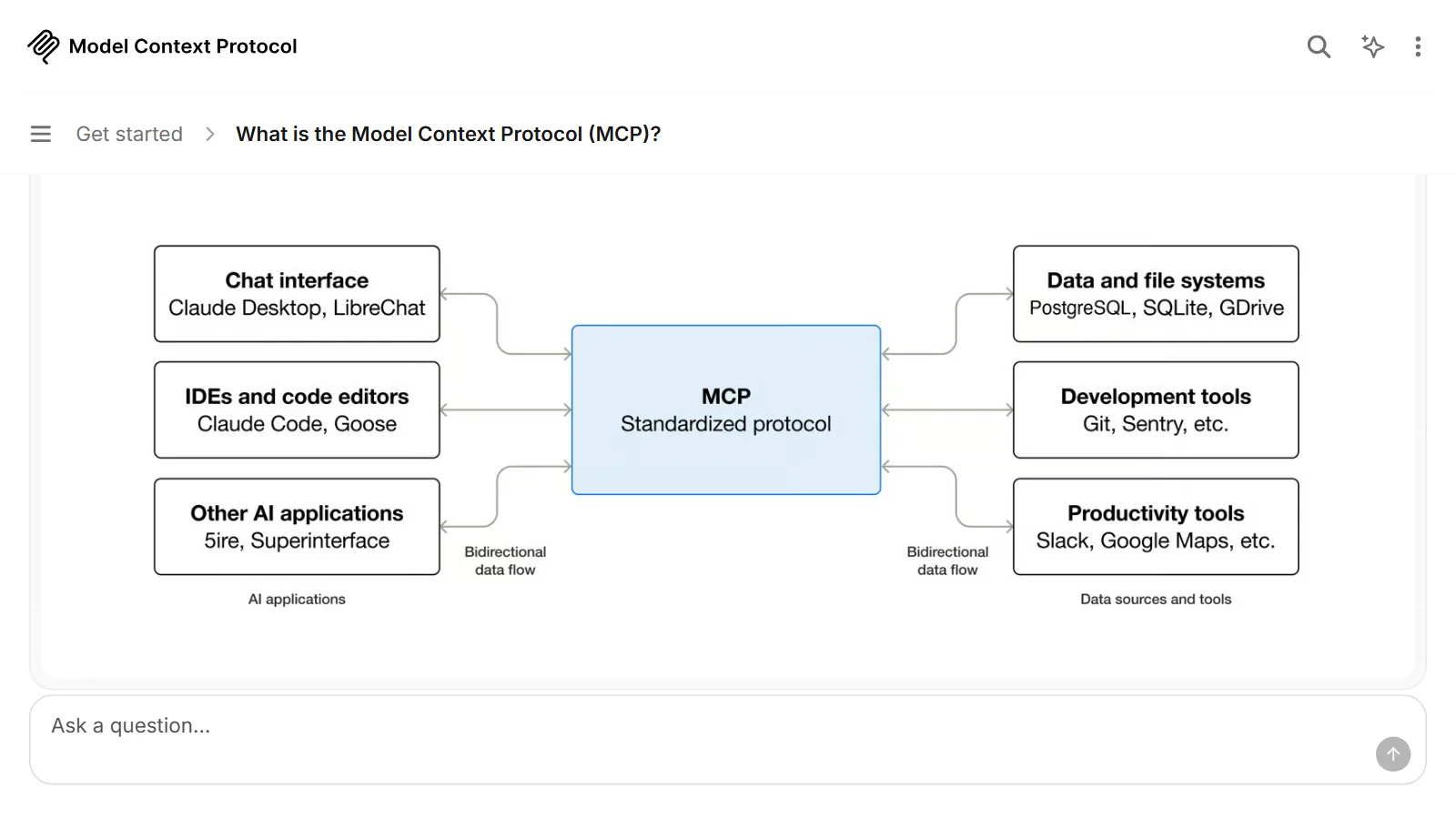
Drawn out, the structure looks like this. The AI app sits in the middle, and several servers connect around it.
[AI app = host]
  ├─ client ── file system server (your computer)
  ├─ client ── calendar server (internet)
  └─ client ── Blender server (your computer)
Compared to a power strip, the AI app is the power strip, and each MCP server is the plug of an appliance plugged into it. One plug (server) goes into one socket on the strip (client). As long as the standard matches, you can plug in anything. This power strip comparison comes back later when we talk about safety.
Servers come in two kinds, depending on where they run.
- Local server: A server that runs inside your computer. It uses a way for programs on the same computer to talk to each other (stdio).
- Remote server: A server that runs on the service's side, on the internet. It communicates over HTTP, the same as the web. It can use standard HTTP authentication, and the official MCP documentation recommends sign-in methods such as OAuth.
Three things a server gives the AI
An MCP server offers three basic elements.
- Tools: Functions the AI can run. Things like creating a file, calling an outside service, or looking something up in a database.
- Resources: Data the AI refers to. File contents and database records fall here.
- Prompts: Templates prepared in advance for work instructions you use often.
Using a tool is like ordering at a restaurant. First, the AI app asks the server, "Please show me the menu" (officially, tools/list). The menu lists each tool's name, description, and the input values it needs. Then the AI picks what it needs and says, "I'll order this" (tools/call). The kitchen (server) cooks the dish and serves it, and the result goes back to the AI.
The actual order of steps: an example
Here, step by step, is an example of an AI agent working like a personal assistant by accessing Google Calendar and Notion. The request is "Sum up my schedule for this week and make it into a Notion page."
- The user makes the request in the AI app (host).
- The AI app already knows the tool lists of the connected servers.
- When the AI decides it needs the calendar lookup tool, the app asks the calendar MCP server to run it.
- The list of events comes back to the AI.
- The AI organizes the events, then calls the tool that makes a Notion page, and the Notion MCP server runs it.
- The AI tells the user the result. Before important actions, the app may ask the user for approval.
The AI decides what to do, and the MCP server does the actual work. MCP only sets how they exchange things in between. It does not set how the AI app uses its language model.
3D and Blender among the official examples
The examples on the official MCP site include these.
- An agent working like a personal assistant by accessing Google Calendar and Notion
- Claude Code looking at a Figma design and building a web app
- A business chatbot connecting to several databases to analyze data through conversation
- AI making a 3D design in Blender and printing it on a 3D printer
How to connect AI and Blender, as in the last example, is explained in Connecting Blender and AI.
How to connect
The method depends on the app you use. For regular users, it often appears as a menu such as "Connections" or "Connectors" in the AI app's settings screen. You pick a service from the list, press the connect button, sign in to that service's account, and give permission. Before you press the button, check just two things.
- Who made it: See whether the server is run directly by the service company or was posted by an individual of unknown origin.
- What permissions it asks for: The sign-in screen says whether it is "read only" or "edit and delete too." If it asks for wider permissions than what you want to do, think twice.
In Claude Code, a developer tool, you connect with one line of terminal command. Here is an example.
claude mcp add --transport http notion https://mcp.notion.com/mcp
It means "connect to Claude Code, under the name notion, the MCP server that Notion runs on the internet, over HTTP." In Claude Code, you can also choose whether to use this connection only in this project, share it with your team, or use it in all your projects. The command syntax and service addresses can change, so check the official documentation first when you actually connect.
Who made and runs MCP
Anthropic released MCP on November 25, 2024. Along with it, Anthropic released as open source the specification document, development tools (SDKs), local server support in the Claude Desktop app, and a set of servers for services such as Google Drive, Slack, and GitHub.
In December 2025, Anthropic donated MCP to the Agentic AI Foundation (AAIF) under the Linux Foundation. The foundation was set up jointly by Anthropic, Block, and OpenAI, and MCP became a founding project along with goose from Block and AGENTS.md from OpenAI. The announcement on December 9, 2025 said that the maintainer structure that decides the specification would stay as it was. At the time of the announcement, monthly SDK downloads were over 97 million, there were 10,000 active servers, and many AI products supported MCP, including ChatGPT, Claude, Cursor, Gemini, Microsoft Copilot, and Visual Studio Code. The numbers and the support list keep changing, so take them only as of the announcement.
Three common misunderstandings
1. "MCP is a new AI model." No. MCP is not a model but a connection protocol. The LLM still plays the role of the brain, and MCP sets the path that brain uses to reach outside tools. It is also not tied to one company's app, so products from many companies support it.
2. "If you connect it with MCP, the AI handles everything safely by itself." Not true. An MCP server is a real program that accesses your computer or account. Be sure to read the "Using it safely" section below.
3. "It is a technology only for developers, so it has nothing to do with me." Building servers is a developer's job, but the people who use them are regular users. You may already be meeting it through features in AI apps that connect your calendar or drive.
Also, "tool use (function calling)" and MCP are easy to confuse. Tool use is the AI model's ability to call tools, and MCP is the standard for offering those tools to many AI apps in the same way.
Using it safely
Think of the power strip again. Just because the plug fits does not mean it is safe to plug in any appliance of unknown origin. MCP is convenient, and it comes with risks to match.
- Connect only servers you can trust. Before you connect, check whether you can trust each server.
- Watch out for prompt injection. Servers that bring in outside content, such as web pages, can be exposed to an attack where instructions hidden in that content make the AI behave in unintended ways (prompt injection).
- Check the command it will run before installing. A local server is a program that runs on your computer. If it comes from an untrusted source, there is a risk of arbitrary code execution (a program someone else chose running on your computer), data leaks, and data loss. That is why the MCP security documentation states that an AI app offering one-click installation of local servers must show the full command it will run, without shortening it, and get the user's approval. When such a confirmation window appears, read it before you click.
- Remember the permissions. An MCP server can run with the same permissions as the AI app. The habit of working on copies of important files helps.
Summary
| Item | Summary |
|---|---|
| What MCP means | An open-source connection protocol that links AI apps to outside data and tools |
| Comparison | A USB-C port for AI |
| Structure | Host (AI app) - client (connection part) - server (provides tools) |
| What servers give | Tools, resources, prompts |
| What to watch out for | Only trusted servers, and check permissions and the commands it runs |
If the LLM is the brain, an AI agent is the way of working that uses that brain to handle tools, and MCP is the USB-C port the tools plug into. Read the three guides together, and you can see at a glance how today's AI has moved beyond "answering" to "working."
Read next
- What is an LLM (large language model)? How a giant autocomplete works
- How AI and AI agents differ: AI that answers, AI that works
References
- Model Context Protocol, What is MCP?: https://modelcontextprotocol.io/docs/getting-started/intro
- Model Context Protocol, Architecture overview: https://modelcontextprotocol.io/docs/learn/architecture
- Model Context Protocol, Security Best Practices: https://modelcontextprotocol.io/docs/tutorials/security/security_best_practices
- Anthropic, Introducing the Model Context Protocol (2024-11-25): https://www.anthropic.com/news/model-context-protocol
- MCP Blog, MCP joins the Agentic AI Foundation (2025-12-09): https://blog.modelcontextprotocol.io/posts/2025-12-09-mcp-joins-agentic-ai-foundation/
- Claude Docs, Glossary: https://platform.claude.com/docs/en/about-claude/glossary
- Claude Code Docs, MCP: https://code.claude.com/docs/en/mcp