How AI and AI agents differ: AI that answers, AI that works
An AI agent is not a new brain but an AI that has been given tools and a repeating loop. This guide explains the difference between the two and what to watch out for when using agents.
한국어English
ON THIS PAGE
- 01A side-by-side comparison
- 02An everyday comparison: a cookbook and a cook
- 03"Agent" is defined a little differently by each company
- 04Telling a chatbot with features apart from an agent
- 05The three ingredients of an agent
- 06How an agent gets "hands and feet": tool use
- 07The agent loop: think, act, check
- 08Three common misunderstandings
- 09Safety habits worth knowing when using agents
- 10Summary
- 11Read next
- 12References
Based on: official documents from Anthropic, OpenAI, and Google Cloud, checked in September 2026.
An AI agent is not a completely new kind of AI. It is a system that takes the AI model we use as a chatbot, gives it tools (abilities such as searching, editing files, and running programs), and makes it repeat the cycle of thinking → acting → checking the result until the job is done. If a chatbot tells you "here's how to do it," an agent tries doing the job itself, checks the result, and then decides the next step on its own. This guide explains, in order, the difference between the two ideas, how an agent works, and what to watch out for when using one.
A side-by-side comparison
| A typical AI chatbot | An AI agent | |
|---|---|---|
| What it does | Answers questions in text | Takes a goal and finishes the job |
| What it uses | Learned knowledge and the conversation | Knowledge + tools (search, files, programs, and so on) |
| How it proceeds | Often one question, one answer | Repeats think → act → check the result |
| Who decides the next step | The person asks the next question | The AI looks at the result and decides on its own |
| What to watch out for | It can give wrong answers that sound right | Wrong actions can pile up or be hard to undo |
The "AI" here mostly means an LLM (large language model), the AI brain that reads and writes text. If you want to know more about what an LLM is, read What is an LLM (large language model)? first.
An everyday comparison: a cookbook and a cook
The difference between the two is easy to see if you compare them to a cookbook and a cook.
- The cookbook (chatbot): Gives you the recipe: "For kimchi stew, stir-fry the kimchi, add water, then add tofu." It can be very accurate, but it never turns on the stove itself.
- The cook (agent): First opens the fridge to see what is there (observing). Plans the order to suit the ingredients (planning), turns on the stove and cooks (acting), tastes it, and adjusts if it is bland (checking the result and repeating).
What the cook knows may not differ much from the cookbook. The difference is in having hands and feet, that is, whether it can use tools, and whether it acts again after seeing the result.
A similar comparison is navigation directions versus self-driving. A navigation app only says "turn right," and a person holds the wheel. Self-driving turns the wheel itself, so it is more convenient, but safety features and human supervision matter that much more. Agents are the same.
"Agent" is defined a little differently by each company
The word "agent" has not settled into a single meaning yet. Looking at the official descriptions from major companies side by side shows what they have in common.
| Source | How it describes an agent (summarized) |
|---|---|
| Anthropic | A system in which the LLM decides for itself how it proceeds and which tools it uses. Usually "an LLM using tools in a loop based on feedback from the environment" |
| OpenAI | A system that independently accomplishes tasks on behalf of the user |
| Google Cloud | A software system that uses AI to pursue goals and complete tasks on behalf of users. Shows reasoning, planning, and memory, and makes decisions with some autonomy |
The three descriptions share two things. First, there is a goal of finishing the job on behalf of the user. Second, in the process, the AI decides to some degree on its own what to do next.
Anthropic makes one more distinction here. If the LLM and tools move in an order set in advance, it calls this a "workflow"; if the LLM decides the order itself, it calls it an "agent." For example, if the order is always the same, as in "when an email arrives, summarize it, translate the summary, and save it," it is closer to a workflow.
Telling a chatbot with features apart from an agent
A chatbot with added features is not always an agent. By OpenAI's standard, an app in which the LLM doesn't control the workflow is not an agent, even if it contains an LLM. For example:
- A simple chatbot
- A single-turn LLM feature (one question, one answer)
- A feature that classifies the sentiment of text
By the same standard, an agent should be able to recognize when a task is finished, correct its own actions if needed, and stop and hand control back to the user if it fails.
Divided by degree of autonomy, there are three levels (Google Cloud's distinction).
| Level | Description | Comparison |
|---|---|---|
| Bot | Usually follows preset rules | A vending machine that gives a set drink when you press a button |
| AI assistant | Can recommend actions, but the user decides | A helpful customer service rep |
| AI agent | Decides and acts on its own toward a goal | A representative you can hand a job to |
The three ingredients of an agent
OpenAI's guide divides the basic ingredients of an agent into three.
- Model: The LLM that reads the situation and makes judgments. It is the agent's brain.
- Tools: Outside functions used to take action. In developer terms, they are called functions or APIs (the windows programs use to exchange things with each other).
- Instructions: Clear guidelines that say how it should act and what it must not do.
Google Cloud sums up the core abilities of an agent as reasoning (drawing conclusions from information), acting (digital actions such as sending messages or changing data), observing (gathering information about its surroundings), and planning (setting the steps toward a goal). This overlaps exactly with the cook comparison earlier.
How an agent gets "hands and feet": tool use
An AI model, by itself, only produces text. A model like that can look up the weather or edit files thanks to tool use (also called function calling).
Here is the order. The developer tells the AI the name and description of a tool such as "weather lookup." The AI looks at the request, decides on its own whether it needs the tool, and if it does, returns a request in a set format: "please call this tool with these values." The actual execution is done not by the AI but by the app (or the server on the service side). When the result is handed back to the AI, the AI reads it and completes the answer.
The table below is an example of handling the request "Check tomorrow's weather in Seoul and tell me if I should take an umbrella" with a weather tool.
| Step | Chatbot without tools | Agent that uses tools |
|---|---|---|
| 1 | Answers only from what it learned, so says it can't know the live weather | Looks at the request and decides it needs the weather tool |
| 2 | - | Requests a call to the weather tool with "Seoul" |
| 3 | - | The app actually looks up the weather and returns the result |
| 4 | - | Reads the result and answers whether an umbrella is needed |
What makes Claude Code an agent is also tools. Without tools, Claude can only answer in text. With tools, it can read code, edit files, run commands, and search the web.
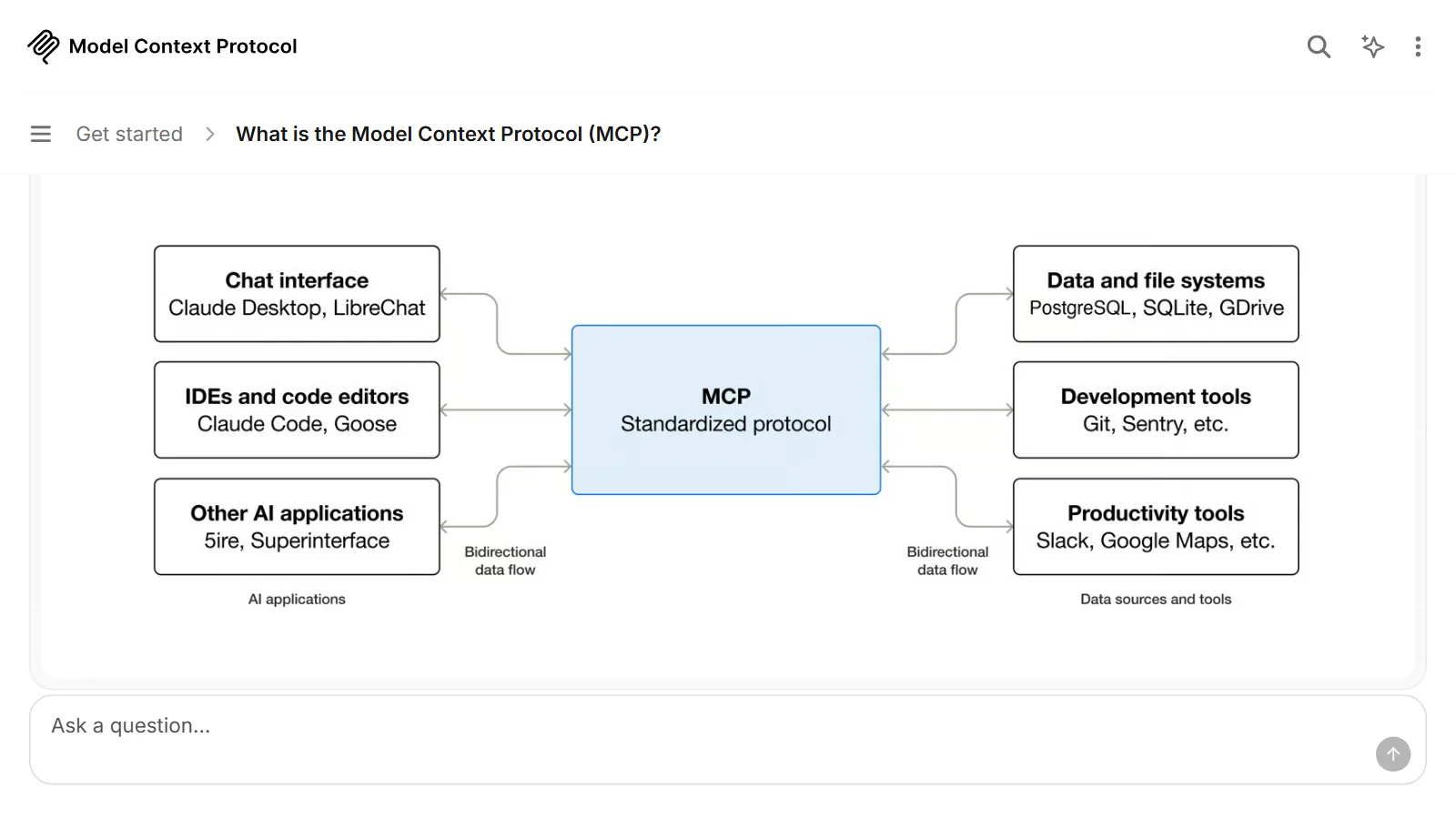
MCP is a standard that sets how many tools are connected to AI. It is explained in What is MCP?.
The agent loop: think, act, check
An agent works through repetition. The Claude Code documentation calls this repetition the agentic loop and divides it into three stages.
- Gather context: Understand the current situation and the information needed.
- Take action: Do something using tools.
- Verify results: Look at the result of the action and decide what to do next.
It repeats this process until the job is done. Drawn in one line, it looks like this.
Person's request → Think → Use a tool → See the result → (think again…) → Done, or check with the person
For example, if the user says "Fix the failing test," the agent moves in this order.
- Runs the test.
- Reads the error message.
- Finds the related files.
- Reads the files.
- Fixes the code.
- Runs the test again and checks that it passes.
Even without a person giving instructions at every step, the agent looks at the result of the previous step and picks the next one. The user can also step in at any point to change direction. The part that runs this loop by managing tools and context around the model is called the agent harness (a frame that connects the model to the work, like a harness that hitches a horse).
Three common misunderstandings
1. "An AI agent is a completely different, new brain." The brain inside most agents is the same kind of LLM as in a chatbot. In Anthropic's words, an agent is often "an LLM using tools in a loop." What changes is the tools, the repeating structure, and the way it decides its own next step.
2. "Agents handle everything, so you can hand off the job and forget about it." Agents need human checkpoints, stopping conditions (for example, a limit on the number of iterations), and limited permissions. An agent's errors can compound.
3. "An agent is always better." When building an AI app, it is better to look for the simplest possible solution first and add complexity only when needed. Agents can cost more, and for work with a fixed order, a workflow is more predictable. Agents suit open-ended problems where it is hard to know in advance how many steps will be needed.
Safety habits worth knowing when using agents
Agents actually change things, so there is more to be careful about than with a chatbot.
- Set the scope of permissions. Tools such as Claude Code have settings that decide what the AI may do without approval. At first, it is safer to approve each action.
- Check whether actions can be undone. Claude Code takes snapshots before editing files, so changes can be undone. But actions taken on outside systems, such as database changes or deployments, can't be undone.
- Test in a practice environment first. Test agents thoroughly in a sandbox (a practice space separated from the real environment), and put safety features in place.
- Check intermediate results. Even in a long task, look at the results at each important step and have it stop if needed.
Claude Code and Blender automation work on the same principle. Splitting work into small steps and checking the result at each step is the basic habit for using agents safely.
Summary
| Item | Summary |
|---|---|
| What an AI agent really is | Not a new AI. Usually a system that adds tools and a repeating loop to the same LLM. |
| The biggest difference from a chatbot | It looks at the result and decides its next action on its own, and does real work with tools. |
| When an agent is the right fit | Open-ended problems where the steps are hard to set in advance. |
| What to watch out for | Compounding errors, outside actions that can't be undone, and the scope of permissions. |
Read next
- What is an LLM (large language model)?: a simple explanation of the LLM, the agent's brain.
- What is MCP?: explains MCP, the standard for connecting tools to AI.
References
- Anthropic, "Building effective agents" (2024-12-19): https://www.anthropic.com/engineering/building-effective-agents
- OpenAI, "A practical guide to building agents" (PDF): https://cdn.openai.com/business-guides-and-resources/a-practical-guide-to-building-agents.pdf
- Google Cloud, "What are AI agents?": https://cloud.google.com/discover/what-are-ai-agents
- Claude Docs, "Tool use with Claude": https://platform.claude.com/docs/en/agents-and-tools/tool-use/overview
- Claude Code Docs, "How Claude Code works": https://code.claude.com/docs/en/how-claude-code-works