Splitting solo game dev work with AI: what to hand off, what to check, terms, and Steam and itch.io AI disclosure
When you make a game alone, how much of the code, 3D assets, art, sound, and text can you hand to AI, and where must a person check the result? This guide covers the commercial-use terms of each kind of tool, the AI disclosure rules on Steam and itch.io, and what AI actually did in a Godot game test.
한국어English
ON THIS PAGE
- 011. The short answer: each area at a glance
- 022. A real record: who did what in a Godot game test
- 033. Code: the area you can hand off the most
- 044. 3D assets: ways to make them and ways to check them
- 055. Art, sound, and text: where terms differ the most
- 066. Rights: how far "the output is yours" goes
- 077. Store rules for AI-generated content
- 088. Follow along: one record file to start with
- 099. Common mistakes and fixes
- 1010. Summary
- 11References
Based on: Claude Code, Blender 5.2, Godot 4.7.2, each tool's terms of use, and the official Steamworks and itch.io guidance. Checked on November 4, 2026. This is not legal advice. Terms change, so check them again before you rely on them. Figure 1 is a real game screen. Figures 2 and 3 are official web pages. The red numbers and boxes were added for explanation.
When you make a game alone, the work splits into five areas: code, 3D assets, art, sound, and text. Today there are AI tools for all five. So it is easy to think "I can just have AI do everything." In practice, how much you can hand off is different in each area, and so is the place where a person has to check. On top of that, if you want to sell the game or put it on a store, you must follow each tool's terms and the store's disclosure rules.
This is part 4 of the series "Solo game development with Blender, AI, and a game engine." It goes through what to give AI and what to check yourself in each area, the commercial-use terms of the tools, and the AI disclosure rules of stores. It also lists what AI actually did in a test game I made with Godot. The whole series starts at the solo game dev map.
1. The short answer: each area at a glance
| Area | Good to hand to AI | A person must | Terms and rules to read first |
|---|---|---|---|
| Code | Game rule code, export scripts, automatic checks, bug fixes | Decide what to make, play it and say how it feels | The output clause of the coding tool's terms, the engine license notice |
| 3D assets | Building shapes with Blender Python scripts, repetitive work, exporting | Compare size, direction, color, and names with numbers and pictures | Ownership by plan for 3D generation tools |
| Art (textures, 2D) | Drafts, patterns, icon sketches | Check that it does not look like someone else's work and that text is not broken | Image tool terms, store disclosure rules |
| Sound | Draft sound effects, sounds made in code | Listen and judge whether it is annoying | Commercial use by plan for sound tools |
| Text (UI text, descriptions, translation) | UI text, help text, draft translations | Check facts and tone, decide what goes in | Font license, store disclosure rules |
In one line: AI is the hands that make and fix; the person is the eyes that decide and check. In house building, AI is the fast bricklayer. Choosing the design, then living in the finished house and finding what to fix, is the owner's job.
2. A real record: who did what in a Godot game test
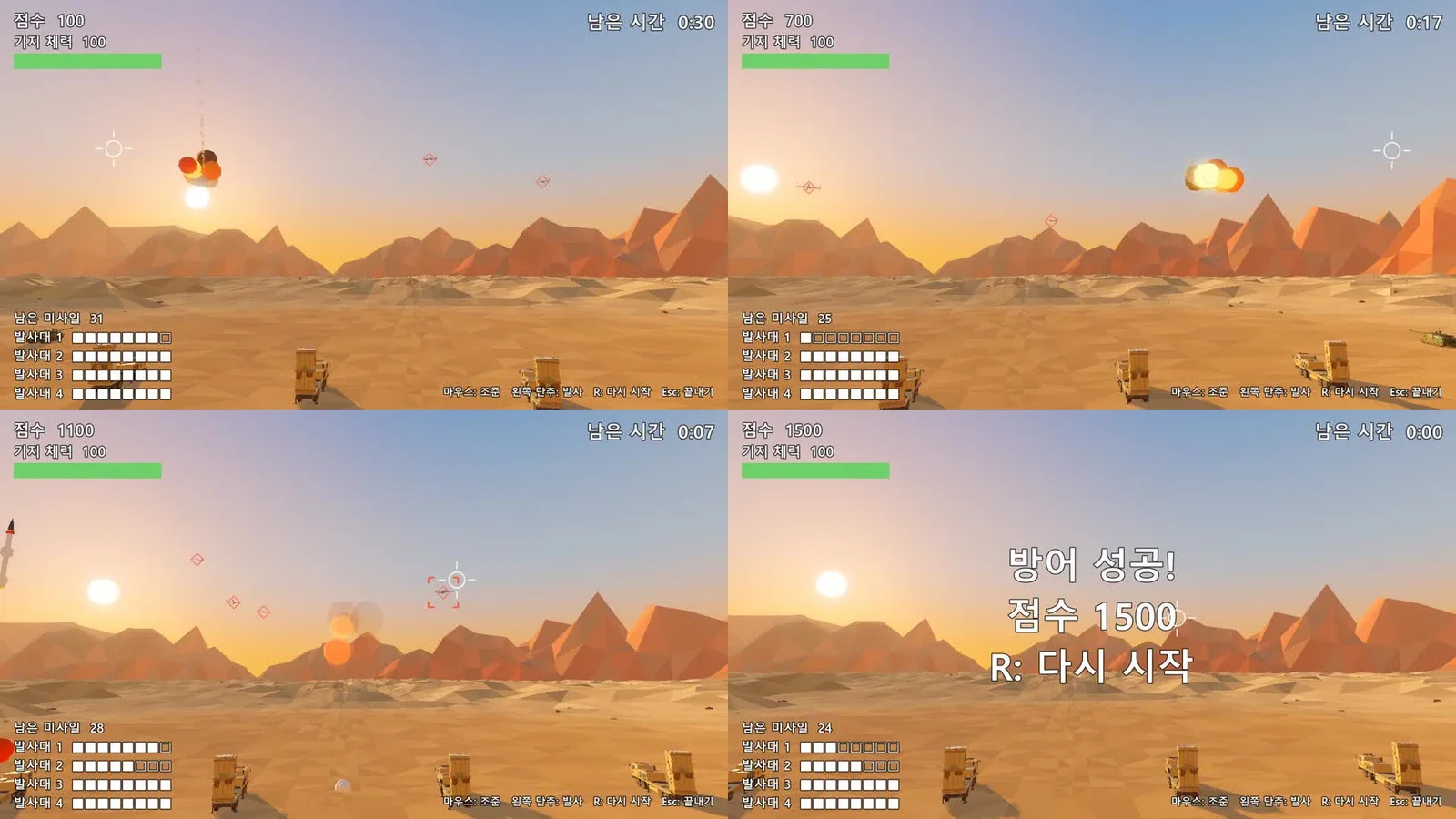
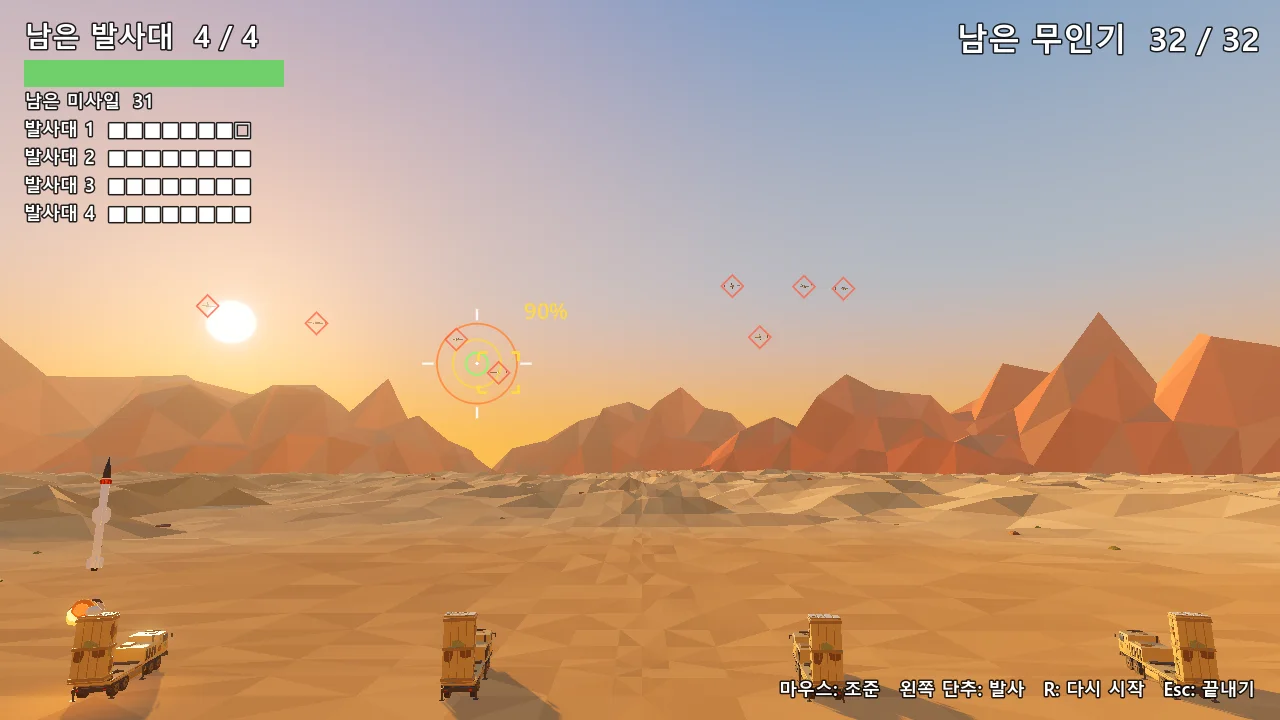
On October 10, 2026, I made a small air defense game with Claude Code and Godot 4.7.2. Claude Code is an AI coding tool that runs in a terminal. It reads and writes the files in a folder and runs commands. Here is who did what in each area, limited to what the records show.
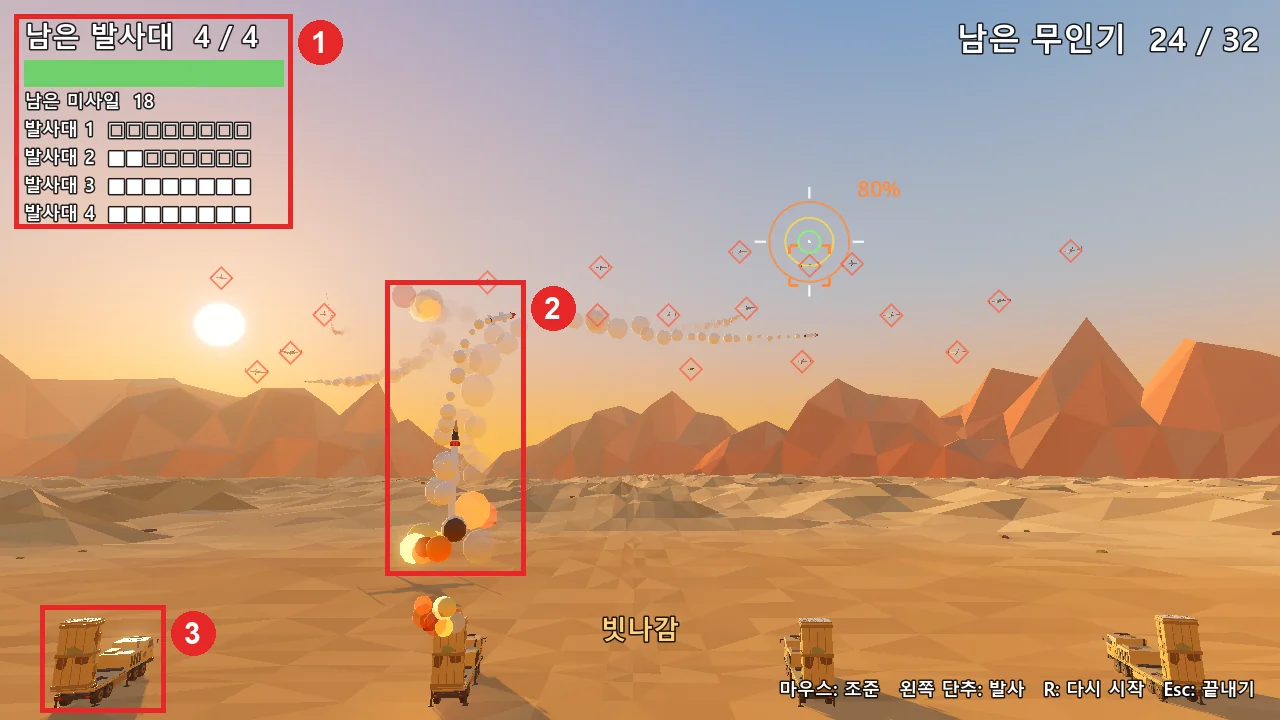 Figure 1. The air defense game. (1) On-screen text (drawn by code that AI wrote) (2) Smoke and explosions (effects made in code) (3) Launcher model (made in Blender and moved over) (Godot run screenshot)
| Area | What AI did | What the person did |
|---|---|---|
| Plan | Drafted the plan (PRD): three questions the test answers, pass criteria, what is out of scope, game rules | Read it and said "go with the proposal" |
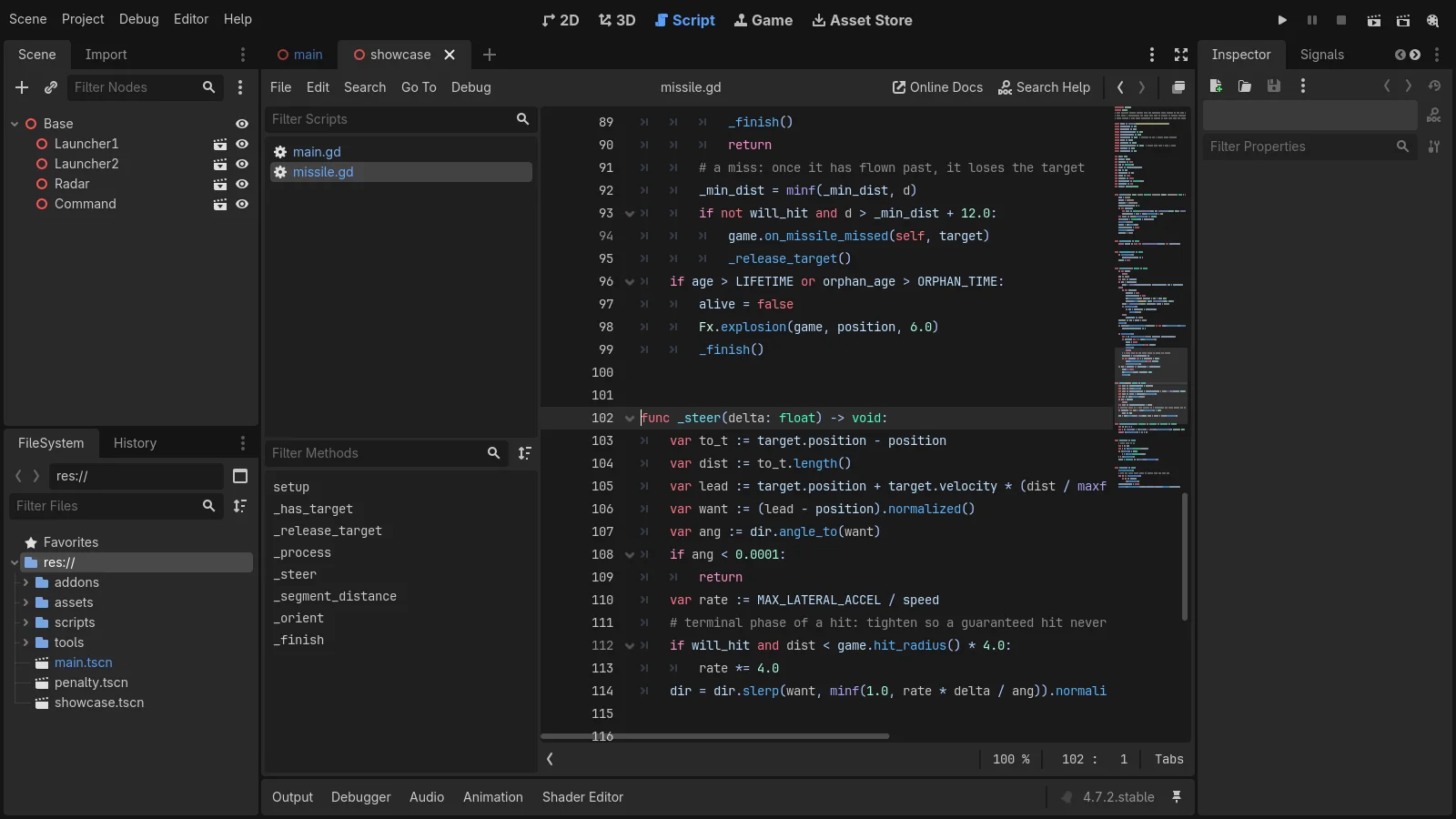
| Code | Game code, a script that builds terrain, sky, and mountains in code, 14 automatic checks, one per rule | Played it five times and said what to change. On the fifth: "difficulty is about right" |
| 3D assets | A script that exports 8 Blender models to glTF, a size comparison between Godot and Blender (all differences 0) | No record (received the comparison pictures and size table) |
| Art | No image files used. Colors came from model materials; sky and ground from code | Nothing |
| Sound | Six sound effects synthesized in code when the game starts. No sound files and no paid tools | Did not comment on sound |
| Text | All on-screen text (launchers left, missiles left, and so on) in Korean | Said "just remove the score," so the score display went away |
The models were low-poly models made earlier for videos with Blender Python scripts, and those scripts were also written with Claude Code. Before that there were versions made with an AI 3D generation tool, but this test did not use them. The plan said not to use the folders holding those old versions.
The first playable version took about one hour. In the same session, a rigged character test and a penalty kick game brought the total to about three hours. Up to right after the rigging test, Claude Code used about 160,000 output tokens, or about 11 US dollars in cost terms. The longest part was not the code. It was the time I spent playing and saying what to change. The full process is in Making a Godot game scene with Claude Code.
What the table shows is that "checking" looks different in each area. For code, even when every automatic check passed, only a person playing could tell whether it was fun. For assets, comparing numbers was enough. For sound, I never listened and judged on purpose, so this record cannot say whether the sound is good.
3. Code: the area you can hand off the most
Code is the best area to hand to AI. The reason is that a machine can check the result. If each rule has a check such as "firing creates a missile" or "one drone hitting a launcher destroys it," AI can run the checks after every change and fix any FAIL. It is like giving homework together with the test and the answer key.
Follow along:
- Before asking for code, have AI write a one-page plan. It should state what to make, when it is done, and what it will not do.
- Have AI make one automatic check for each rule.
- Play one round yourself and say what to change in numbers. "Spawn twice as fast" gets tuned faster than "make it harder."
- Have AI update the plan when a rule changes.
There are two places a person must not miss. First, fun and difficulty cannot be measured by automatic checks. Second, check that AI did not loosen the checks themselves. If the number of checks suddenly drops, ask why.
Read the terms once, too. Anthropic's Consumer Terms of Service (effective October 8, 2025) say that, as long as you follow the terms, the company assigns its rights in outputs to you. The Commercial Terms used for the API and team plans (effective June 17, 2025) also say the customer owns its outputs. The same consumer terms tell you not to rely on outputs without checking their accuracy yourself. Getting the rights and having a correct result are two separate things.
The engine has its own duty. Godot uses the MIT license. When you ship a game, you must put the Godot license text somewhere the player can see it (a credits screen, a licenses menu, a file shipped with the game, and so on). This is the same whether AI or a person wrote the code.
4. 3D assets: ways to make them and ways to check them
There are two main ways to make 3D assets with AI.
| Way | How | Strength | What to check |
|---|---|---|---|
| Let AI drive Blender | AI writes Blender Python scripts or sends commands to Blender through MCP | The result stays as a script you can run again. Sizes can be set as numbers | Size, origin, and names follow the rules |
| 3D generation tools | Give a picture or text and get a model | Shapes appear fast | Face count, split vertices, ownership by plan |
MCP is a connection standard that lets AI use another program as a tool. Like a power socket that takes any appliance with the right plug, any program that supports MCP can be driven by AI. How to connect is in Connecting Blender and AI, and what to check before handing over Blender is in A safety check before letting AI drive Blender.
When you use a 3D generation tool, always check the plan. For example, Meshy's terms of use (updated September 19, 2026) say Meshy owns the output made on the free plan and lets free users use it under the CC BY 4.0 license as long as they credit Meshy. They say users on a paid plan own their output. So if you put a model made on the free plan into a game, you must credit the source. How to clean up a generated model for a game is in Cleaning up an AI-made 3D model in Blender.
Blender itself has no limits on commercial use. The license page on blender.org says what you make with Blender (images, videos, and .blend files) is yours.
The person checks with numbers. In my record, I had AI compare the size of all 8 models in Godot against Blender, and every difference was 0. Even so, there were five places where colors went missing or a floor plate came along with the model. These were checked with the comparison pictures and size table, and the export script handled all five. The rules a game asset should follow are in the next part, Game asset rules.
5. Art, sound, and text: where terms differ the most
Art, sound, and text are what players see and hear directly, so they fall right under the store disclosure rules (section 7). It is also common for commercial use to depend on the plan.
Art. My two test games had no image files at all. Model colors came from materials, and the sky and ground were made in code. If you make textures or 2D art with AI, find the commercial-use and ownership clauses in that tool's terms and write them down. The person's job is to check that the art does not look like another work or a trademark and that any text in the picture is not broken.
Sound. The six sound effects in the air defense game (launch, explosion, launcher hit, when firing is not possible, when you win, when you lose) are computed in code as sound waves when the game starts. With no sound files and no paid tools, there were no sound terms to read. If you use an AI sound tool, check the plan. For example, on the ElevenLabs pricing page, the Commercial License appears from the Starter plan, and it is not in the free plan's list.
Text and fonts. AI wrote the on-screen text in Korean inside the code, and I decided what to show. I removed the score from the air defense game and the probability numbers from the penalty kick game, because a screen full of numbers bothered me when I played. In the canyon flight game, exported for the web, Korean text only showed after the font was put inside the game. A game running in a browser cannot use the fonts installed on the PC. I used a reduced font made from the free font Noto Sans KR, keeping only 2,350 Korean characters (424 KB). Its license, the SIL OFL, allows bundling the font with software and selling it with the software, with three conditions:
- The font cannot be sold by itself.
- Every copy you distribute must include the copyright notice and the license text.
- A modified font cannot use the original font's reserved names.
A font with characters removed also counts as a modified version. A modified version cannot use the original font's reserved name as its font name (the name stored inside the font and shown in font menus). The file name has nothing to do with it. The reserved name for Noto Sans KR is "Source." Check the first line of the font's license to find its reserved name.
6. Rights: how far "the output is yours" goes
The Anthropic terms in section 3 say the company assigns its rights in outputs, with the words "(if any)." Meshy's ownership clause for paid plans also adds "to the extent possible under applicable law." That means the company passes on whatever rights it has. It does not promise that copyright exists in the output.
Whether copyright exists is up to each country's law. The U.S. Copyright Office published a report (Part 2) on the copyrightability of generative AI outputs on January 29, 2025. The report concludes that, with today's technology, prompts alone do not give users enough control over the result to be treated as its authors, and it states that the parts a person creatively selected, arranged, or changed are protected. Copyright basics for AI output are covered separately in Copyright basics for AI-made images and text. For a solo developer, this means: keep a record of what you selected and changed, rather than using AI output as is. If a sale or a contract depends on it, ask an expert in that country's law.
7. Store rules for AI-generated content
Read the rules of the store you plan to use when you start, not after the game is done. Answering "was this art made with AI?" later needs a record.
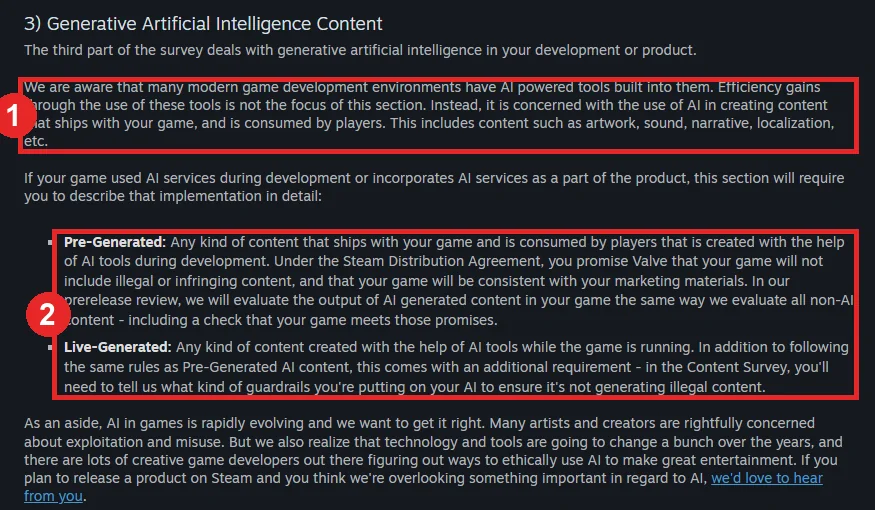 Figure 2. The generative AI part of Steam's Content Survey. (1) What the section covers (2) Pre-Generated and Live-Generated (Steamworks documentation screenshot)
Steam. Before you submit a game for review, you fill in the Content Survey. Its third part is about generative AI. As (1) in Figure 2 shows, this part is not about efficiency gains from development tools. It asks whether you used AI to make content that ships with the game and that players see and hear (artwork, sound, narrative, localization, and so on). The two kinds in (2) are:
| Kind | Meaning | What you also do |
|---|---|---|
| Pre-Generated | Content made with AI tools during development and shipped in the game | Promise there is no illegal or infringing content and that the game matches its marketing. Review judges it by the same standard as non-AI content |
| Live-Generated | Content made by AI while the game runs | All of the above, plus describe the guardrails that stop it from generating illegal content |
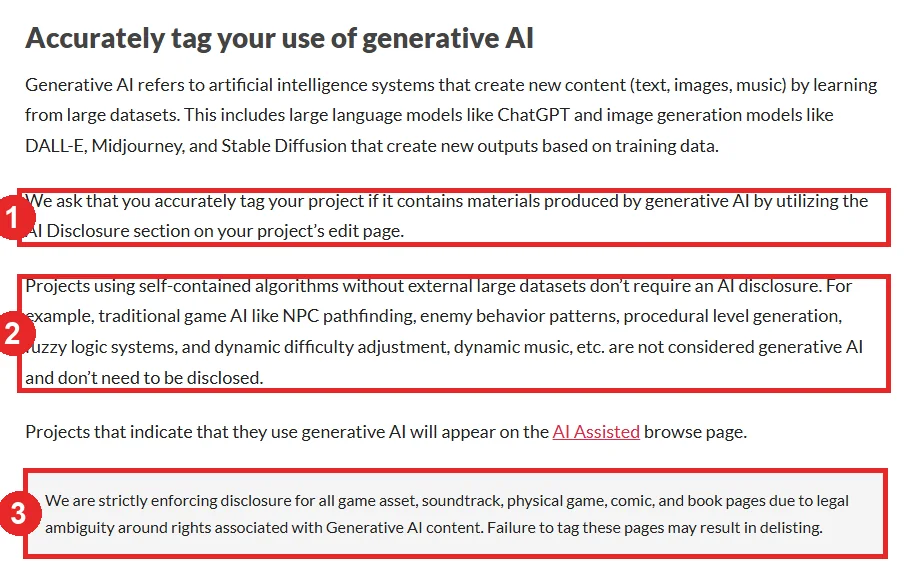 Figure 3. The generative AI part of the itch.io quality guidelines. (1) Tag it in the AI Disclosure section (2) Algorithms that need no disclosure (3) Where it is strictly enforced (itch.io documentation screenshot)
itch.io. If your project contains material made with generative AI, mark it in the AI Disclosure section of the project's edit page ((1) in Figure 3). Projects that do so also appear on the AI Assisted browse page. As (2) says, self-contained algorithms that do not use large external datasets (enemy pathfinding, procedural level generation, automatic difficulty adjustment, and so on) are not treated as generative AI and need no disclosure. As (3) says, disclosure is strictly enforced for game asset, soundtrack, physical game, comic, and book pages, and failing to tag may get a page delisted.
Neither page has a sentence that requires disclosure just because AI helped write code. Still, some cases are unclear. For example, a model built by a Blender script that AI wrote could be judged either way as "content made with the help of AI tools." When in doubt, it is safer to describe plainly what you used and how. My two test games were never put on a store, so I have no record of actually filling in these surveys.
8. Follow along: one record file to start with
Starting point: You have just made the game's project folder.
Follow along:
- Make one record file in the project folder, such as
credits.md. - Write one line per tool: tool name, plan, date you checked the terms, commercial-use conditions, attribution duty.
- Write one line per thing that goes into the game (models, art, sound, fonts, text): file name, how it was made (by hand, which AI tool, where it came from), and what a person changed.
- When you give AI work, write in the plan: "When you add a new asset, add a line to
credits.md." - Before exporting, use this file to fill in the credits screen and the store survey. Add the Godot license text at this point too.
For example:
| What went in | How it was made | Conditions |
|---|---|---|
| Launcher model | Blender Python script (written by AI), sizes from the plan | None (made by me) |
| Six sound effects | Synthesized in game code (written by AI) | None |
| Game font | Noto Sans KR reduced to 2,350 Korean characters | SIL OFL: include the license text, do not use the reserved name (Source) |
| Engine | Godot 4.7.2 | MIT: make the license text visible to players |
With this one table, you know right away what to write in the store survey and whom to put in the credits. It works like the contents list you stick on each box when you move house.
9. Common mistakes and fixes
| Symptom | Cause | Fix |
|---|---|---|
| Every automatic check passes, but the game is not fun | Check scripts cannot measure fun | Play it yourself and say what to change in numbers |
| The number of checks quietly went down | AI changed the checks to get rid of a FAIL | Record the check count and ask why if it drops |
| You forgot to credit a model made on a free plan | You did not check the conditions for that plan | Write the ownership clause in credits.md and credit the source |
| Korean text shows as boxes in the web build | A game in a browser cannot use PC fonts | Put a free font inside the game and include its license text |
| Right before release, you cannot tell which art was made with AI | Nothing was written down at the time | From the start, write one line per asset on how it was made (section 8) |
| The exported game has no engine license text | You did not know the MIT notice duty | Put the Godot license text in the credits screen or a shipped file |
10. Summary
AI is the hands that make and fix; the person is the eyes that decide and check. Check code with automatic checks, assets with numbers, and fun and sound by playing and listening. Read tool terms and store rules at the start, and write one line on how each thing in the game was made.
In part 5, Game asset rules, we check polygons, textures, origin, scale, names, LOD, and collision shapes for models sent from Blender to a game engine, using real screens.
References
- Anthropic, Consumer Terms of Service: https://www.anthropic.com/legal/consumer-terms
- Anthropic, Commercial Terms of Service: https://www.anthropic.com/legal/commercial-terms
- Meshy, Terms of Use: https://www.meshy.ai/terms-of-use
- ElevenLabs, Pricing: https://elevenlabs.io/pricing
- Blender, License: https://www.blender.org/about/license/
- Godot Engine 4.7 docs, Complying with licenses: https://docs.godotengine.org/en/stable/about/complying_with_licenses.html
- SIL Open Font License, official text: https://openfontlicense.org/open-font-license-official-text/
- Steamworks documentation, Content Survey: https://partner.steamgames.com/doc/gettingstarted/contentsurvey
- itch.io, Content creator quality guidelines: https://itch.io/docs/creators/quality-guidelines
- U.S. Copyright Office, Copyright and Artificial Intelligence, Part 2: Copyrightability (2025): https://www.copyright.gov/ai/Copyright-and-Artificial-Intelligence-Part-2-Copyrightability-Report.pdf
- This series: A map of solo game development, What helps to know before solo game development, Setting the scope of your first game, Game asset rules
- Also read: Making a Godot game scene with Claude Code, Choosing a game engine in 2026
- Figures: 1 is a run screenshot of a test game I made; 2 and 3 are screenshots of the official documentation pages