Choosing an AI image model in autumn 2026: GPT Image 2.5 and Nano Banana 2.1 compared
Names, release dates, prices, and leaderboard positions of GPT Image 2.5 (Flare and Sunburst) and Nano Banana 2.1, the image models that arrived in autumn 2026, checked against official sources, plus simple rules for picking one by use.
한국어English
ON THIS PAGE
Based on: OpenAI API model docs (GPT Image 2.5 Flare and Sunburst), Gemini API docs (model pages, pricing, release notes), the Artificial Analysis image leaderboard (AA-Image-T2I v2.1), and the Meshy API pricing page. Checked on November 1, 2026. Images are real screenshots of official pages.
In autumn 2026 the top of the AI image model field changed almost at once. OpenAI released GPT Image 2.5 as two models in September, and Google made Nano Banana 2.1 generally available in October. On a leaderboard ranked by human votes, these two names now sit near the top.
The names look alike, and each company prices images in a different way, so it is hard to know where to start. This post sorts out the names, release dates, prices, and leaderboard positions of both model families from official sources, and then gives simple rules for choosing one by use. For how AI image generation works, see How AI image generation works and how to write good prompts. Video models are covered in Eight AI video models compared and How to choose an AI video model by use case.
1. Short answer: which model to try first
The table below uses only facts from official docs and the leaderboard. Taste matters a lot with images, so pick two or three from the table and test them with the same prompt.
| What you want | Try first | Why |
|---|---|---|
| Top quality, precise edits | GPT Image 2.5 Sunburst | Rank 1 on the leaderboard. OpenAI calls it its "most capable" model and suggests it where editing precision matters most |
| Many images, fast | GPT Image 2.5 Flare | Rank 2. The docs rate its speed "Very fast", faster than Sunburst |
| Near-top quality at a low price | Nano Banana 2.1 | Rank 4. Leaderboard price is $33.6 per 1,000 images, about one sixth of GPT Image 2.5 |
| Images with text, infographics | Nano Banana 2.1 | Google lists better text rendering and infographic layout as new in 2.1 |
| The same character in many images | Nano Banana 2.1 | The official docs say it takes up to 14 reference images |
2. Names: two model families
Image models often have several names inside one company. It is a bit like a car model that comes in a base trim and a premium trim. These are the names used in this post.
| Common name | API name | Maker | Release | Note |
|---|---|---|---|---|
| GPT Image 2.5 Flare | gpt-image-2.5-flare | OpenAI | September 8, 2026 | The fast one, for everyday images |
| GPT Image 2.5 Sunburst | gpt-image-2.5-sunburst | OpenAI | September 8, 2026 | The precise one, takes longer |
| Nano Banana 2.1 | gemini-nano-banana-2.1 | GA on October 6, 2026 | An update to Nano Banana 2 | |
| Nano Banana 2 | gemini-3.1-flash-image | GA on May 28, 2026 | Official name Gemini 3.1 Flash Image. Marked deprecated on October 6 | |
| Nano Banana Pro | gemini-3-pro-image | GA on May 28, 2026 | Official name Gemini 3 Pro Image | |
| Nano Banana 2 Lite | gemini-3.1-flash-lite-image | GA on June 30, 2026 | Official name Gemini 3.1 Flash Lite Image |
"GA" stands for general availability. It means the company has taken off the preview label and says the model is ready for real work. Preview models can be renamed or shut down with little notice, so pick a GA model for anything you plan to keep using.
If you use Nano Banana 2 now, note one thing. On the same day Google released 2.1, it marked Nano Banana 2 (gemini-3.1-flash-image) as deprecated and asked users to move to 2.1. No shutdown date has been announced yet.
3. How to read the leaderboard
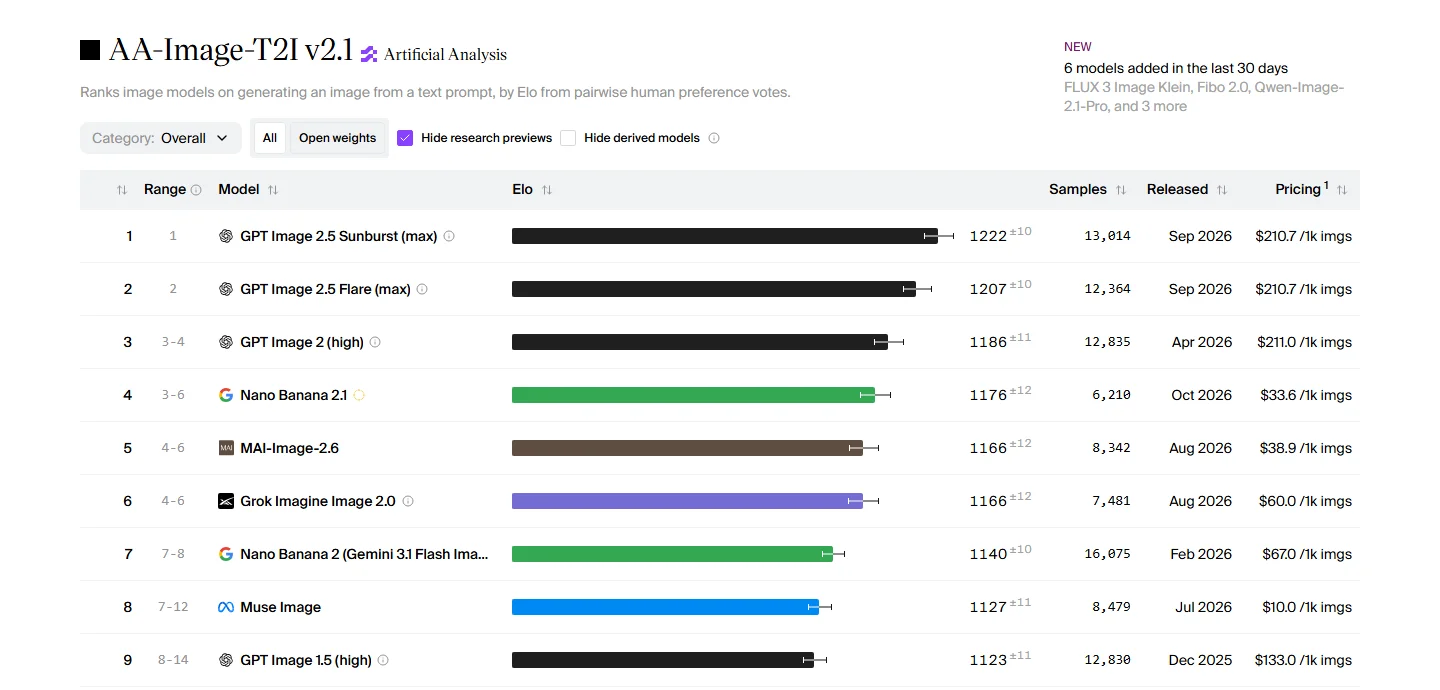 From left: rank, Range (how far the rank could move), model name, Elo score with ± margin, Samples (number of votes), Released (month), and Pricing (per 1,000 images) (Artificial Analysis screenshot)
Artificial Analysis is an independent site that compares AI models. For this leaderboard, people see two images made from the same text prompt and pick the better one. The votes are turned into an Elo score, the same rating system used for chess players. Beating a strong opponent raises your score more, and a bigger score gap means a bigger difference in skill.
Follow along: read the leaderboard in this order.
- Check that Category is set to Overall. If you switch to a category such as photorealism, text, or illustration, the order changes.
- Look at the ± number next to Elo. Ranks 1 and 2 are 1222±10 and 1207±10, so their margins overlap a little, but the Range column fixes them at 1 and 2, so the order is fairly settled. Ranks 5 and 6 both show 1166, so they are effectively tied.
- Look at the Range column. Nano Banana 2.1 at rank 4 shows "3-6". As more votes come in, it could land anywhere from rank 3 to rank 6.
- Look at the brackets after a name. "(max)" and "(high)" are quality settings. The same model costs and looks different at lower quality.
- The Pricing column is the cost of 1,000 images at 1024x1024 with default settings. What you actually pay depends on size and quality.
Other models in the top 15 of the table we checked for this guide include MAI-Image-2.6 from Microsoft AI, Grok Imagine Image 2.0, Muse Image from Meta, and FLUX 3 Image from Black Forest Labs, among others. The board changes as votes come in, so open it again right before you choose.
4. GPT Image 2.5: Flare and Sunburst
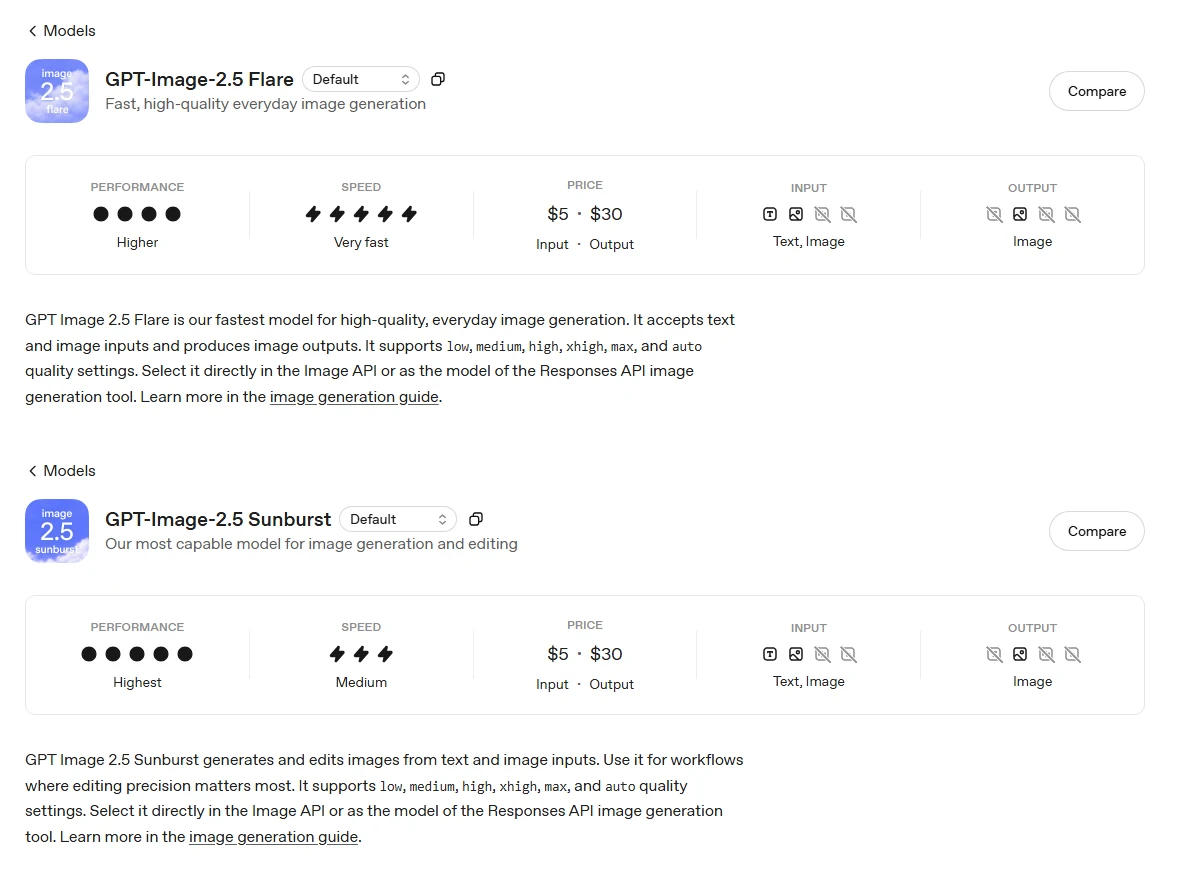 Top: Flare (performance Higher, speed Very fast). Bottom: Sunburst (performance Highest, speed Medium). Both show $5 and $30 in the PRICE box (input and output per 1M tokens) (OpenAI developer docs screenshot)
OpenAI split GPT Image 2.5 into two models from day one. Compare the dots and lightning bolts in the two rows. Flare is the fast one and Sunburst is the careful one. The price box is the same for both.
- The docs describe Flare as "fast, high-quality everyday image generation".
- Sunburst is "our most capable model for image generation and editing", meant for work where editing precision matters most. According to the OpenAI developer community announcement, Sunburst adds precision for detailed work in exchange for longer generation times.
- There are six quality settings:
low,medium,high,xhigh,max, andauto. The names at ranks 1 and 2 on the leaderboard carry(max). - The same announcement says the update began rolling out to all ChatGPT users on September 8. ChatGPT may not show a separate menu for choosing between the two models.
Prices are per token, not per image. A token is the small unit an AI uses to count text and images. Like a taxi fare that depends on distance, a bigger image or a higher quality setting uses more tokens and costs more.
| Item | Price per 1M tokens (standard) |
|---|---|
| Text input | $5 (cached input $1.25) |
| Image input | $8 (cached input $2) |
| Image output | $30 ($15 with Batch) |
OpenAI does not list a per-image price. The model docs also say the GPT Image 2 calculator cannot estimate token use for 2.5. To get a rough per-image cost, use the leaderboard figure in section 3 ($210.7 per 1,000 images, at 1024x1024 with default settings). The price changes with size and quality.
5. Nano Banana 2.1: near the top for less
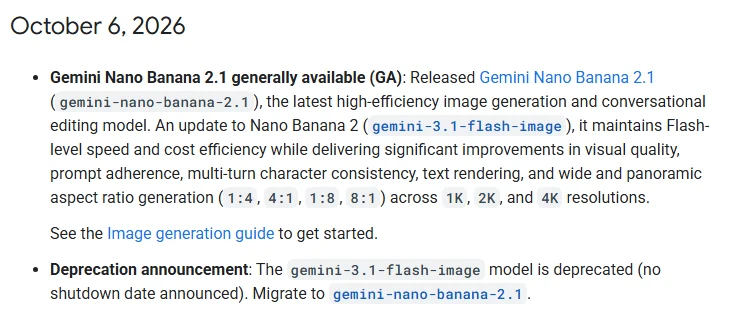 The Nano Banana 2.1 entry in the release notes. The first item announces Nano Banana 2.1 GA, and the second marks Nano Banana 2 as deprecated with no shutdown date (Gemini API docs screenshot)
Nano Banana is the nickname for Google's Gemini image models. Read the two items in the release notes one after the other. The GA news for 2.1 and the notice to move off Nano Banana 2 share the same date.
Google's model page lists these changes in 2.1:
- Better visual quality and realism at 1K, 2K, and 4K.
- Fixed tiling artifacts at 2K and 4K on very wide or tall ratios such as 1:4, 4:1, 1:8, and 8:1.
- More accurate text rendering and infographic layout.
- Up to 14 reference images can be combined into one result.
- It can use Google web and image search results as a reference.
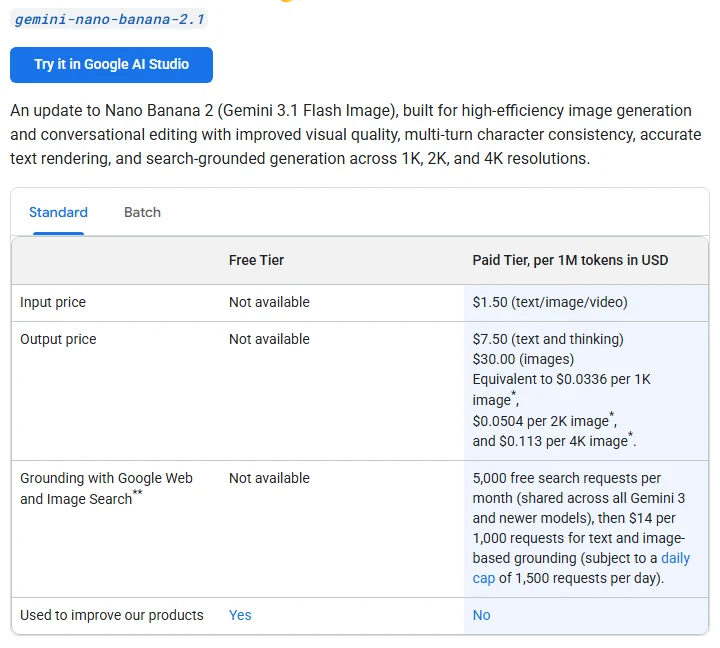 The Output price cell lists per-image prices ($0.0336 for 1K, $0.0504 for 2K, $0.113 for 4K), and the Free Tier column says Not available (Gemini API docs screenshot)
Look at the Output price cell in the pricing screenshot. Unlike OpenAI, Google lists a price per image. The Free Tier column says "Not available", so you need billing set up to use it through the API. The last row says paid usage is not used to improve Google's products.
The same pricing page lists Google's other image models.
| Model | 1K image | 2K image | 4K image |
|---|---|---|---|
| Nano Banana 2.1 | $0.0336 | $0.0504 | $0.113 |
| Nano Banana 2 | $0.067 | $0.101 | $0.151 |
| Nano Banana Pro | $0.134 | $0.134 | $0.24 |
| Nano Banana 2 Lite | $0.0336 | not listed | not listed |
The newer model is the cheaper one. A 1K image from Nano Banana 2.1 costs about half of one from Nano Banana 2. If you still use Nano Banana 2, you now have two reasons to move: price and deprecation. Batch requests cost half the standard price.
6. Prices side by side
The two companies price images differently, so a direct comparison is hard. The table adds the leaderboard figures, which use one common basis (1024x1024, default settings, 1,000 images).
| Model | Official pricing basis | Leaderboard price (1,000 images, 1024x1024, default settings) | Leaderboard rank |
|---|---|---|---|
| GPT Image 2.5 Sunburst (max) | Tokens ($30 per 1M output tokens) | $210.7 | 1 |
| GPT Image 2.5 Flare (max) | Tokens (same as Sunburst) | $210.7 | 2 |
| Nano Banana 2.1 | Per image ($0.0336 per 1K) | $33.6 | 4 |
| Nano Banana 2 | Per image ($0.067 per 1K) | $67.0 | 7 |
| Nano Banana Pro | Per image ($0.134 per 1K) | $134.0 | 11 |
Inside a web service, prices turn into credits. For example, the Meshy API pricing page charges 4 credits per image for nano-banana-2-1, and 9 credits (text to image) or 12 credits (image to image) for GPT Image models. The same model can cost different amounts in different places, so check the pricing page of the service you plan to use. Credits and terms on platforms such as Higgsfield are covered in An introduction to Higgsfield.
7. Using image models in 3D work
AI image models are most useful in the early stages of 3D work.
- Reference images: ask for front and side views of an object, then load them as reference images in Blender and model over them. A character needs several angles, so a model that takes many reference images (Nano Banana 2.1 takes up to 14) helps.
- Image to 3D model: feed one image into a 3D generation service to get a model. Turning one image into a 3D print with Meshy AI and Claude Code walks through a real example. Images with a plain background and an object that is not cut off give better results.
- Texture bases: ask for patterns such as wood grain or stone and use them as a base for materials. Check that the seams do not show when the pattern repeats.
Before you publish or sell what you make, check the service terms and copyright. The basics are in Copyright basics for AI-made images and text. When you post the images, it is a good idea to label them "AI-generated image".
8. Common mistakes and fixes
| Symptom | Cause | Fix |
|---|---|---|
| The API bill is higher than expected | GPT Image 2.5 charges by token, so bigger images and higher quality cost more | Test at low or medium, then remake only the keepers at high or above |
| You got a notice that old code will stop working | Nano Banana 2 (gemini-3.1-flash-image) is deprecated | Change the model name to gemini-nano-banana-2.1 and check the results again |
| The free API does not work | Nano Banana 2.1 has no free API tier (Not available) | Try it in Google AI Studio first, or set up billing before using the API |
| You picked rank 1 but your image looks worse | The leaderboard averages many prompts, and taste varies | Switch Category to your use (photorealism, text, and so on) and test two or three models with the same prompt |
| Text in the image is wrong | Text rendering varies a lot between models | Put the exact words in quotes and keep them short. Add long text later in an editing program |
| The same character looks different in each image | Text prompts alone let faces and clothes drift | Feed the first result back as a reference image and say "the same character" |
9. Summary
Top quality: GPT Image 2.5 Sunburst. Speed: Flare. Best balance of price and quality: Nano Banana 2.1. The leaderboard is a starting point; decide after testing with your own prompt. New models arrive every month in this field, so the next update will revisit the rankings and prices.
References
- OpenAI API docs: GPT Image 2.5 Flare, GPT Image 2.5 Sunburst
- OpenAI developer community: Introducing GPT Images 2.5 in the API and ChatGPT
- Gemini API docs: Gemini Nano Banana 2.1, Gemini 3.1 Flash Image, Pricing, Release notes
- Artificial Analysis: Text to Image leaderboard
- Meshy: API pricing
- Images: screenshots of official pages were taken from each company's site.