Google DeepMind Genie 4 explained: a real-time world model with sound, and what it means for 3D artists
Using only the official announcement, this guide sums up what is new in Google DeepMind's world model Genie 4, how it differs from Genie 3, who can use it and when, its limits, and what it may mean for Blender and game creators.
한국어English
ON THIS PAGE
- 01Genie 4 at a glance
- 02What "world model" means
- 03New feature 1: changing the scene with text, in real time
- 04New feature 2: physics and human movement
- 05New feature 3: the sound of the scene
- 06New feature 4: multi-step events guided by Gemini
- 07What changed since Genie 3
- 08Who can use it, and when
- 09Where trusted testers tried it
- 10Safety and limits
- 11What it means for 3D creators
- 12Common misunderstandings
- 13Summary
- 14Further reading
- 15References
Based on: the Google DeepMind blog post "Genie 4: A new generation of world simulation" (announced October 27, 2026), the Genie 3 announcement on the same blog (2025), and the Project Genie post on the Google blog (2026). Checked in October 2026. Genie 4 is open only to trusted testers for now, so we have not tried it ourselves. This guide covers the official announcement only. The pictures are a screenshot of the announcement page and stills taken from DeepMind's official demo videos.
Genie 4 is an AI that creates a "living scene" in real time, which you move through with your keyboard and change with a line of text. It is a new world model from Google DeepMind. This time it makes more than pictures: it also makes the wind, the music, and the people talking. You can walk around a scene, type "drop a marble bust on the watermelon," and watch what happens next.
If you build scenes in Blender or a game engine, your first question is probably "Will this replace my work?" The announcement gives a fairly clear answer. Genie 4 makes moving images (pixels). Nowhere does it say that it exports 3D model files. This guide walks through the new features, what changed since Genie 3, who can use it and when, and its limits. At the end, it looks at what this means for 3D creators, keeping facts and guesses apart.
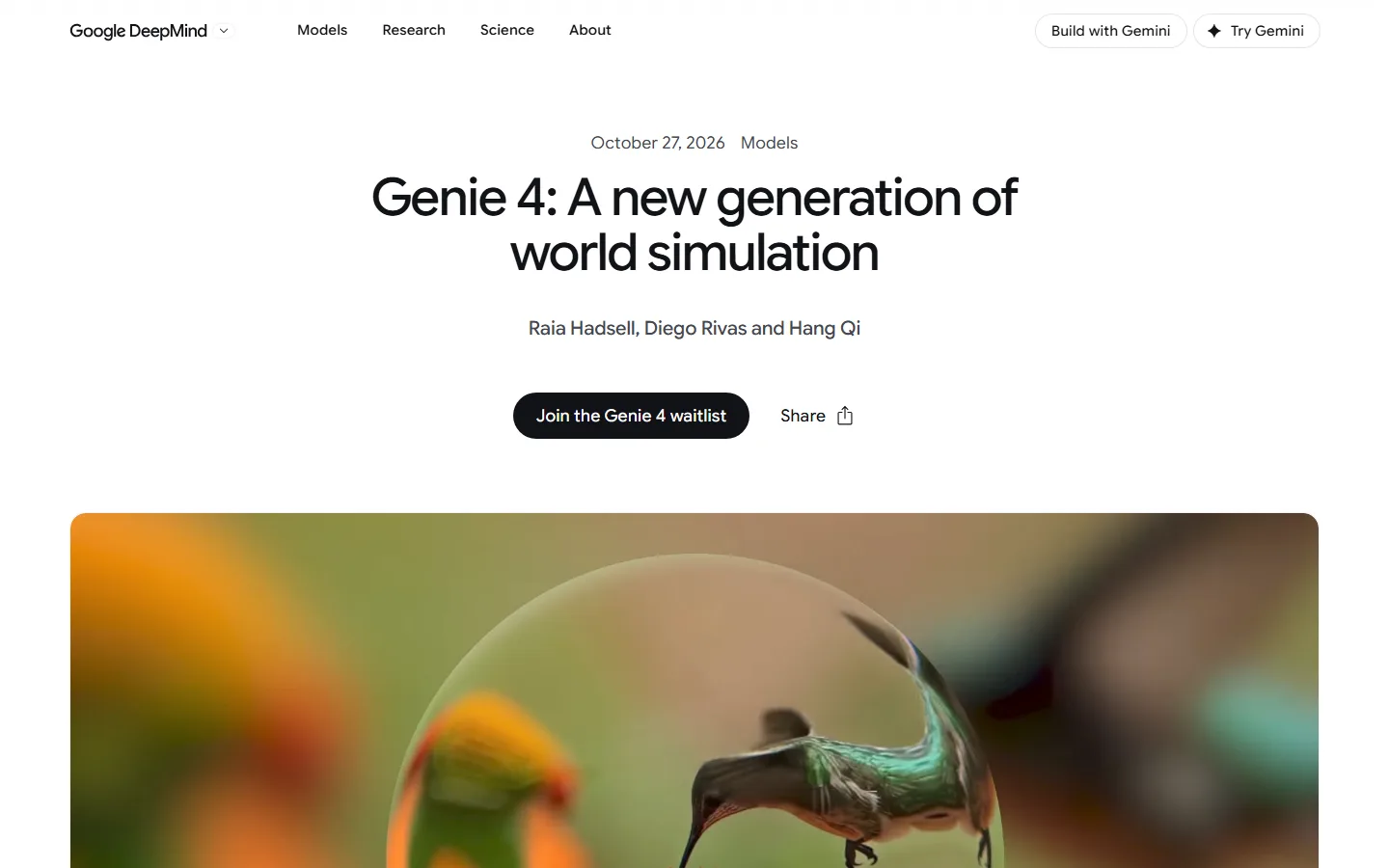 The top of the Genie 4 announcement page. The waitlist button sits under the title (Google DeepMind blog screenshot)
Genie 4 at a glance
| Item | What the announcement says |
|---|---|
| What it is | A new world model. It makes the scene, the sound, and people's movement and speech together, in real time |
| Built on | Capabilities from the Gemini family. Gemini Omni keeps things close to how the real world looks and moves, and other Gemini models handle the reasoning that keeps the scene consistent |
| Controls | Keyboard to walk and turn the camera, text (prompts) to change the scene |
| New focus | Real-time scene changes, physics and human movement, sound, multi-step events guided by Gemini |
| Who can use it now | Trusted testers (research preview) |
| Next in line | Google AI Ultra subscribers in Project Genie, and early access partners of the Gemini API and Google AI Studio. The post says "soon" and gives no date |
| Not stated | Resolution, frames per second, how long one session lasts, price, release date, 3D file export |
What "world model" means
A world model is an AI that draws what happens next in the current scene. Comparing it with a game engine makes the difference clear.
- A game engine takes 3D models, materials, and physics rules that people made, and calculates each frame from them.
- A world model has none of those parts. It looks at the frames so far and at your input (keyboard, text), and draws the next frame directly.
Think of a game engine as a film set built in advance. A world model is a painter who paints the view to your left the moment you say "Let's go left." With no set, the painter can paint anything. But after a while, the door painted earlier may drift to a slightly different place. This weak point comes back in the "Limits" section.
DeepMind says Genie 4 could help with everything from building training environments for robots and AI agents to creating new interactive experiences. An agent is an AI that does not just answer, but works through steps on its own to get a job done.
New feature 1: changing the scene with text, in real time
Several demo videos on the announcement page are labeled as recordings of real-time use. You can see the W A S D keys at the lower left, arrow keys at the lower right, and a text box at the bottom center. You walk and move the camera with the keyboard, and change the scene with text.
The examples given are changing the weather, moving the camera, and adding a new person or object. Gemini adjusts your text to fit the surrounding scene. Even when you type nothing, Gemini keeps watching and steers the scene so the story keeps moving.
The two pictures below are the before and after of one demo video. Read the text in the box in the first picture, then look at how the second picture carries it out.
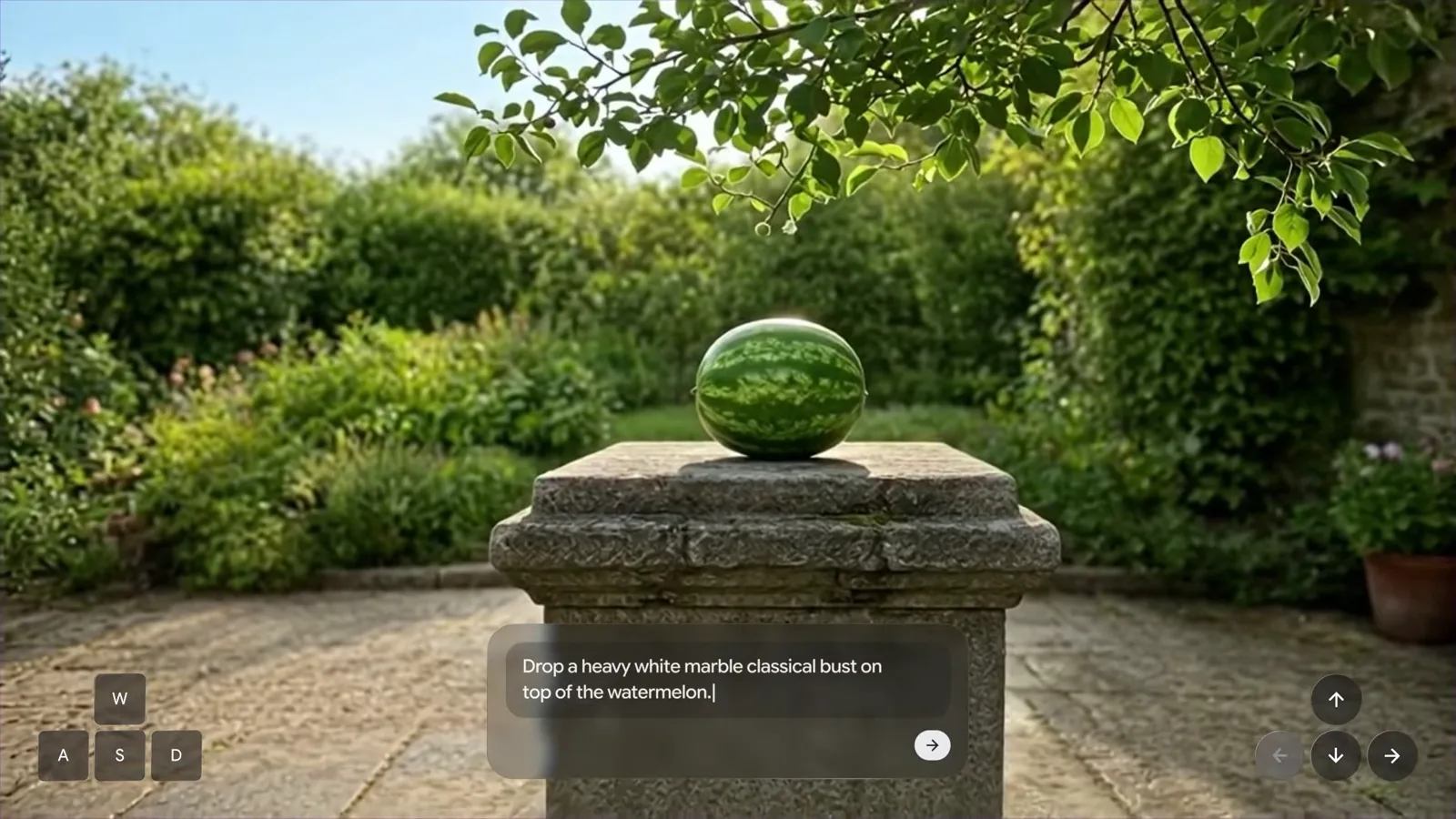 Before. The text in the box: "Drop a heavy white marble classical bust on top of the watermelon." (still from an official Google DeepMind demo video)
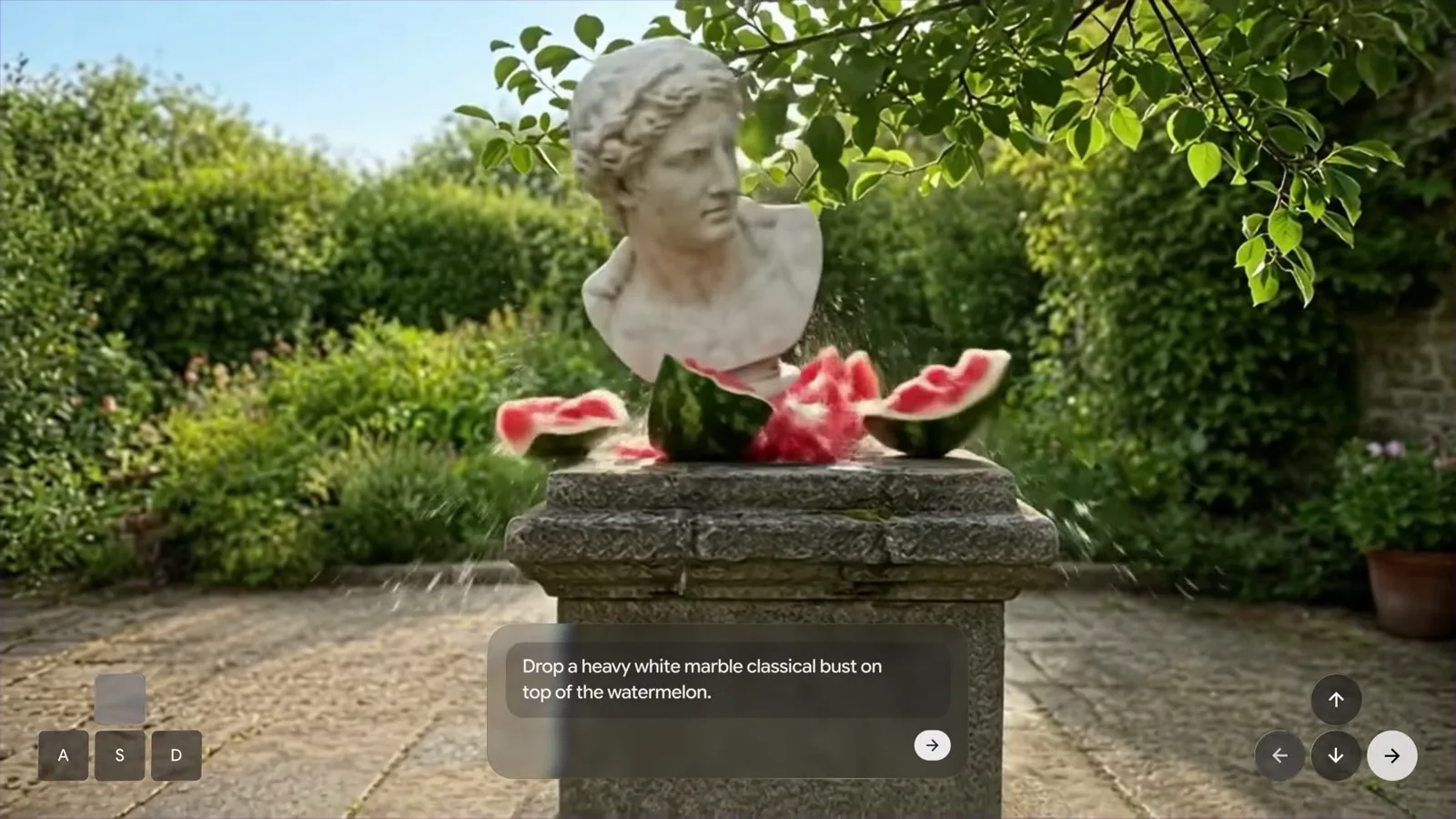 After. The bust lands, the watermelon breaks, and pieces and drops fly out (still from an official Google DeepMind demo video)
Two things stand out here. First, one line of text did two jobs at once: it added an object, and it started an event where that object falls. Second, the model went on to draw the result, with the watermelon breaking and pieces flying. In Blender, this shot would need a bust model, a fracture simulation for the watermelon, and a particle setup for the drops.
New feature 2: physics and human movement
DeepMind says Genie 4 simulates physical situations such as air flow (aerodynamics) and collisions. The demos include a close-up of a maple seed falling from a tree into the grass, along with the watermelon shot above.
"The most dramatic leap," DeepMind says, is people. Characters move naturally, react to what is around them, and can be steered in real time.
 A demo that asked for a busy rural Japanese train station in the 1980s. People on the platform walk and board the train in their own ways (still from an official Google DeepMind demo video)
Look at how each person's pose and walk is different. On the other hand, the letters on the station sign at the upper left are smeared and cannot be read. "Rendering legible text" is also on the official list of open research problems. If signs, book covers, or on-screen writing matter in your shot, do not count on them for now.
New feature 3: the sound of the scene
DeepMind calls Genie 4 "our first real-time world model to generate audio natively" (the first among its own models). A forest comes with wind in the leaves, and a beach comes with crashing waves.
The bigger step, in DeepMind's view, is human speech. Characters talk to each other and change what they say based on your input or on events in the scene. The page says all the sound in the videos at the top of the post was made by Genie 4 itself. Sound cannot be shown in a picture, so turn on the audio in the videos on the announcement page and listen.
Still, real-time audio accuracy remains an open research problem.
New feature 4: multi-step events guided by Gemini
Genie 4 does not work alone. Gemini 3.8 Flash sits beside it as a guiding agent. It does three things.
- It breaks a goal into steps.
- It looks at the new frames from Genie 4 and checks whether each step worked.
- When the scene changes or the user steps in, it changes the plan on the spot.
On a film set, Genie 4 is the camera crew drawing the picture, and Gemini is the assistant director holding the storyboard and calling "That shot is done, next shot."
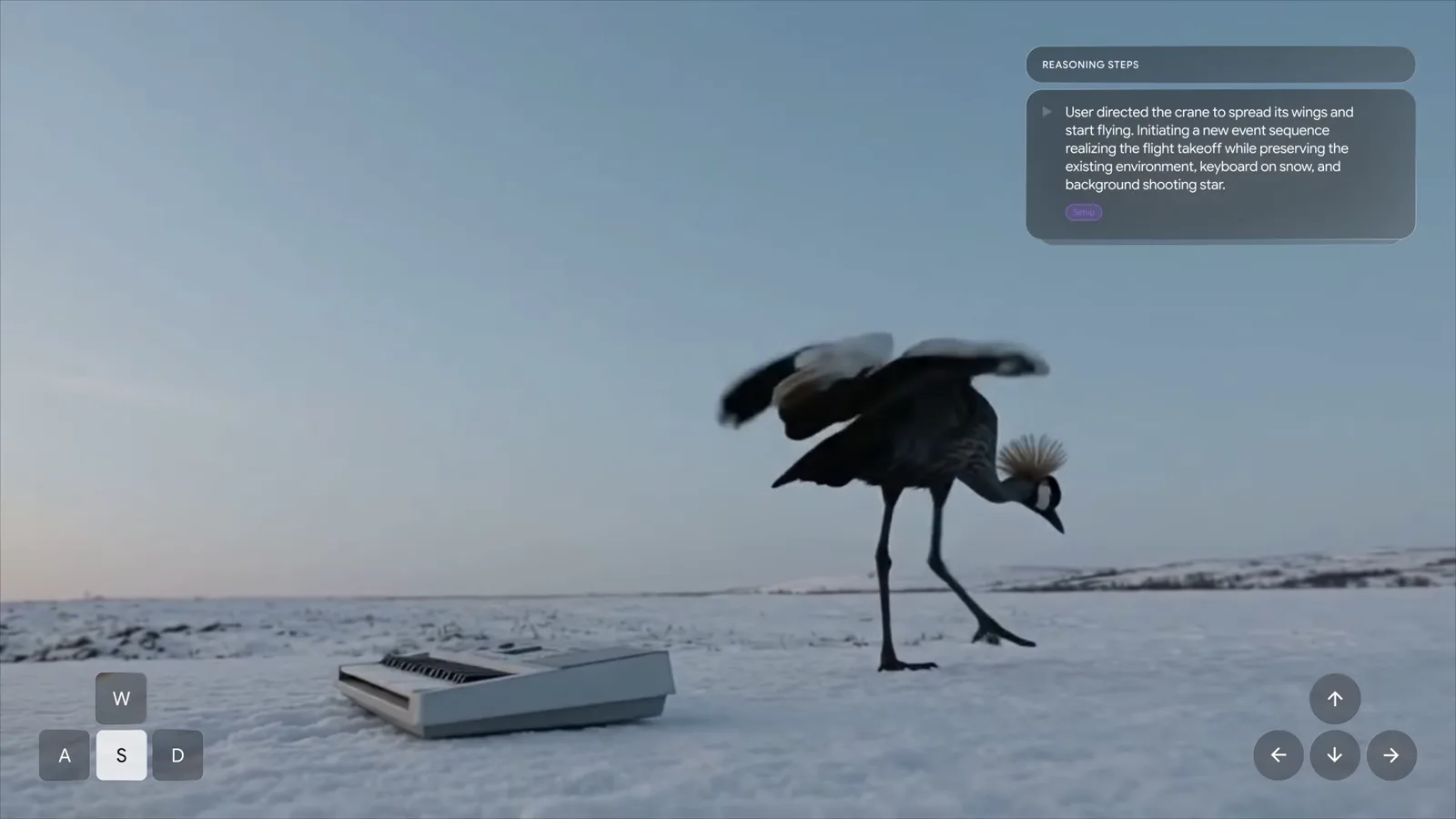 The REASONING STEPS box at the upper right. It says the user told the crane to spread its wings and fly, so a takeoff event starts while the background stays the same (still from an official Google DeepMind demo video)
Read the box at the upper right. It says, in short, "The user directed the crane to spread its wings and start flying" and "Start the takeoff while keeping the environment, the keyboard on the snow, and the shooting star in the background." Gemini first sorts out what to change and what to keep, and Genie 4 draws it.
There is also an experiment tied to robotics research. Gemini 4 Argon breaks a user's task into steps and feeds those steps to Genie 4 as text captions while the simulation runs. The example shows Apptronik's Apollo humanoid robot playing a game of checkers.
What changed since Genie 3
The Genie 4 post gives no number-for-number comparison with Genie 3. The only comparison is a demo video that puts the two models side by side, with a note under it: "Results for illustrative purposes. Sequences shortened."
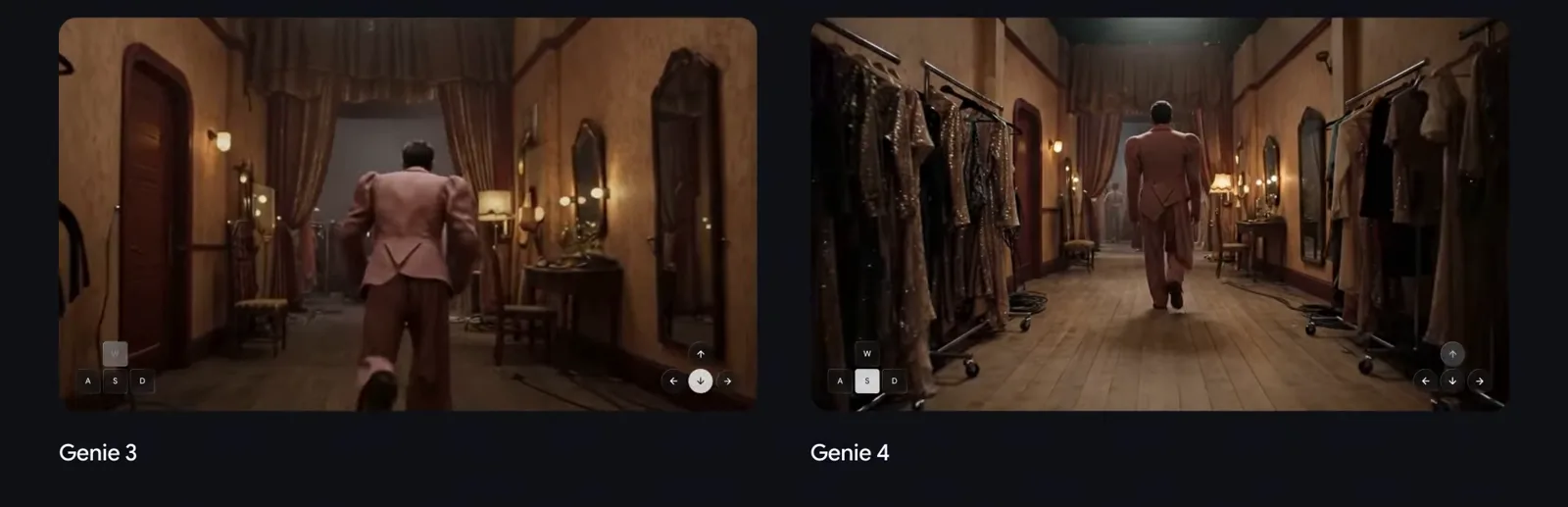 The same backstage hallway in Genie 3 (left) and Genie 4 (right). The note under the original video reads "Results for illustrative purposes. Sequences shortened." (still from an official Google DeepMind demo video)
Compare the clothes on the racks, the wood grain on the floor, and the way the person walks. Keep in mind that DeepMind picked this scene, so you cannot assume the same gap in every scene.
These are the differences that official sources confirm.
| Item | Genie 3 | Genie 4 |
|---|---|---|
| Announced | August 2025 | October 2026 |
| Resolution and frame rate | 720p, 24 frames per second | Not stated |
| How long it holds together | Consistent for a few minutes, visual memory of about one minute | Consistent over "short sessions." No length given |
| Changing the scene with text | Yes (change the weather, add objects and characters) | Yes. Gemini adapts the text to the scene and steers it between inputs |
| Sound | Not mentioned | Ambient sound, music, and dialogue made together with the scene |
| Underlying models | Not mentioned | Gemini Omni and other Gemini models |
| Access | Limited research preview for a small group of academics and creators | Research preview for trusted testers |
Genie 2, which came before, was a model for building environments to train agents. The Genie 3 post called Genie 3 "our first world model to allow interaction in real-time." We found no official source that compares Genie 2 and Genie 4 directly.
Who can use it, and when
Right now only trusted testers can. DeepMind plans to collect their feedback and then open it to consumers and developers, starting with these two groups.
- Google AI Ultra subscribers who use Project Genie
- Early access partners of the Gemini API and Google AI Studio
Project Genie is an experimental web app that Google opened in January 2026. When it opened, the post said it was built on Genie 3, that Google AI Ultra subscribers in the U.S. aged 18 or older could use it, and that each generation was limited to 60 seconds. This announcement does not say which countries, what length limits, or what prices will apply once Genie 4 arrives. If you want in, use the Join the Genie 4 waitlist button at the top of the announcement page, and check official news for the release.
Where trusted testers tried it
DeepMind says it tested Genie 4 with trusted testers in creative work, journalism, education, gaming, and engineering. Four uses are named.
| Field | Use named in the announcement |
|---|---|
| Creative direction | A quick "draft mode" for previsualization (previz) and ideas. Filmmakers step into a simulation and run several takes, changing camera angles, lighting, dialogue, and action |
| History and photos | Turning one archival photo into a simulation of that place in seconds. Showing how short events such as a flash flood or a wildfire unfold |
| Game and experience design | Going from an idea to an explorable prototype in seconds. Testing visual style, material look, and controls with text before writing any engine code |
| Business simulation | Building scenarios quickly from nothing |
The direction for the future is "hybrid world models." These combine the structured reasoning of code and language models with pixel-level simulation. The current pairing, with Gemini planning the structure and story in the background and Genie drawing the picture and sound in front of you, is described as an early step in that direction.
Safety and limits
Safety: DeepMind says Genie 4 has safety guardrails in line with the policies for its other models, and that it went through internal safety evaluations before the preview to block harmful or malicious output. It went to trusted testers first to get early feedback before a wider release. All video and audio made by Genie 4 will carry SynthID. SynthID is a digital watermark you cannot see or hear, used later to tell whether something was made by AI. Like the hidden pattern in a banknote, it is invisible to the eye but readable by a machine.
Limits: Genie 4 is still "an early, experimental model," and the official limits are these.
- The scene holds together over short sessions. But when a simulation runs longer, after many complex text edits, or as you move around the scene, details and object positions can shift.
- Complex physical interactions, real-time audio accuracy, legible text, spatial accuracy, and long-term consistency are still being researched.
Back to the painter: the door you saw earlier may be somewhere else when you turn around. A 3D scene file is strong exactly because the same object always stays in the same place. Genie 4 still has that as a weak point.
What it means for 3D creators
From here on, the text mixes in guesses. The table keeps what DeepMind says apart from what we are guessing.
| Our work | What the announcement says | Our guess | Catch |
|---|---|---|---|
| Video previz | Filmmakers use a "draft mode" to try camera, lighting, and action over several takes | Looks useful for testing framing and mood before building a Blender blockout | Object positions can drift, so matching shots may be hard |
| Game prototypes | Test visual style, materials, and controls with text before engine code | Could speed up the mock-up stage where a team agrees on "the feel" | The output is video. 3D model or level file export is not mentioned |
| Final video | Not mentioned | Hard to see it replacing final shots right now | Smeared text, long-shot consistency, resolution not stated |
| Sound | Makes sound and dialogue with the scene | Rough location sound in previz could make mood calls easier | Audio accuracy is still being researched |
In short, Genie 4 looks less like a Blender replacement and more like a sketchbook for the stage before you open Blender. Exact sizes, reusing the same object across shots, and files to hand to a game engine still belong to 3D scene files. On the other hand, quickly looking at many "what if the scene were like this" options may move toward world models. This view should be checked again once Genie 4 opens to the public and we can try it.
There are a few things you can do now.
- Practice describing a scene clearly in words. Some demo prompts on the page split the "environment" and "character" descriptions, and many spell out where the camera is and what to avoid. It is the same skill as writing prompts for AI video tools.
- Keep making blockouts. Even if you like a world model's mock-up, shooting the same scene from several angles still needs a 3D scene where objects stay put.
- When you use the output, keep in mind that it carries SynthID, and think about copyright as well.
Common misunderstandings
| Misunderstanding | What the announcement says |
|---|---|
| It has a higher resolution than Genie 3 | Resolution and frame rate are not stated. The only comparison is a side-by-side demo video |
| The scene stays the same no matter how long it runs | The post says details and object positions can shift over longer runs or many edits |
| The sound is added afterward | The post says all the sound in the videos at the top was made by Genie 4 |
Summary
Genie 4 is a real-time scene generator you steer with text and a keyboard, now with sound and dialogue, but still for testers only and with no 3D file output. For 3D creators, it is likely to become a quick mock-up tool for the stage before Blender, while exact scenes and final work stay with 3D scene files.
Further reading
- AI video generation basics: making video from text and images
- How AI image generation works, and how to write good prompts
- Copyright basics for AI-made images and text
- AI and Blender: Start Small and Work Together
References
- Google DeepMind, Genie 4: A new generation of world simulation: https://deepmind.google/blog/genie-4-a-new-generation-of-world-simulation/
- Google DeepMind, Genie 3: A new frontier for world models: https://deepmind.google/discover/blog/genie-3-a-new-frontier-for-world-models/
- Google, Project Genie: Experimenting with infinite, interactive worlds: https://blog.google/innovation-and-ai/models-and-research/google-deepmind/project-genie/
- Pictures: screenshot of the Google DeepMind blog page announcing Genie 4, and stills from the official demo videos on the same page (copyright Google DeepMind)