How to choose an AI video model: recommendations for live action, animation, film, and motion
Eight AI video models sorted by use: live action, animation and games, film-style camera work, human motion and physics, sound and lip-sync, keeping the same character, and saving money, with leaderboard evidence and results from our own use.
한국어English
ON THIS PAGE
- 011. Six steps for choosing
- 022. Live action: people, products, and real places
- 033. Animation and game style
- 044. Film style: camera motion and long single shots
- 055. Motion: human movement and physics
- 066. Sound and lip-sync
- 077. Keeping the same character and background
- 088. Saving money
- 099. Five failures we ran into
- 1010. Recommendations by use at a glance
- 11Common mistakes and fixes
- 12Summary
- 13Related posts
- 14References
Based on: category rankings from the Artificial Analysis video arena (video with audio, text-to-video and image-to-video) and official announcements and docs from each company. Checked on October 31, 2026. Images are real screenshots of the leaderboards and stills from Seedance 2.5 results we made ourselves. We have used Seedance 2.5 and Kling 4.0 directly. Recommendations for the other models rely on leaderboards and official specs. Our result stills come from a sponsored Higgsfield video we were paid to make.
There is no single AI video model that is best at everything. The model that ranks first when you start from text differs from the one that ranks first when you start from an image, and the order changes again between a person walking and water splashing. So the fastest way to choose is to decide first what you want to make.
This post starts with a six-step order for choosing. Then it splits recommendations and evidence into seven uses: live action, animation, film-style shots, motion, sound, keeping the same character, and saving money. At the end are five failures we ran into ourselves. Specs and prices for each model are in the tables of Eight AI video models compared.
1. Six steps for choosing
The models covered here are Gemini Omni 1.1 Flash, Grok Imagine Video 1.5, Wan 3.0, Seedance 2.5, FLUX 3 Video, MiniMax H3, Kling 3.0, and Kling 4.0. Answer these questions in order and the list shrinks to two or three candidates.
- Decide whether you start from text or from an image. From text only, Wan 3.0 ranks first; from one image, Seedance 2.5 ranks first. Still, for text-to-video Wan 3.0 is within 30 points of MiniMax H3 and Seedance 2.5, so the three form a top group.
- Decide how many seconds one shot is. Under 10 seconds, all eight models work. Over 20 seconds, the ones that make 30 seconds in one run remain: Wan 3.0, Seedance 2.5, and Kling 4.0.
- Decide whether you need sound. If dialogue matters, look at Seedance 2.5 and FLUX 3 Video. To time sound effects exactly to the picture, look at Gemini Omni Flash.
- Decide whether the same character and path must hold. Kling 4.0, which takes the most references and keyframes, has the edge.
- Decide on price. Run tests many times on cheaper models (MiniMax H3, Gemini Omni Flash at 360p), and make only the final shot on a top model.
- Whatever model you use, check the result frame by frame. Failures such as a changing background, a frozen ending, or objects swapping order are easy to miss in a single playback (section 9).
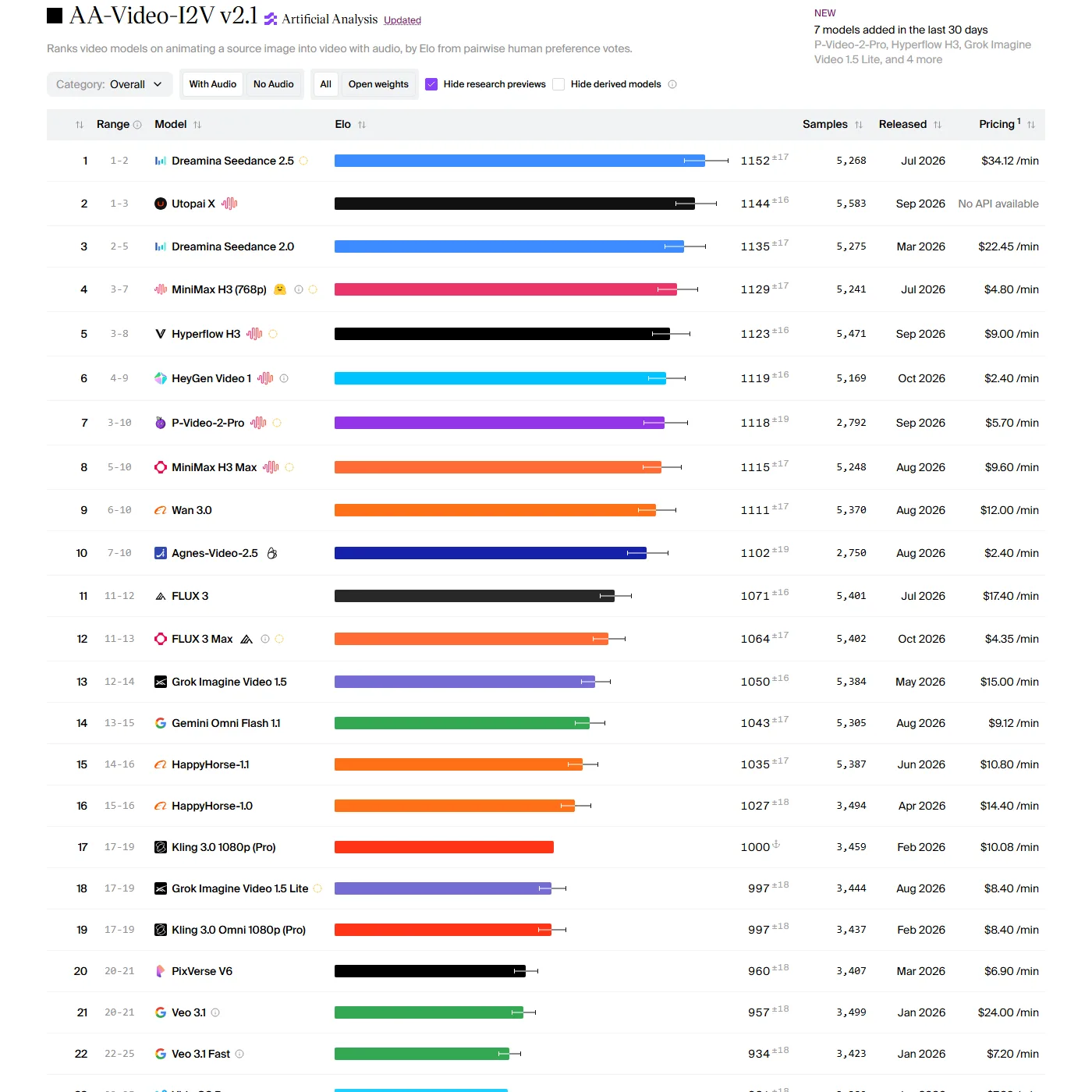 Figure 1. The image-to-video leaderboard (with audio). Seedance 2.5 is 1st and Wan 3.0 is 9th (Artificial Analysis screenshot)
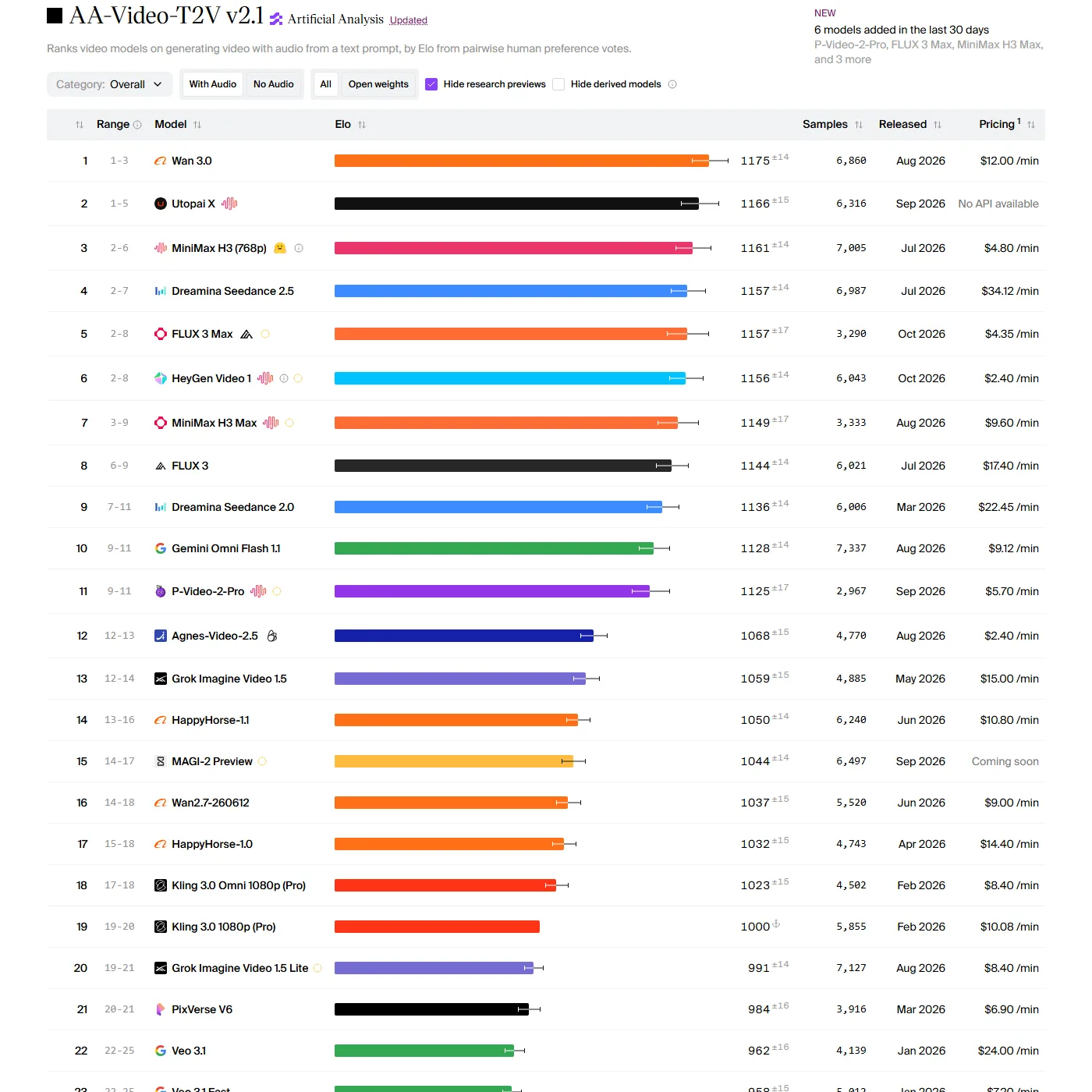 Figure 2. The text-to-video leaderboard (with audio). Wan 3.0 is 1st and Seedance 2.5 is 4th (Artificial Analysis screenshot)
Try it: To see the step 1 difference yourself, open the Artificial Analysis video leaderboard and switch between the Image to Video (Figure 1) and Text to Video (Figure 2) tabs at the top. Check that Wan 3.0 and Seedance 2.5 trade places between the two tables. The leaderboard is built from people watching two videos made from the same prompt without knowing the model names and picking one, with the votes added up as a score (Elo). How to read the leaderboard is covered in more detail in section 5 of the AI video model comparison.
Press the Category button to switch to category rankings such as Live-Action Film, Animation & Gaming, and Physics. The ranks in sections 2 to 7 are these category rankings. Category scores have a large margin of error, ±40 to 55 points, so a gap under 30 points can flip. That is why this post recommends a "top group" rather than a single winner. In some categories a model outside the eight, such as Utopai X or HeyGen Video 1, is first. In those cases only the order among the eight is given.
2. Live action: people, products, and real places
| Starting point | Top group (category "Live-Action Film") | Score |
|---|---|---|
| Text | MiniMax H3, Wan 3.0, Seedance 2.5 | 1,121, 1,115, 1,115 |
| Image | Seedance 2.5 first, then MiniMax H3 | 1,156, 1,096 |
- Starting from text, MiniMax H3, Wan 3.0, and Seedance 2.5 sit within 6 points of each other, so they are effectively one group. Of these, MiniMax H3 has the lowest leaderboard price at $4.80 per minute.
- Starting from one image, Seedance 2.5 leads MiniMax H3, second among the eight models, by 60 points.
- In the lighting and materials category (how light falls on surfaces), Wan 3.0 is near the top in text-to-video, and Seedance 2.0 and 2.5 in image-to-video.
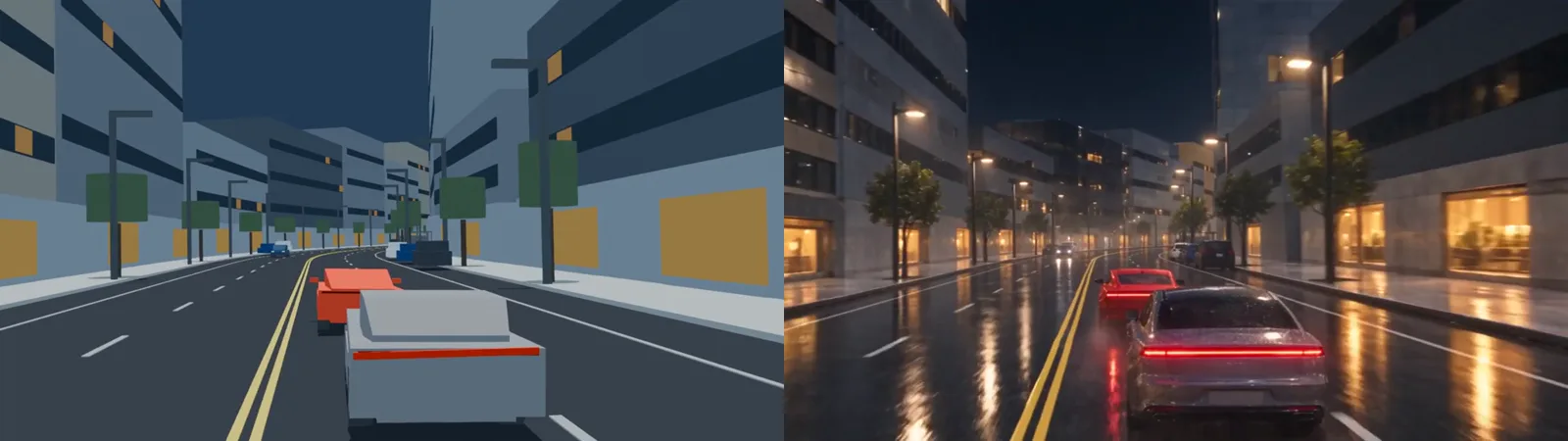 Figure 3. Left, the Blender blockout. Right, the Seedance 2.5 video edit result. We gave it the blockout video plus one reference image that set the mood (still from a video we made)
What we saw in our own use: Figure 3 is the result of feeding a road scene made only from boxes in Blender (a blockout) into Seedance 2.5's editing mode and turning it into live action. A blockout is a rough draft that only fixes where buildings stand and where cars go, like chalk marks for actors on a stage. The positions of the two cars, the yellow center line, and the rows of street lights on both sides stayed almost the same. One reference image gave steadier results than several.
Try it: For a live-action shot, first prepare one image that sets the framing. Then give that image as the start image to the top image-to-video model (Seedance 2.5 right now). If you also want to set where the camera and objects move, you can make a simple blockout video in a 3D program such as Blender, as in Figure 3, and feed it into the editing mode.
3. Animation and game style
| Starting point | Top group (category "Animation & Gaming") | Score |
|---|---|---|
| Text | Wan 3.0, MiniMax H3 Max, Seedance 2.5, Gemini Omni Flash | 1,220, 1,188, 1,165, 1,153 |
| Image | Seedance 2.5, Seedance 2.0, Wan 3.0 | 1,173, 1,159, 1,118 |
- Starting from text, Wan 3.0 is 2nd in this category overall and the highest among the eight.
- To animate a character image, Seedance 2.5 is first.
- If you want to try animating one character image with an open model on your own computer, see Turning one character image into video with Wan 2.1.
4. Film style: camera motion and long single shots
| What | Top group | Evidence |
|---|---|---|
| Directing the camera in text | Wan 3.0 (1st, 1,153), Seedance 2.5 (1,115) | Category "Camera Control," text-to-video |
| Moving the camera from one image's framing | Seedance 2.5 (1st, 1,186), MiniMax H3 Max (1,161) | Same category, image-to-video |
| Telling a story over several scenes | Text: Wan 3.0 (1,186), MiniMax H3 (1,168) / Image: MiniMax H3 (1,191), Seedance 2.5 (1,181) | Category "Multi-Scene & Narrative" |
| Long single shot | Wan 3.0, Seedance 2.5, Kling 4.0 (30 s), FLUX 3 Video (20 s) | Official specs (Wan 3.0 from press reports) |
| Pinning the path with keyframes | Kling 4.0 (up to 10), FLUX 3 Video (several) | Official specs |
Keyframes are images you pin in the middle of a video, such as "this image at 5 seconds, this one at 12 seconds." The model fills in the way between the pinned images.
What we saw in our own use: We made a 30-second single-shot flight scene with Kling 4.0 three times. The version with two reference images was slightly better than the one with five keyframes. One version reached the final framing too early, so the last 6 seconds were an almost frozen picture. In another, the front and rear planes swapped order between 13 and 16 seconds. More keyframes did not make the long shot more precise, and the ending had to be checked separately.
Try it: If you need film-like camera motion, choose like this.
- If you can describe the camera in words ("slowly moves closer while turning right"), direct Wan 3.0 in text.
- If you already have an image with good framing, give it to Seedance 2.5 and write only the camera motion as text.
- If you need to set midpoints in a shot longer than 20 seconds, use Kling 4.0's keyframes. Always watch the last 5 seconds of the result on their own.
5. Motion: human movement and physics
| What | Top group, text-to-video | Top group, image-to-video |
|---|---|---|
| Human anatomy (natural hands, arms, legs) | Seedance 2.5 (1st, 1,188), Wan 3.0 (1,173), MiniMax H3 (1,164) | Seedance 2.5 (1st, 1,137), Seedance 2.0 (1,095) |
| Physics (impacts, water, smoke, falling) | MiniMax H3 Max (1st, 1,154), Seedance 2.5 (1,127), MiniMax H3 (1,125) | Seedance 2.0 (1,115), Seedance 2.5 (1,114), Wan 3.0 (1,106) |
| Shapes holding over time | MiniMax H3 (1,144), Wan 3.0 (1,129) | MiniMax H3 Max (1st, 1,185) |
- For people walking, running, and using their hands, Seedance 2.5 is first in both text and image.
- For water splashing and objects colliding, MiniMax H3 Max and H3 lead in text-to-video. In image-to-video physics, models outside the eight are 1st and 2nd, and among the eight, the Seedance family and Wan 3.0 form a close group.
- Second place in text-to-video physics (1,140) is listed as "FLUX 3 Max." That name could not be found on the Black Forest Labs blog, so it is left out of the recommendations here. FLUX 3 Video itself scores 1,114 in the same category.
What we saw in our own use: When we fed 30 fps video (30 frames per second) into Seedance 2.5, the result came out at 24 fps, dropping one frame in every five, so the motion stuttered. Making the input video 24 fps from the start removed the stutter. A scene where a plane rolled too fast looked unrealistic, so we slowed it down to more than 1.2 seconds per roll.
6. Sound and lip-sync
Lip-sync means matching mouth shapes to speech. It deals with the same problem as a dubbed film where mouths and voices do not line up.
| What | Top group | Evidence |
|---|---|---|
| Timing sound effects and music to the picture | Gemini Omni Flash (1st, 1,189), MiniMax H3 Max (1,155) | Category "Audio Synchronization," text-to-video |
| Dialogue and mouth shapes | Text: Seedance 2.5 (1st, 1,196), FLUX 3 Video (1,176) / Image: Seedance 2.5 (1st, 1,220), MiniMax H3 Max (1,172) | Category "Dialogue & Lip-Sync" |
| Stereo (different sound left and right) | MiniMax H3, Kling 4.0 | Official specs. Kling 3.0 is mono |
- For scenes with dialogue, Seedance 2.5 is first in both text and image. Starting from text, FLUX 3 Video is also near the top.
- When sound-effect timing matters, such as an explosion sound that must land on the explosion, look at Gemini Omni Flash first. Its official docs say languages other than English were not evaluated, so always listen to the result if the dialogue is in another language.
What we saw in our own use: With Kling 4.0, there was almost no sound unless the prompt included a sound-effect sentence. On Higgsfield, Seedance 2.5 cost the same with sound on. We first made shots with sound off, then had to generate them again just to get sound, paying credits twice.
Try it: Whatever model you use, add one separate sound sentence at the end of the prompt. Example: "Sound: engine roar, wind rushing past, tires on wet asphalt." If turning sound on costs nothing extra, leave it on from the start.
7. Keeping the same character and background
If the same character must appear in several shots, a model that takes many references has the edge. References are images or videos you give the model to say "follow this face, this outfit, this background."
| Model | References accepted (official) |
|---|---|
| Kling 4.0 | 10 images, 7 subjects, 5 videos, 15 in total |
| Wan 3.0 | 10 images, 5 videos, 5 audio clips (press reports) |
| Kling 3.0 | 7 images (4 when used with video) |
| Gemini Omni 1.1 Flash | 3 videos (3 s or less each), no audio references |
On the leaderboard, the MiniMax H3 family is near the top of the "Spatio-Temporal Consistency" category (whether shapes hold over time). Kling 4.0 is not on the leaderboard yet, so it cannot be compared there.
What we saw in our own use: In one shot made with Seedance 2.5, the background suddenly turned into different rocks at 2 and 9 seconds. The plane colors also changed from section to section. Cutting the reference images down to one and regenerating made it better. More references did not always mean more stability.
8. Saving money
| Method | Model | Notes |
|---|---|---|
| Test on a cheaper model | MiniMax H3 | Leaderboard price $4.80 per minute, the cheapest of the eight |
| Low-resolution draft | Gemini Omni 1.1 Flash at 360p | Up to 60% faster than 720p at about a third of the price (official) |
| Preview mode | FLUX 3 Video draft mode | Official feature; price not published |
| Low official price | Grok Imagine Video 1.5 | $0.08 per second (official; $4.80 per minute) |
| Most expensive | Seedance 2.5 | Leaderboard price $34.12 per minute |
The basic approach is to run many tests on cheaper models to settle the prompt and framing, then make only the final shot on the top model for that use.
What we saw in our own use: Seedance 2.5 on Higgsfield has a 480p draft mode, and if you like a draft you can finalize it to 1080p within 7 days. But draft results jumped exactly once per second as if the picture were redrawn, so we could not judge background changes from a draft. Standard 480p cost the same as the draft. For tests that need a judgment, standard mode at a low resolution worked better than draft mode.
9. Five failures we ran into
All of these happened while using Seedance 2.5 and Kling 4.0.
| # | Failure | Model | What reduced it |
|---|---|---|---|
| 1 | Background turned into a different place midway | Seedance 2.5 | One reference image and regeneration in standard mode |
| 2 | Motion stuttered after feeding 30 fps video | Seedance 2.5 | Made the input video 24 fps |
| 3 | Draft jumped every second, impossible to judge | Seedance 2.5 | Tested in standard mode at a low resolution |
| 4 | Last 6 seconds almost frozen; front and rear swapped | Kling 4.0 | Checked the last 5 seconds separately; two references instead of keyframes |
| 5 | No sound without a sound sentence | Kling 4.0 | Wrote sound sentences directly in the prompt |
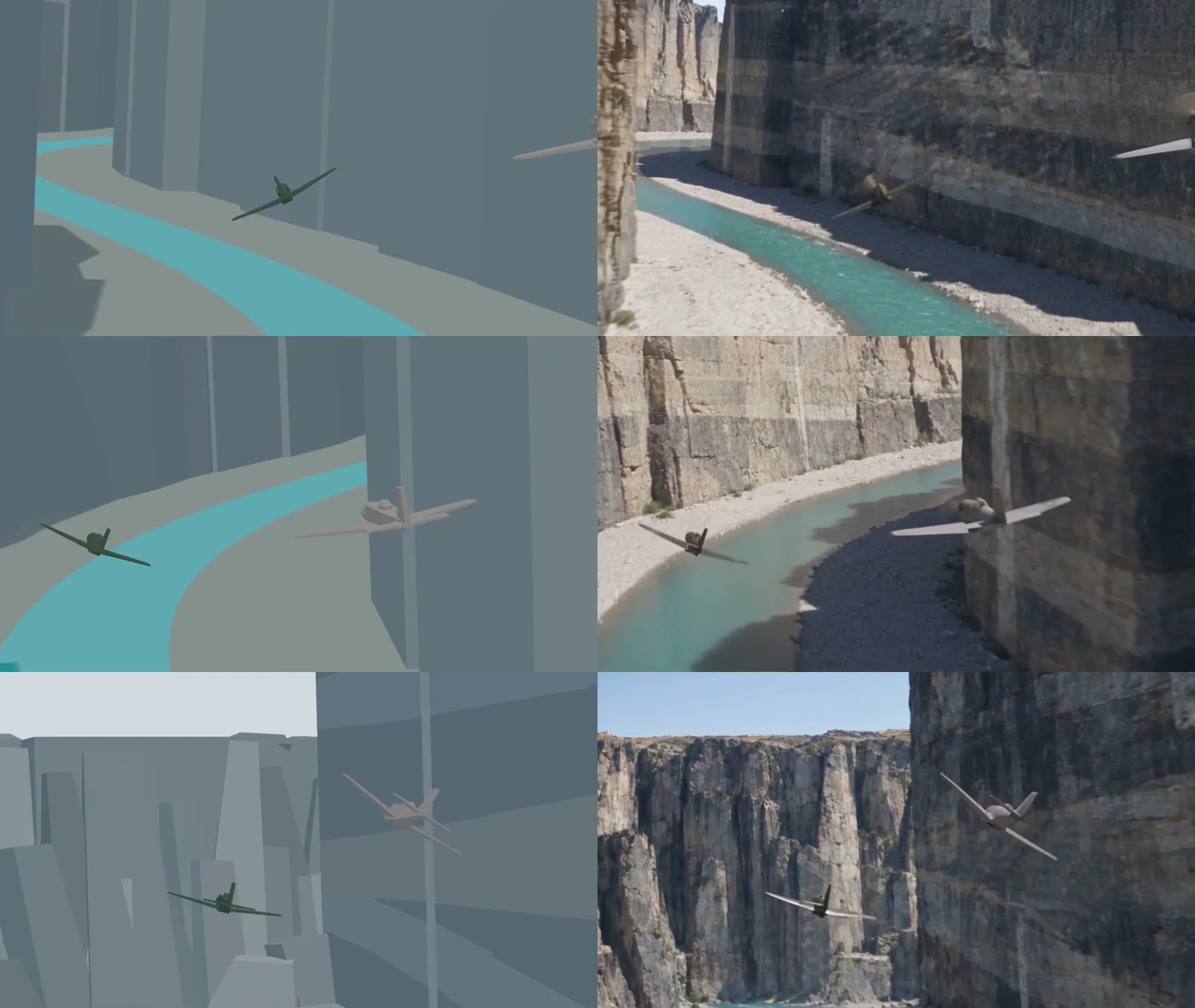 Figure 4. A check image that puts the blockout (left) and the Seedance 2.5 result (right) side by side at 1, 5, and 9 seconds. The image is from a version of the result where repeated, frozen frames were removed by editing (stills from a video we made)
When you pull frames every few seconds and line them up like Figure 4, background changes or objects swapping order that you missed during playback become easier to find. In this version, at all three moments the two planes and the canyon walls are where the blockout put them.
Try it: If the free video tool ffmpeg is installed, open a command window in the folder with your result video and pull one image per second with this line.
ffmpeg -i result.mp4 -vf fps=1 frame_%02d.png
Replace result.mp4 with your result file name. Images such as frame_01.png and frame_02.png appear in the same folder. Flip through them and check that the background, the number of objects, and their front-to-back order stay the same. To check the fps of the result in Windows File Explorer, right-click the video file → Properties → Details tab → "Frame rate."
10. Recommendations by use at a glance
| Use | Look at first | Also consider |
|---|---|---|
| Live action, from text | MiniMax H3 | Wan 3.0, Seedance 2.5 |
| Live action, from an image | Seedance 2.5 | MiniMax H3 |
| Animation and games, from text | Wan 3.0 | MiniMax H3 Max |
| Animation and games, from an image | Seedance 2.5 | Wan 3.0 |
| Camera direction (text) | Wan 3.0 | Seedance 2.5 |
| Single shot over 20 s, keyframes | Kling 4.0 | Wan 3.0, Seedance 2.5 |
| Human motion | Seedance 2.5 | Wan 3.0 |
| Physics (water, impacts) | MiniMax H3 Max | Seedance 2.5 |
| Dialogue and lip-sync | Seedance 2.5 | FLUX 3 Video |
| Sound-effect timing | Gemini Omni Flash | MiniMax H3 Max |
| Same character across shots | Kling 4.0 | Wan 3.0 |
| Many cheap tests | MiniMax H3 | Gemini Omni Flash at 360p, Grok |
Common mistakes and fixes
| Symptom | Cause | Fix |
|---|---|---|
| I used the top-ranked model and the result is poor | The leaderboard tab doesn't match my starting point (text or image) | Look at the tab that matches your starting point (Text to Video, Image to Video) |
| I can't tell whether to pick 1st or 3rd | Category scores have a ±40 to 55 point margin | Treat gaps under 30 points as one group and choose by price and length |
| Motion in the result stutters | The input video's fps differs from the output | Make the input at the output fps (24 for Seedance 2.5) |
| The end of a 30-second video looks frozen | It reached the final framing too early | Check the last 5 seconds separately and retry with reference images instead of keyframes |
| The video has no sound | Some models (Kling 4.0, which we tried) make no sound unless the prompt asks for it | Add one line starting with "Sound:" |
| The background changes midway | Seen with many references in draft mode (changing both together fixed it) | Cut references to one and regenerate in standard mode |
Summary
From text, Wan 3.0; from an image, Seedance 2.5; for physics, MiniMax H3 Max; for sound-effect timing, Gemini Omni Flash; for long single shots and the same character, Kling 4.0. Test on cheaper models, and check results frame by frame whatever model you use.
Related posts
- Eight AI video models compared: specs, prices, and trade-offs as of October 2026
- AI video generation basics
- Turning one character image into video with Wan 2.1
- Introducing Higgsfield
References
- Artificial Analysis, Text to Video leaderboard: https://artificialanalysis.ai/video/leaderboard/text-to-video
- Artificial Analysis, Image to Video leaderboard: https://artificialanalysis.ai/video/leaderboard/image-to-video
- Gemini API docs, Omni: https://ai.google.dev/gemini-api/docs/omni
- Google blog, Gemini Omni 1.1 Flash: https://blog.google/innovation-and-ai/technology/developers-tools/build-with-gemini-omni-1-1-flash/
- xAI docs, grok-imagine-video-1.5: https://docs.x.ai/docs/models/grok-imagine-video-1.5
- ByteDance Seed, Seedance 2.5: https://seed.bytedance.com/en/seedance2_5
- Black Forest Labs, FLUX 3 Video: https://bfl.ai/blog/flux-3-video
- MiniMax blog, MiniMax H3: https://www.minimax.io/blog/minimax-h3
- Kling blog, Kling 4.0 vs 3.0: https://kling.ai/blog/kling-4-vs-3
- Wan 3.0 launch report (The Next Web): https://thenextweb.com/news/alibaba-wan3-video-model-after-share-sale
- ffmpeg official site: https://ffmpeg.org/
- Images: Figures 1 and 2 are real screenshots of the Artificial Analysis leaderboards. Figures 3 and 4 are stills from a Blender blockout and Seedance 2.5 results we made