Eight AI video models compared: specs, prices, and trade-offs as of October 2026
Official names, clip length, resolution, sound, reference inputs, prices, and openness of Gemini Omni 1.1 Flash, Grok Imagine Video 1.5, Wan 3.0, Seedance 2.5, FLUX 3 Video, MiniMax H3, Kling 3.0, and Kling 4.0 in two tables, plus the strong and weak points of each.
한국어English
ON THIS PAGE
- 011. Names: official names and common nicknames
- 022. Comparison 1: basic specs
- 033. Comparison 2: price, where to use it, and openness
- 044. Strong and weak points of each model
- 055. How to read the leaderboard
- 066. Note: where Veo 3.1 and Sora stand now
- 077. Information that changes often
- 08Common mistakes and fixes
- 09Summary
- 10Related posts
- 11References
Based on: official announcements and docs from Google, xAI, ByteDance Seed, Black Forest Labs, MiniMax, and Kling, Hugging Face model cards, the model options on Higgsfield, and the Artificial Analysis video arena leaderboards. Checked on October 31, 2026. Images are real screenshots of official pages and a still from a Seedance 2.5 result we made ourselves. We have used two of these models directly, Seedance 2.5 and Kling 4.0. The rest are summarized from official material and leaderboards. Our result stills come from a sponsored Higgsfield video we were paid to make.
New versions of almost every AI video model came out between summer and fall 2026. More than eight models now take one line of text or one image and return a video with sound. The names look alike, and companies and platforms sometimes call the same model by different names, so it is easy to get lost at first.
This post first sorts out the official names of eight widely used models. Then two tables compare clip length, resolution, sound, reference inputs, price, and openness. After that, each model gets a short list of strong and weak points. Which model to pick for live action, animation, film-style shots, or motion is covered separately in How to choose an AI video model by use case. If you are new to AI video, start with AI video generation basics.
1. Names: official names and common nicknames
Video models go by several names. Version numbers get dropped, and platforms reorder words. This post uses the official names below so you can search for them without confusion.
| Common name | Official name | Made by | Notes |
|---|---|---|---|
| Gemini Omni Flash | Gemini Omni 1.1 Flash | First version at Google I/O in May 2026, 1.1 announced on August 27 | |
| Grok Imagine | Grok Imagine Video 1.5 | xAI | Faster version Video 1.5 Fast, lighter version Lite |
| Wan (latest) | Wan 3.0 | Alibaba | Higher tier Wan 3.0 Prime. The newest downloadable Wan is the 2.2 family |
| Seedance (latest) | Seedance 2.5 | ByteDance Seed | Listed as "Dreamina Seedance 2.5" on leaderboards |
| FLUX 3 | FLUX 3 Video | Black Forest Labs | FLUX 3 is the name of a model family trained on images, video, and sound together |
| Hailuo 3, MiniMax H3 | MiniMax H3 | MiniMax | The official announcement does not use the name "Hailuo 3". Faster version H3 Max |
| Kling 3.0 | Kling 3.0 | Kling AI | Kling 3.0 Omni is a separate version with more reference features |
| Kling 4.0 | Kling 4.0 | Kling AI | Generally available since October 15, 2026 |
FLUX 3 needs care. On July 23, 2026, Black Forest Labs announced FLUX 3 as a "model family" trained on images, video, sound, and robot motion together. The model that makes video is FLUX 3 Video, released on August 4. The name "FLUX 3 Max" that appears on leaderboards could not be found on the Black Forest Labs blog, so this post does not cover it separately.
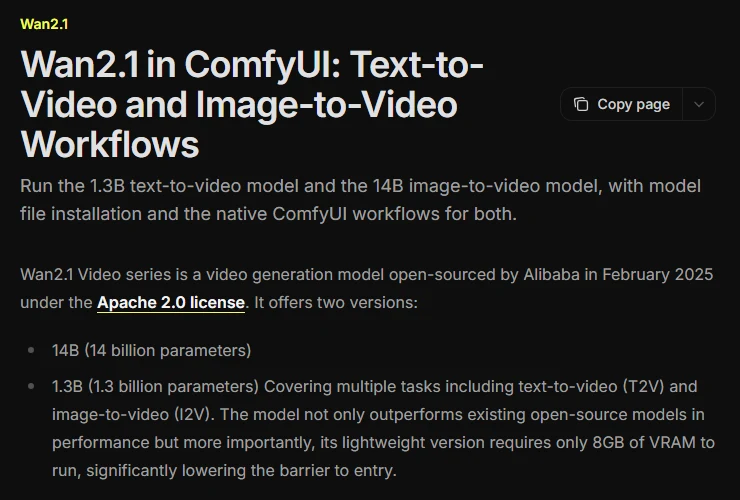
Wan is easy to mix up too. Wan 2.1 and 2.2, covered in the Wan 2.1 post, are open models anyone can download. Wan 3.0, however, is a closed model that you can only use through Alibaba Cloud's API. The name continues, but how you use it does not.
2. Comparison 1: basic specs
A few terms first.
- Max length is the length of one generated clip. Some models also let you "extend" a clip by adding more after it.
- fps is the number of frames in one second. It is like how many pages of a flipbook you turn per second.
- Upscale means making a small video bigger after it is generated. It is not the same as generating it big in the first place.
- Reference inputs are images, video, or sound you give the model to say "follow this person, this outfit, this background." They are like costume photos shown to an actor.
- Keyframes are images you pin in the middle of a video to say "at this moment it must look like this." Think of the stops marked on a travel itinerary.
| Model | Max length per run | Resolution | fps | Sound | References and control |
|---|---|---|---|---|---|
| Gemini Omni 1.1 Flash | About 10 s (3–10 s on Higgsfield), up to 40 s total with extensions | 360p, 720p; 1080p and 4K are upscaled | Not stated | Yes | First and last frame, 3 reference videos (3 s or less each), editing by conversation |
| Grok Imagine Video 1.5 | Not published (2–15 s on Higgsfield) | Not published (480p–1080p on Higgsfield) | Not stated | Yes, including dialogue | Start image |
| Wan 3.0 | 30 s (press reports) | 480p, 720p, 1080p (press reports) | 30 (press reports) | Yes | Start and end images, image/video/audio references |
| Seedance 2.5 | 30 s, up to two extensions | Not published (480p–1080p on Higgsfield) | 24 in our output files | Yes | Reads camera motion from a reference video, video editing |
| FLUX 3 Video | 20 s | 720p; 1080p is upscaled | Not stated | Yes, lip-sync | Start, end, and multiple keyframes, multiple shots |
| MiniMax H3 | 15 s | 2K | 24 in the open release | Stereo | Text, image, video, and audio inputs |
| Kling 3.0 | 15 s | 720p, 1080p, 4K | Not stated | Mono | Start and end images, 7 reference images |
| Kling 4.0 | 30 s, up to 2 min with extensions | 720p, 1080p (4K and HDR "coming soon") | 24 in our output files | Stereo | 10 keyframes, 15 references in total |
"Press reports" marks values we could only confirm through news articles, not company docs. For Wan 3.0, Alibaba's documentation link did not open, so its specs come from press reports. "24 in our output files" is what we measured by opening video files we made. It is not a spec the company published.
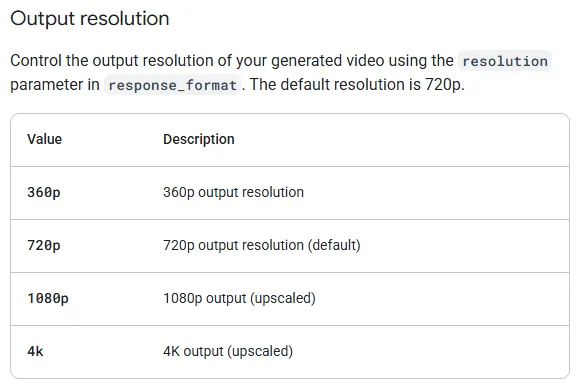 Figure 1. The resolution table for Gemini Omni Flash. "upscaled" is written next to 1080p and 4K (Gemini API official docs screenshot)
Try it: When you read a model's docs, look for "upscaled" or "upscale" next to the resolution. Gemini Omni Flash in Figure 1 defaults to 720p, and 1080p and 4K are enlarged after generation. FLUX 3 Video also defaults to 720p, and its 1080p is upscaled. If you choose a model only because it says "4K support," you may be getting a small video blown up.
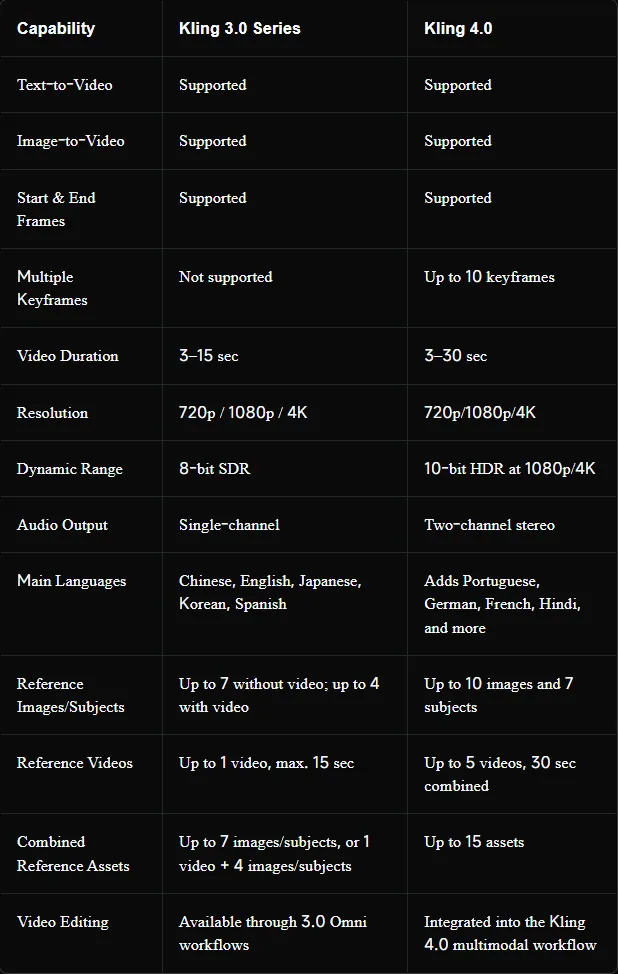 Figure 2. Kling's official comparison of 3.0 and 4.0. Length 15 s to 30 s, no keyframes to 10, mono to stereo (Kling official blog screenshot)
Figure 2 is Kling's own comparison of 3.0 and 4.0. Read it row by row and you can see what grew in 4.0. However, Kling's own Kling 4.0 feature page marks 4K and 10-bit HDR as "coming soon." At the end of October 2026 the comparison table and the feature page disagree, so if you need 4K, check the resolution list on screen before you generate.
3. Comparison 2: price, where to use it, and openness
An API is a window through which a program hands work to a model. In restaurant terms, it is a delivery window that takes orders straight to the kitchen instead of through the dining room. Prices are usually set as "dollars per second of video." Open weights means the model files are published so you can download them and run them on your own computer.
| Model | Official API price | Leaderboard price (per minute) | Where to use it | Open weights |
|---|---|---|---|---|
| Gemini Omni 1.1 Flash | About $0.10/s (720p) | $9.12 | Gemini app, Google Flow, YouTube Shorts, Gemini API | No. Every video carries an invisible watermark (SynthID) |
| Grok Imagine Video 1.5 | $0.08/s | $15 | grok.com, Grok app, xAI API | No |
| Wan 3.0 | 720p $0.10/s (press reports) | $12 | Alibaba Cloud Model Studio API | No (open up to 2.2) |
| Seedance 2.5 | No official table | $34.12 | Dola, BytePlus API, several platforms | No |
| FLUX 3 Video | No official table | $17.40 | BFL API and partners | No (an open version is only planned) |
| MiniMax H3 | No amount given ("less than 1/3 of leading models," a company claim) | $4.80 (768p) | hailuoai.video, API | Partly (2 base models, 768p) |
| Kling 3.0 | No official table | $10.08 (1080p) | Kling web, app, API | No |
| Kling 4.0 | No official price published | Not on the leaderboard yet | Kling web, MCP, CLI | No |
You can also use all eight models in one place on video AI platforms such as Higgsfield. Platforms charge in credits instead of dollars. The platform's layout is covered in Introducing Higgsfield.
What we saw in our own use: Making 720p video with Seedance 2.5 on Higgsfield cost about 7.5 credits per second (90 credits for 12 seconds). Turning sound on did not change the price. For Kling 4.0, the quote screen showed 50 credits for 10 seconds at 720p, 150 credits for 30 seconds at 720p, and 225 credits for 30 seconds at 1080p.
The leaderboard price is what one minute costs at the settings the leaderboard chose (1080p where offered), so it can differ from the official price. For example, xAI's docs list Grok Imagine Video 1.5 at $0.08 per second, but the leaderboard lists $15 per minute ($0.25 per second). Prices change often, so check the official pricing page again before you use a model.
 Figure 3. The MiniMax H3 page on Hugging Face. The bottom line is the license (Hugging Face screenshot)
Try it: To find out whether you can run a model on your own computer, search for its name on Hugging Face, see whether a page exists, and read the License line. MiniMax H3 in Figure 3 is the only one of the eight with model files posted. The license is the "MiniMax H3 Community License," and the model card does not say under what terms you may use it commercially. If you plan to use it for paid work, read the full license first.
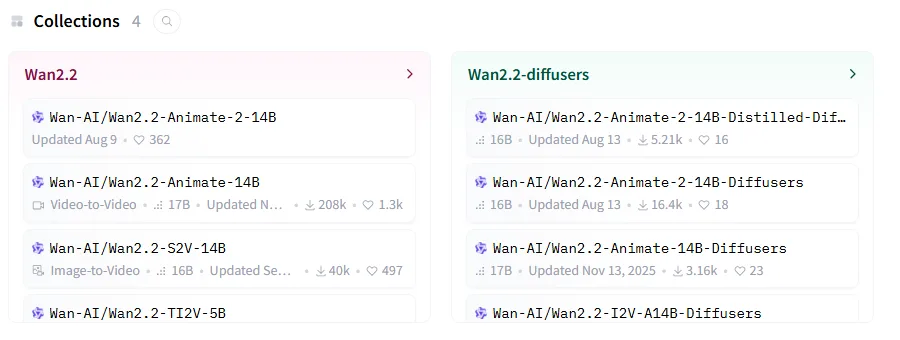 Figure 4. The Wan team's Hugging Face account. The newest collection is Wan2.2, and there are no Wan 3.0 files (Hugging Face screenshot)
Figure 4 is the Wan team's Hugging Face account. The newest collection is Wan2.2, and Wan2.2-Animate-2-14B at the top is the newest file, posted in summer 2026. The date shown in the image is the date it was last updated. Wan 3.0 is not there. Even when model names continue, openness differs from version to version. If you plan to run a model locally, first check that the files actually exist like this.
4. Strong and weak points of each model
The "rank" below is from the Artificial Analysis video arena in section 5 (video with audio). Text-to-video means you give only text. Image-to-video means you give one image as the first frame. This post reads "FLUX 3" on the leaderboard as FLUX 3 Video.
Gemini Omni 1.1 Flash
- Strong points: First in text-to-video for matching sound to the picture. You can edit a finished clip by talking to it, such as "make the background night." A 360p draft is up to 60% faster than 720p and costs about a third. It is free in YouTube Shorts, and available by paid subscription (Google AI Plus, Pro, Ultra) in the Gemini app and Google Flow.
- Weak points: About 10 seconds per run, and only 16:9 and 9:16. The official docs say languages other than English were not evaluated. Its image-to-video rank is 14th, below the middle.
Grok Imagine Video 1.5
- Strong points: The official price is simple and low at $0.08 per second. It makes sound effects, ambient sound, and dialogue in one pass. xAI says the Fast version makes a 6-second 720p clip in about 25 seconds.
- Weak points: Max length, resolution, and fps are not in the official docs. It ranks 13th in both text-to-video and image-to-video, in the middle.
Wan 3.0
- Strong points: First overall in text-to-video. Also first in the complex composition, multi-scene narrative, and camera control categories. Press reports say it makes up to 30 seconds at 30 fps and takes 10 images, 5 videos, and 5 audio clips as references at once.
- Weak points: Starting with this version, model files are not published. Its image-to-video rank is 9th, lower than text-to-video. Specs and prices could not be confirmed in official docs (press reports only).
Seedance 2.5
- Strong points: First overall in image-to-video. First in both text and image for human anatomy and for dialogue and lip-sync (matching mouth shapes to speech). It makes 30 seconds in one run, reads camera motion from a reference video, and has an editing mode that changes an existing video.
- Weak points: The leaderboard price is $34.12 per minute, the highest of the eight.
- What we saw in our own use: We fed simple Blender scenes (blockouts) into the editing mode and made nine live-action shots. The output files were always 24 fps. When we fed in 30 fps footage, one frame in every five was dropped and the motion stuttered. In one shot the background suddenly changed at 2 and 9 seconds, and we had to make it again.
 Figure 5. Left, the Blender blockout. Right, the Seedance 2.5 video edit result. The image is from a version of the result where repeated, frozen frames were removed by editing (still from a video we made)
Figure 5 is one frame from the result of giving a blockout video to Seedance 2.5. The positions of the two planes and the bend of the canyon stayed almost the same as on the left. When you set the framing in advance like this, the result wobbles less. How to check results frame by frame is explained with pictures in How to choose by use case.
FLUX 3 Video
- Strong points: Makes 20 seconds in one run, and you can put several keyframes between the start and end. Second in text-to-video for dialogue and lip-sync. A cheaper preview (draft mode) lets you check first.
- Weak points: The default is 720p, and 1080p is upscaled. Its image-to-video rank is 11th. We could not find an official price or fps.
MiniMax H3
- Strong points: Third in text-to-video and fourth in image-to-video, yet its leaderboard price of $4.80 per minute is the lowest of the eight. It makes 15 seconds at 2K with stereo sound. Two base models are open.
- Weak points: The open models are 768p, and at 33 billion numbers (33B) they are hard to run on a home computer. On Higgsfield you can only choose one resolution, 2K. Commercial use terms require reading the full license.
Kling 3.0
- Strong points: Goes up to 4K, and Kling 3.0 Omni takes 7 reference images and multiple shots.
- Weak points: The leaderboard uses Kling 3.0 1080p as its 1,000-point anchor, and it now ranks 19th in text-to-video and 17th in image-to-video. Its sound is mono.
Kling 4.0
- Strong points: 30 seconds per run, 10 keyframes, and 15 references in total give the most detailed control over movement. You can extend forward and backward up to 2 minutes. Sound is stereo.
- Weak points: Not on the leaderboard yet. 4K and HDR are "coming soon." We could not confirm from official docs how widely the developer API is available.
- What we saw in our own use: We made a 30-second single-shot flight scene three times. The output was 1920x1080, 24 fps, with sound. The version with two reference images was slightly better than the version with five keyframes. One version reached the final framing too early, so the last 6 seconds were almost frozen. In another, the front and rear planes swapped order midway. Without a sound-effect sentence in the prompt, there was no sound.
5. How to read the leaderboard
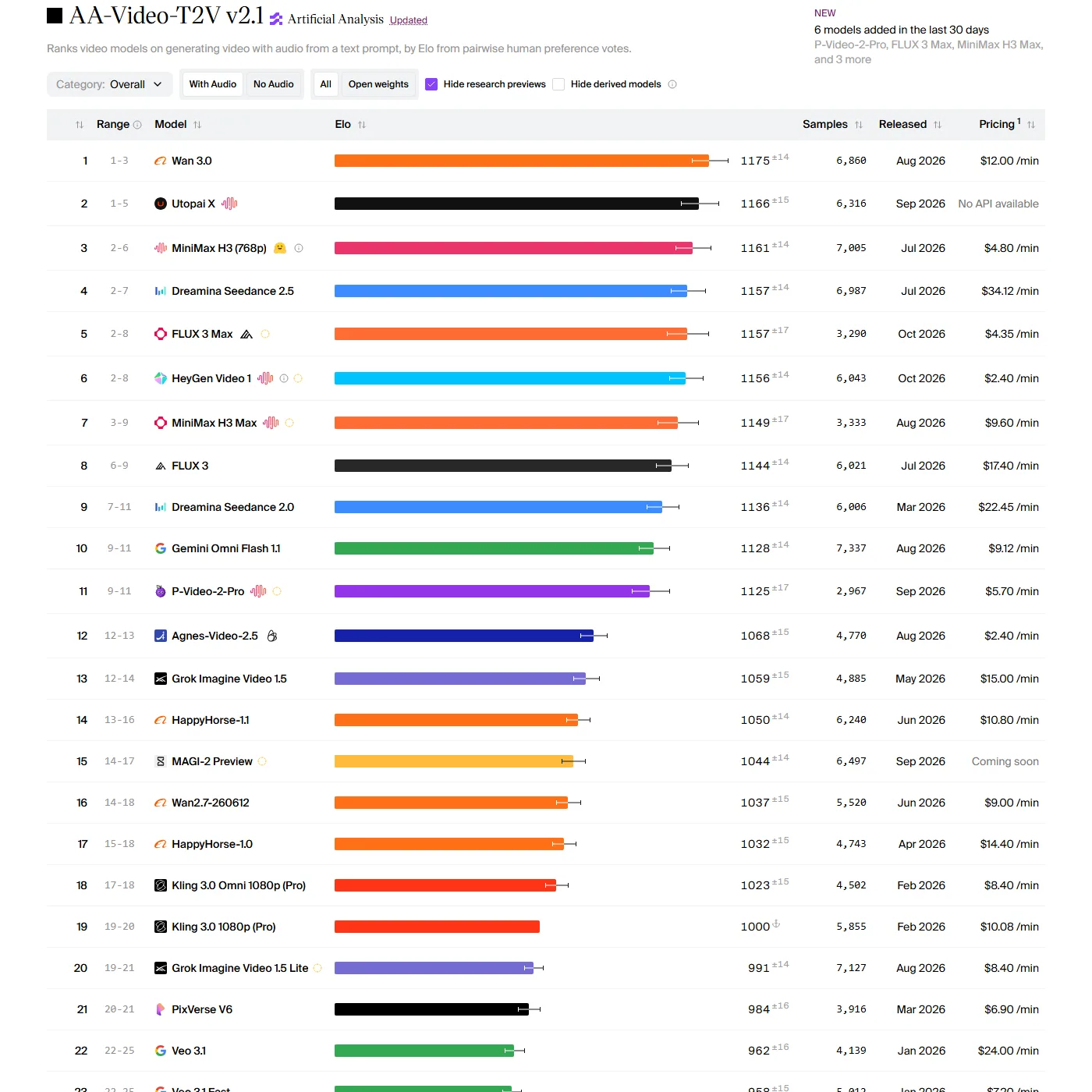 Figure 6. The text-to-video leaderboard (with audio). The thin line at the end of each bar is the score's margin of error (Artificial Analysis screenshot)
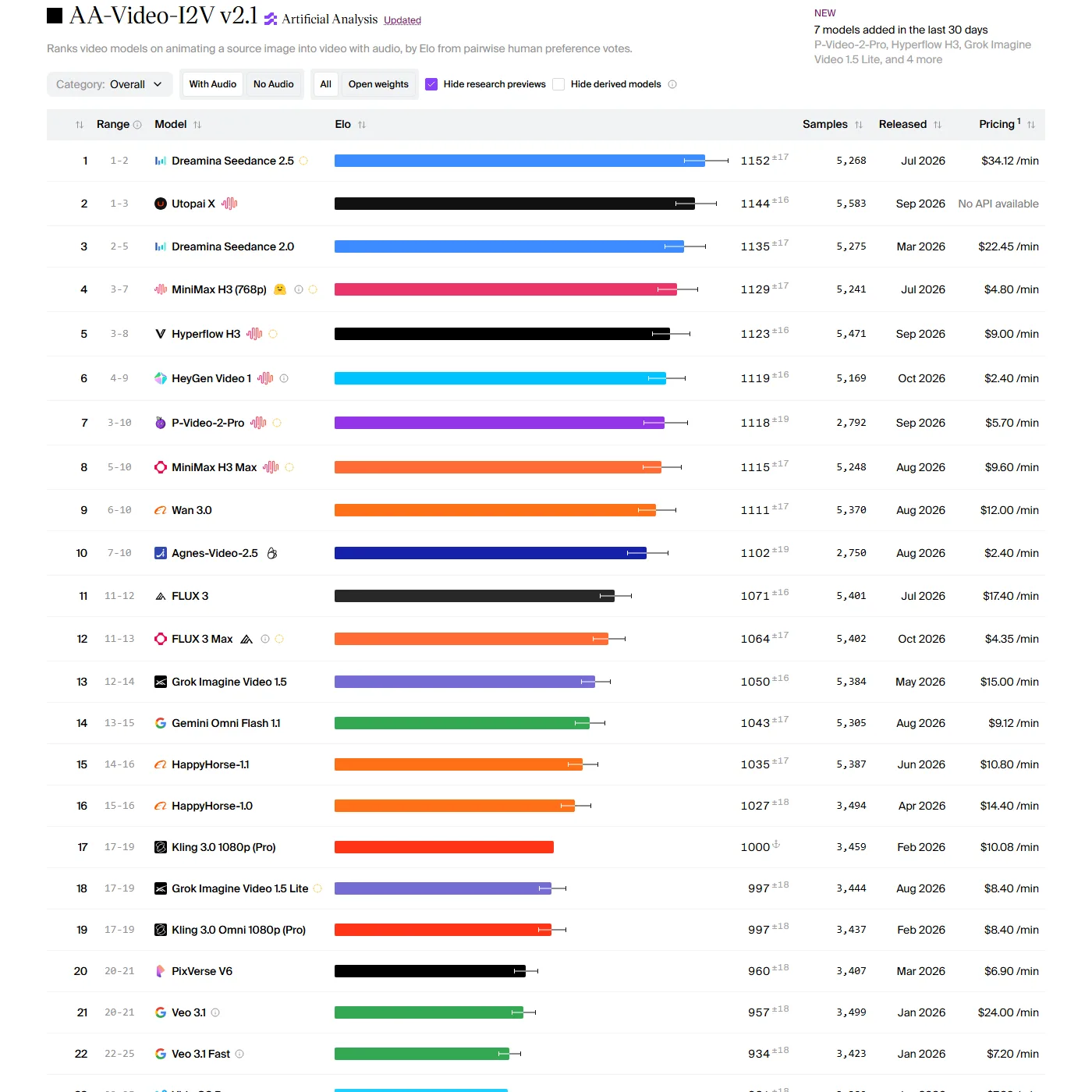
The ranks in this post come from the Artificial Analysis video arena. In an arena, people watch two videos made from the same prompt without knowing which model made which, pick the better one, and the votes add up to a score (Elo). It works like a blind taste test.
Try it: When you open a leaderboard like Figure 6, check three things.
- Look at the buttons at the top to see whether With Audio or No Audio is on. Many models now make sound too, so the two tables are in different orders.
- Switch between the Text to Video and Image to Video tabs. Seedance 2.5 is 4th in text-to-video but 1st in image-to-video.
- Look at the small number next to each score (a value like ±14) and the Range column. The margin is about ±14 to 17 points for the overall rank and ±40 to 55 points for category ranks such as live action or animation. A gap under 30 points can flip, so 1st and 4th are often really in the same group.
Leaderboards change every time a new model is added. On October 31, 2026, Kling 4.0 was not on it yet. Models outside the eight in this post, such as Utopai X and HeyGen Video 1, also sit near the top. When you quote a leaderboard, write down the date with it.
6. Note: where Veo 3.1 and Sora stand now
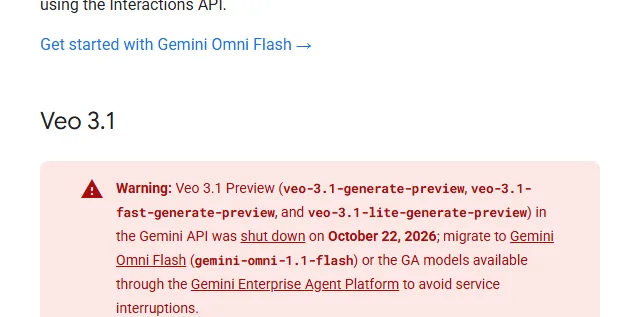 Figure 7. The Veo 3.1 preview shutdown warning (Gemini API official docs screenshot)
- Veo 3.1: Google's previous video model. As Figure 7 shows, the Veo 3.1 preview in the Gemini API ended on October 22, 2026, and Google tells developers to move to Gemini Omni Flash. The generally available version on the enterprise platform remains, and it is still listed on Higgsfield. It ranks 22nd in text-to-video.
- Sora: OpenAI shut down the Sora web and app on April 26, 2026, and the Sora 2 models in the API on September 24. Details are in the Wan 2.1 post.
7. Information that changes often
The items below are likely to change after this post was written. Check the official pages again before choosing a model.
| Item | Status on October 31, 2026 |
|---|---|
| Prices | Only Gemini Omni Flash and Grok have official prices. The rest are press or leaderboard figures |
| Kling 4.0 | 4K and HDR "coming soon," API availability not confirmed, not on the leaderboard |
| Wan 3.0 | Specs and prices from press reports; official docs not confirmed |
| FLUX 3 | The open version FLUX 3 Dev is only planned |
| MiniMax H3 | Commercial terms require reading the full license |
| Leaderboard | Order changes when new models are added |
Common mistakes and fixes
| Symptom | Cause | Fix |
|---|---|---|
| I can't find "Hailuo 3" in the model list | The official name is MiniMax H3 | Search for MiniMax H3 or H3 Max |
| There is nowhere to download Wan 3.0 | Wan 3.0 is a closed, API-only model | Use the Wan 2.2 family to run it locally |
| I made it in 4K but it looks blurrier than expected | The base resolution was upscaled | Check the docs for "upscaled" and compare at the base resolution |
| The leaderboard price differs from the official price | The leaderboard uses its own settings (such as 1080p) | Use the official pricing page as the reference |
| The video has no sound | Some models (Kling 4.0, which we tried) make no sound unless the prompt asks for it | Write sound effects, ambience, and dialogue as sentences |
| I can't call the Veo 3.1 preview model in the Gemini API | It ended on October 22, 2026 | Switch to Gemini Omni 1.1 Flash |
Summary
Starting from text, Wan 3.0 ranks first; starting from an image, Seedance 2.5 ranks first. MiniMax H3 has the lowest leaderboard price of the eight, and Kling 4.0 is for long single shots and keyframes. Prices and specs change often, so check the date and confirm on the official pages.
Related posts
- How to choose an AI video model: recommendations for live action, animation, film, and motion
- AI video generation basics
- Turning one character image into video with Wan 2.1
- Introducing Higgsfield
- Google DeepMind Genie 4
References
- Google blog, Gemini Omni: https://blog.google/innovation-and-ai/models-and-research/gemini-models/gemini-omni/
- Google blog, Gemini Omni 1.1 Flash: https://blog.google/innovation-and-ai/technology/developers-tools/build-with-gemini-omni-1-1-flash/
- Gemini API docs, Omni: https://ai.google.dev/gemini-api/docs/omni
- Gemini API pricing: https://ai.google.dev/gemini-api/docs/pricing
- Gemini API docs, video (Veo 3.1 shutdown notice): https://ai.google.dev/gemini-api/docs/video
- xAI, Grok Imagine Video 1.5: https://x.ai/news/grok-imagine-video-1-5
- xAI docs, grok-imagine-video-1.5: https://docs.x.ai/docs/models/grok-imagine-video-1.5
- ByteDance Seed, Seedance 2.5: https://seed.bytedance.com/en/seedance2_5
- Black Forest Labs, FLUX 3 Video: https://bfl.ai/blog/flux-3-video
- Black Forest Labs blog: https://bfl.ai/blog
- MiniMax blog, MiniMax H3: https://www.minimax.io/blog/minimax-h3
- Hugging Face, MiniMaxAI/MiniMax-H3: https://huggingface.co/MiniMaxAI/MiniMax-H3
- Hugging Face, Wan-AI: https://huggingface.co/Wan-AI
- Kling blog, Kling 4.0 vs 3.0: https://kling.ai/blog/kling-4-vs-3
- Kling 4.0 feature page: https://kling.ai/feature/kling-4-ai-video-generation
- OpenAI deprecations: https://developers.openai.com/api/docs/deprecations
- Artificial Analysis, Text to Video leaderboard: https://artificialanalysis.ai/video/leaderboard/text-to-video
- Artificial Analysis, Image to Video leaderboard: https://artificialanalysis.ai/video/leaderboard/image-to-video
- Wan 3.0 launch report (The Next Web): https://thenextweb.com/news/alibaba-wan3-video-model-after-share-sale
- Images: Figures 1–4, 6, and 7 are real screenshots of official pages. Figure 5 is a still from a Blender blockout and Seedance 2.5 result we made