Building Godot game scenes with Claude Code: notes from an air defense game and a canyon flight game
Based on real notes from making an air defense mini game, a penalty shootout, and a canyon flight game with Godot 4.7.2 and Claude Code, this guide covers what to prepare, the first plan, moving Blender models over, automatic checks, and the play-and-fix loop, along with the snags we hit.
한국어English
ON THIS PAGE
- 011. The short answer
- 022. Why Godot worked well with AI
- 033. What to prepare
- 044. A one-page plan first
- 055. Moving Blender models over
- 066. The first version, then five rounds of fixes
- 077. Letting the AI check its own work
- 088. A rigged character and a penalty shootout
- 099. The second game: canyon flight
- 1010. The order to follow
- 11Common mistakes and fixes
- 12In one line
- 13References
Based on: Godot 4.7.2 (Standard, Windows), Claude Code, Blender 5.2. These are notes from October 2026. Command line options were checked against the official Godot 4.7 docs. All figures are real game screens and real Godot and Blender screens. The on-screen text in the games is Korean.
On the night of October 10, 2026, I asked Claude Code to make a small air defense game in Godot. About an hour later, a first version was running. In the same session, I also tested moving a rigged character into Godot and made a penalty shootout game. Three days later, I made a canyon flight game in one session, from plan to a full playable run. Claude Code wrote all the code. My part was to decide what to make, play it, and say what to change.
This guide puts those two sessions in an order that is easy to follow. It covers what I prepared, what went into the first plan, where moving Blender models got stuck, how I checked what the AI made, and how many times I played and asked for changes. It explains the working order for making one game scene with Claude Code and Godot, and the real snags along the way.
1. The short answer
| Question | My notes |
|---|---|
| Time to the first playable version | About 1 hour for the air defense game |
| What one session produced | Air defense game, rigged character test, penalty shootout (about 3 hours in total, including waiting) |
| Other costs | None. Godot is free, and no image or video generation credits were used |
| Claude Code usage | Up to right after the rig test: about 160,000 output tokens, about 11 US dollars at list prices (measured with a usage counter; not measured after that) |
| Disk space | 252 MB for the game folder |
| Did the models come over intact? | All 8 models matched Blender with 0 size difference |
| Rigged character animation | Came over. Largest pose difference 1.4 mm |
| What took longest | Not the code, but my time playing and saying what to fix. The air defense game reached "difficulty is about right" after I played it five times |
| Canyon flight game | In one session: plan → 4 stages → Windows and web exports. Automatic checks 18/18 |
The AI was good at writing code, fixing it, and checking it on its own. My job was to decide what to make, play it, and describe how it felt in one or two sentences.
2. Why Godot worked well with AI
Godot is a free, open source game engine. A game engine is like a workbench that already has the common parts of a game: drawing, physics, sound, and input. A carpenter does not build a new saw and hammer for every job, and a game engine saves you from building those parts again.
Two things made it a good match for Claude Code.
- Scenes and scripts are text files. Godot scene files (
.tscn) and scripts (.gd) are plain text you can open in Notepad. So the AI could write and edit files directly instead of clicking around the editor. The air defense game's scene file is only a few lines: one node with one script. The script builds the ground, the sky, and the launchers in code. - It runs without a window.
--headlessruns the engine without a display or audio device. After making the game, the AI could run an automatic check script without opening a window and confirm rules like "firing creates a missile" on its own.
Screenshots and recordings, on the other hand, need a window. Each time, a game window popped up on my screen for a moment.
3. What to prepare
Starting point: Claude Code is installed and you are signed in. Installation is covered in Getting started with Claude Code.
Steps:
- Download the Standard Windows build from the official Godot site. In my notes, I downloaded 4.7.2 Standard and unzipped it. There was no installer.
- Make an empty folder for the game. This becomes the Godot project folder.
- If you will use Blender models, note where they are. I used 8 low-poly models made earlier for videos.
- Start Claude Code in that folder.
The Godot download has two executables. The one ending in _console prints messages to the terminal while it runs. Use that one when the AI runs automatic checks and reads the results.
4. A one-page plan first
Before asking for code, I had the AI write a one-page plan (PRD). A PRD says what you are making, why, and when it counts as done. It is like a floor plan before building a house. Without a floor plan, rooms keep getting added. Without a plan, the AI keeps adding features too.
My air defense plan had these parts.
| Item | What it said |
|---|---|
| Why | Three questions: do our models come over cleanly, can AI alone make a working game, how much time and space does it take |
| Pass criteria | Models have the right size, direction, and color; one round goes start → play → end → restart; time and disk use are measured |
| Out of scope | Installers, menu and settings screens, multiple stages, online, mobile |
| Game rules | Camera view, controls, number of missiles, number and speed of drones, win and lose conditions |
| Models to use | Folder names, sizes, names of moving parts |
| Naming rule | Generic names like "missile", "launcher", "drone" instead of real equipment names |
You can ask for a plan in a way like this (example).
I want to make one game scene of 2-3 minutes in Godot 4.7. Before writing any code, write PRD.md first.
- 3 questions this test answers, pass criteria (with how to check), what is out of scope
- A table of game rules (camera, controls, win/lose)
- Models: the models in <model folder path>. Open the files and write down their sizes and part names
Do not write code until I read the PRD and say "go".
I read the plan and replied, "Go with what you proposed." Because this one page existed, later changes could be stated as "change X in section 2 of the plan."
5. Moving Blender models over
Starting point: The plan is settled, and the AI knows the model folder path.
Steps:
- Have the AI write a script that exports the Blender models to glTF (
.glb). Blender can run without a window (in the background). - Have it make comparison images that put the Godot view next to the Blender image (Figure 1).
- Have it compare sizes as numbers too. By eye, you miss small size differences.
glTF is an open file format for exchanging 3D models. Godot names glTF as its recommended format. Each export setting is covered in From Blender to Godot 4.7 with glTF.
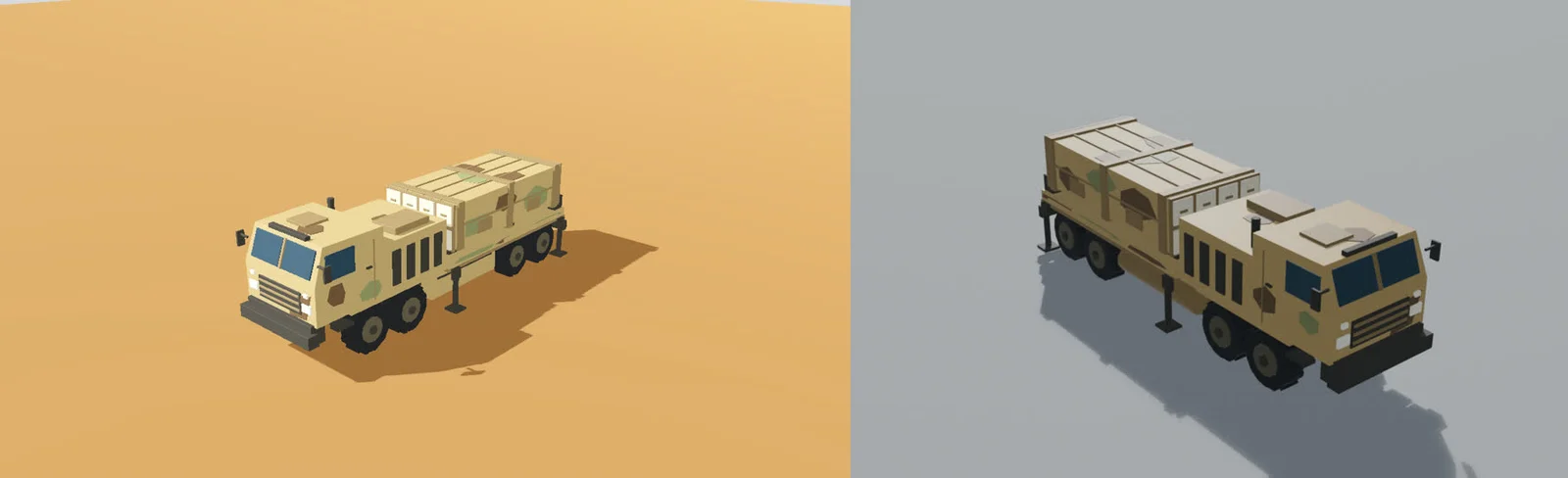 Figure 1. The same launcher model. Godot on the left, Blender on the right. All 8 models were compared like this, and the size difference was 0 (Godot and Blender screens)
All 8 models came in with 0 size difference, and part names and parent-child links stayed the same. One thing changes: the forward direction. The side that faced forward in Blender (+Y) becomes −Z in Godot, because Godot uses a coordinate system where +Y is up.
We hit five snags. In each case, the AI fixed it by adding a step to the export script.
| Snag | What we saw | Fix |
|---|---|---|
| Colors connected through nodes | The tank lost its colors | Copy the node color into the base color at export |
| Studio floor and lights from the video setup | A floor plate and lights came along with the model | Leave them out at export |
| A collection not linked to the scene | An empty file came out | Link it to the scene before export |
| Materials built as node groups | The character turned all white | Make a simple material from the group's base color |
| Bone animation and face animation | Two separate animations, only one played | Merge them with an export option |
The last two rows came up with the rigged character (section 8). The third row, an empty file with no error, was the most confusing. If an exported file is suspiciously small, check that first.
6. The first version, then five rounds of fixes
Starting point: The models are in the Godot project.
Steps:
- Have the AI build the first version from the rules in the plan.
- Have it make a batch file to run the game (
run_game.bat), and play one round yourself. - Say what you felt in one or two sentences. The more you use numbers, the faster it lands.
- Have it update the plan with the changed rules.
The first version took about an hour. Here is what I said over five plays and what changed.
| Round | What I said | What changed |
|---|---|---|
| 1 | "Too easy. Everything gets hit and it keeps reloading" | No reloading; 32 drones in a row |
| 2 | "Make the paths look real. Spawn them together. Three aim rings at 100/90/80%. Camera closer" | Missiles rise straight up, then arc; 2-4 drones at once; three aim rings |
| 3 | "Spawn twice as fast. One hit destroys a launcher" | Spawn gap 2.5 s → 1.7 s; launchers destroyed in one hit |
| 4 | "Make them switch to another launcher. Too big up close. 50% farther" | Target switching; drones shrink as they get closer; spawn distance 1,500 m |
| 5 | "Difficulty is about right. Just remove the score" | Score display removed. Rules final |
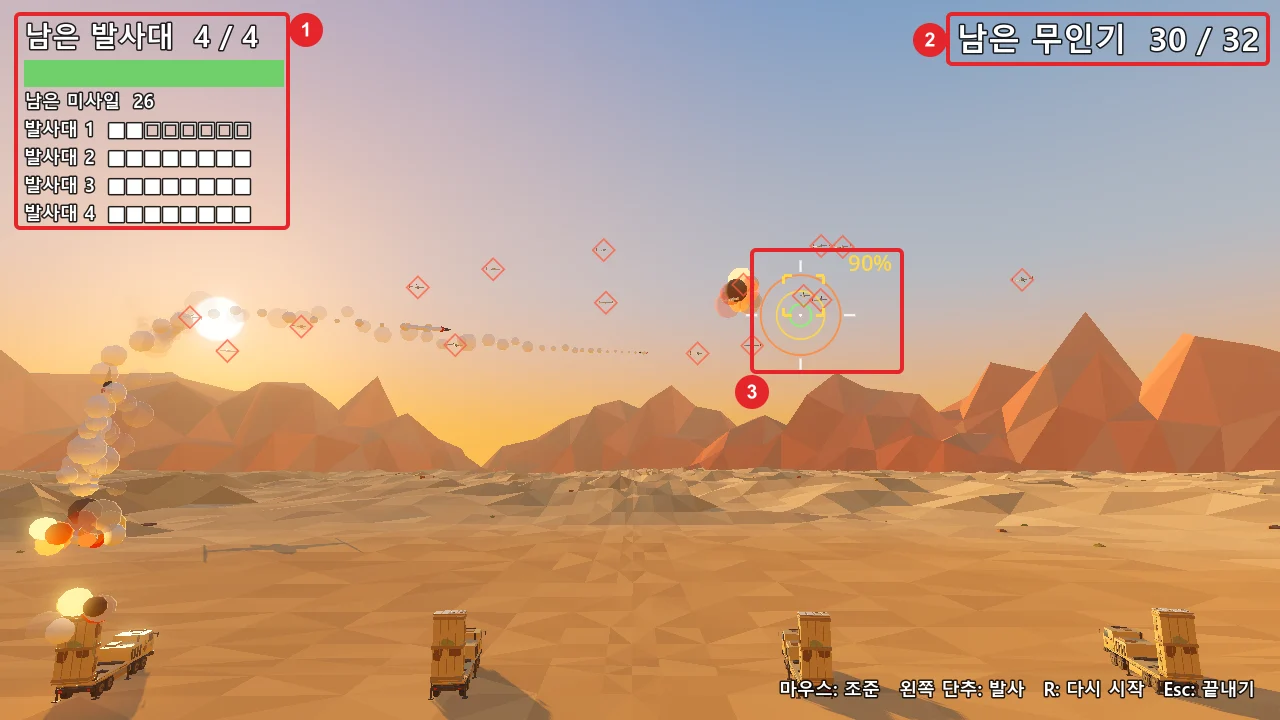 Figure 2. The air defense game after five rounds of fixes. ① Remaining launchers and missiles ② Remaining drones ③ Three-ring aim circle and hit chance (Godot run screenshot)
Letting the game play itself did not tell us the difficulty. "Easy" and "about right" only came from a person playing. A screen full of numbers also bothered me, so I asked to drop the score and just "show the four launchers being defended."
7. Letting the AI check its own work
Starting point: The game from the previous section runs.
Steps:
- Have the AI write an automatic check script with one check per rule.
- Have it rerun the checks every time a rule changes.
- If a line says FAIL, show that line to the AI as is and have it fix the problem.
The air defense checks run with the line below. --path picks the project folder (the folder with project.godot), and anything after -- is not used by the engine but read by the game's scripts (official docs).
Godot_v4.7.2-stable_win64_console.exe --headless --path <project folder> -- --autotest
Here is part of the output when I ran the same command again while writing this guide. The check names are in Korean, so the English meaning follows each line.
[autotest] PASS  1 발사하면 미사일이 나온다  남은 미사일 31          (firing creates a missile; 31 missiles left)
[autotest] PASS  2 무인기 한 대가 닿으면 발사대 하나가 파괴된다  4 -> 3  (one drone hit destroys one launcher)
[autotest] PASS  파괴된 발사대를 노리던 무인기는 다른 발사대로 방향을 바꾼다  (drones retarget when their launcher is gone)
[autotest] PASS  무인기는 멀리서 크게, 가까이서 작게 그려진다  멀리 14.0배, 가까이 3.2배  (drones drawn 14x far, 3.2x near)
[autotest] PASS  조준 세 칸: 100% / 90% / 80% / 밖은 0%           (three aim rings: 100/90/80%, outside 0%)
[autotest] PASS  무인기가 한 번에 2~4대 나온다  3대                 (2-4 drones spawn at once; 3 this time)
[autotest] PASS  재장전 없음: 남은 미사일을 다 쓰면 더 안 나간다  발사 30  (no reload: nothing fires once missiles run out)
[autotest] 14/14 passed
On my PC this check took about 15 seconds. That is shorter than one round played by a person (about 40 seconds), and no window opens.
Each check matches one rule in the plan. When a rule changed, I had the checks change too. That way, if a new rule broke an earlier one (for example, "one hit destroys a launcher"), it showed up as FAIL in the check step before I played.
8. A rigged character and a penalty shootout
After the air defense game, I tested whether a human character comes over with its animation. I used a striker, a goalkeeper, and a ball made earlier for a soccer video. The skeleton (rig) and the 10-second animation were made by hand in Blender. Mixamo was not used.
Rigging means putting a skeleton inside a model so it can move. It is like putting a wire frame inside a doll.
 Figure 3. The rigged character's animation playing in Godot. From left: right after the kick, start of the celebration, both arms up (Godot run screenshot)
| What we checked | Result |
|---|---|
| Skeleton | 17 deform bones and one animation (9.97 s) came in. The 9 control bones were dropped, and their motion was baked into the remaining bones |
| Pose | 6 bones × 7 frames compared with Blender. Largest difference 1.4 mm |
| Face | 8 face shapes (shape keys) came in with the animation |
| Playback | Double speed, pause, and playing only a section all worked |
This test took about 20 minutes. While at it, I had the AI make a penalty shootout with these characters, which took about 30 minutes. You and the computer take turns, five kicks each, in a game of chance.
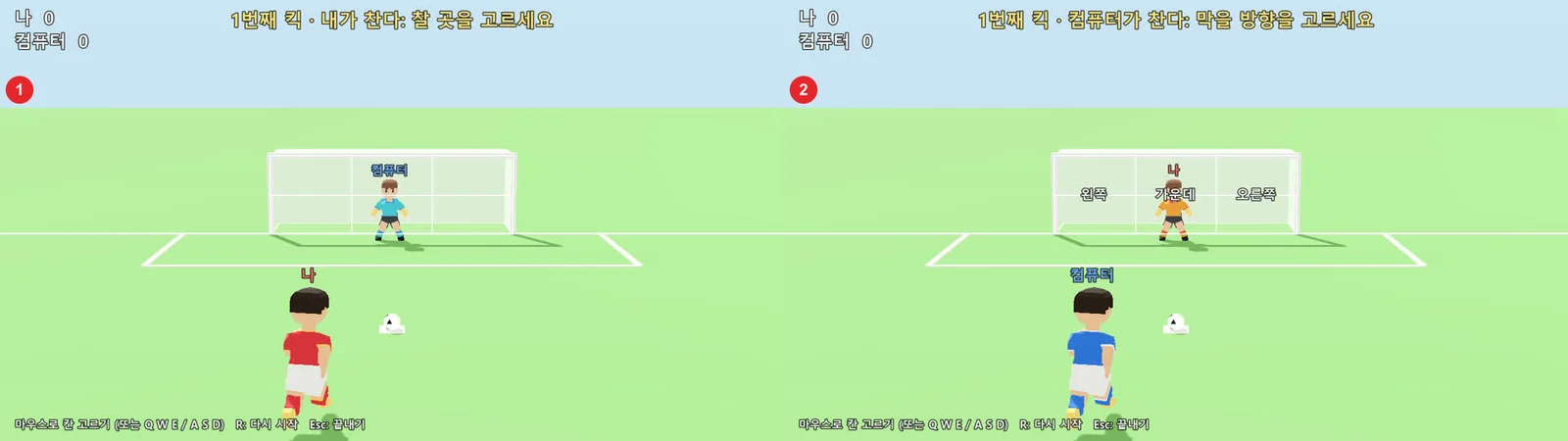 Figure 4. The penalty shootout. ① My turn to kick ② The computer's turn to kick. Shirt colors and the name tags above the heads switch each turn (Godot run screenshot)
In the first version, the odds were shown on screen and both teams' characters looked the same. Both felt odd when I played, so I said "showing the odds feels wrong" and "the characters look the same, which is weird." The next version hid the odds and gave each side its own shirt colors and name tags (Figure 4).
9. The second game: canyon flight
Three days later, on October 13, I made a game about flying fast through a canyon. This time the plan was split into stages from the start, and I played each stage before moving on.
| Stage | What was built | What I said |
|---|---|---|
| First version | Canyon, bridge, missiles, flares, Windows and web exports | "Difficulty OK, feels rough" |
| A | Continuous S-shaped canyon, engine flames | "Make it harsher, so you can't get through without slowing down" |
| A, round 2 | Three sets of tight turns, wingtip trails | Passed |
| B | A missile chasing from behind, a timing ring, a roll | "The chase doesn't feel strong" |
| C | Bombing and a result card | "I don't get the pillar aim; make it like firing a missile" |
| C, round 2 | Aim tightens when you point the nose and fly straight | "The tightening feels right" |
| D | Title screen, countdown, checkpoint, sound, Korean font | "It does feel like a game" |
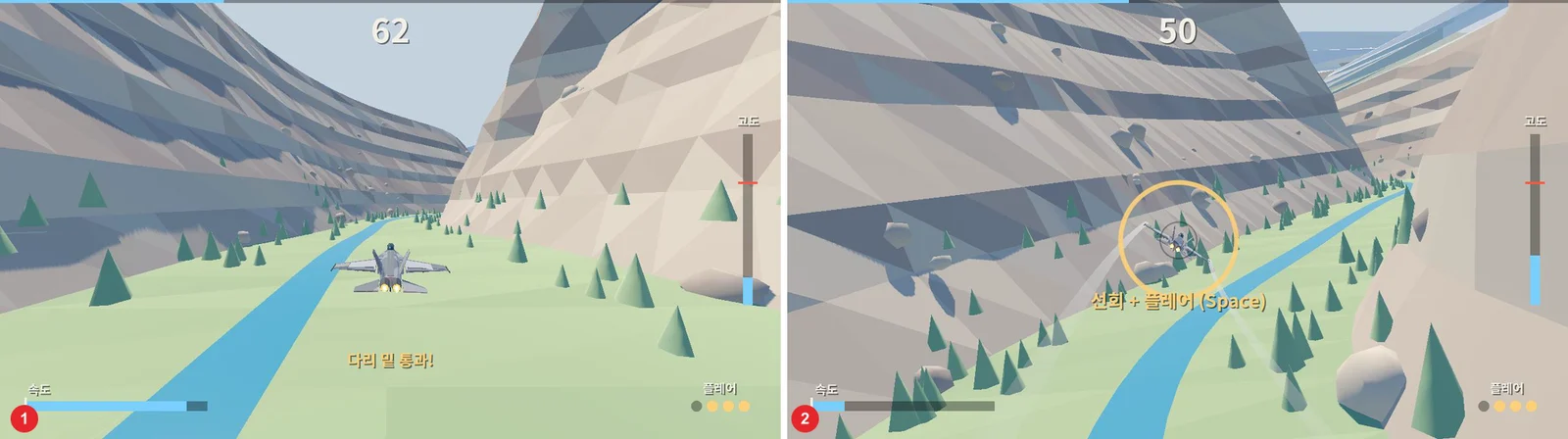 Figure 5. The canyon flight game flying on autopilot. ① The moment it passes under the bridge ② The yellow ring that tells you when to dodge the missile from behind (Godot run screenshot)
Steps: A screen like Figure 5 can be recorded without anyone flying. --write-movie runs the game while writing a video file, and --fixed-fps sets the frames per second. I had the AI add an autopilot mode (--autoplay) to the game, then recorded just 30 seconds (900 frames) like this. A window opens for this.
Godot_v4.7.2-stable_win64_console.exe --path <project folder> --write-movie <save path>\flight.avi --fixed-fps 30 --quit-after 900 -- --autoplay
This game also has 18 automatic checks, and the exported Windows build passed 18/18 too. The check script also flies the course on autopilot at a few fixed speeds. Running it again while writing this guide gave the following (English meaning in parentheses).
[autotest] 참고  자동 비행 170 m/s: 시간 초과 / 74.0초 / 진행 85% / 벽까지 최소 15m   (note: autopilot 170 m/s: out of time, 85% done)
[autotest] 참고  자동 비행 190 m/s: 벽에 부딪혔다 / 63.9초 / 진행 83% / 벽까지 최소 -48m  (note: autopilot 190 m/s: hit a wall)
[autotest] PASS  1 굽이 앞에서 줄이며 날고 폭격까지 하면 별 셋  임무 완료 / 65.1초 / 진행 100% / 벽까지 최소 12m / 빗나간 거리 0m  (slow down before turns and bomb: three stars, mission complete)
[autotest] PASS  14 줄이지 않으면(230 고정) 급한 굽이를 못 돈다  벽에 부딪혔다 / 24.9초 / 진행 42% / 벽까지 최소 -43m  (fixed at 230 without slowing: cannot make the tight turn)
[autotest] 18/18 passed
These lines show in numbers that my request, "you can't get through without slowing down," really holds. Too slow and you run out of time, a fixed fast speed hits a wall, and only slowing before turns gets you to the end. On my PC this check took about 1 minute 30 seconds.
The exported files were 107 MB for Windows and 40 MB for the web. Exporting needs Godot's export templates, which were a separate 1.2 GB download.
When I played the web build, the Korean text showed correctly, but it lagged. We have not found the cause yet. To show Korean in the web build, the font had to be bundled into the game, because a game running in a browser cannot use the fonts installed on the PC. We bundled a free-to-use font trimmed to 2,350 common Korean characters (424 KB).
10. The order to follow
This is the order that settled in over the two games.
- Write a one-page plan first. Have it list the questions, pass criteria, and what is out of scope, and do not let it write code until you say "go."
- Compare models with numbers. Get comparison images and a size table together.
- Get the first version fast. Do not expect polish at first; start with one round that works.
- Play it and say one or two sentences. "Spawn twice as fast" lands sooner than "make it harder."
- Add an automatic check for each rule. Have the AI rerun them after every change.
- Split the work into stages. Like the canyon game's A, B, C, D, play each stage before moving on.
Common mistakes and fixes
| Symptom | Cause | Fix |
|---|---|---|
| A "no main scene" error window appears on first run | The project's main scene is not set | Have the AI set the main scene in the project settings |
| The exported model file is empty | The collection is not linked to the scene | Add a step that links it before export |
| The character is all white | glTF cannot read node group materials | Rebuild a simple material from the base color before export |
| A script error appears after adding a new class name | The new class_name is not registered yet | Open once with --import (starts the editor, finishes importing, then quits) |
You cannot make a class named Plane | Godot already has a built-in with that name | Use another name (for example, jet) |
| Korean text shows as boxes in the web build | A game in a browser cannot use PC fonts | Bundle a free-to-use font in the game |
| Paths in a batch file get mangled | Characters like \t change when written through a shell | Have the AI write batch files with a file-writing tool, not shell commands |
In one line
Plan first, compare models with numbers, get the first version fast, play and say one or two sentences, add automatic checks for each rule (--headless), move on stage by stage.
References
- Godot Engine 4.7 docs, Command line tutorial: https://docs.godotengine.org/en/stable/tutorials/editor/command_line_tutorial.html
- Godot Engine download: https://godotengine.org/download/
- Claude Code docs: https://code.claude.com/docs/en/overview
- Related guides on this site: From Blender to Godot 4.7 with glTF, Choosing a game engine in 2026
- Figures: all real Godot run screenshots and Blender images (test games we made)