Setting the scope of your first game: a size a solo developer can finish, and how to schedule it
To take a first solo game all the way to the end, you need to cut it down to the right size. This guide covers what to write on a one-page plan and how to split the schedule into steps, with real times, snags, and scope changes from making three small games in Godot.
한국어English
ON THIS PAGE
- 011. The short answer: the size of a first game
- 022. What goes on a one-page plan
- 033. Splitting into steps
- 044. How long it actually took
- 055. How the scope changed
- 066. Where I got stuck
- 077. Making a schedule
- 088. A second game: when you widen the scope
- 09Exercises
- 10Common mistakes and fixes
- 11Summary
- 12References
Based on: Godot 4.7.2 (Standard, Windows), Claude Code, and the official Godot 4.7 docs. Checked in November 2026. All figures are real run screens from test games I made. Text inside the games is Korean.
The most common reason a solo game never gets finished is not skill but size. The game you first picture is usually too big to finish alone even in a few months. So the first job on a first game is not writing code. It is cutting the scope down to a size you can finish. Scope is the line between "what we make this time" and "what we do not make this time." It is like deciding what goes in this truckload before you pack everything when you move house.
This is part 3 of the solo development series. It covers the right size for a first game, what to write on a one-page plan, and how to split the work into steps, and it shows real times and snags from my notes on making small games in Godot. This guide explains how to set the scope of a first game and plan its schedule. The map of the whole series is in A map of solo game development.
1. The short answer: the size of a first game
| Item | Right size for a first game |
|---|---|
| Screens | One. Starts right away, no menu or settings screen |
| Rules | One rule you can explain in one line |
| One round | About a minute. Goes start → play → end → restart |
| Controls | Two or three keys, or just the mouse |
| Models | Ones you already have or can make simply |
| Sound | A few sound effects |
| Export | Later, after the first version works |
This looks small, but if you finish this much, you go around the full loop of work a game needs once: putting in models, reading input, deciding win and loss, and letting the player start again. A second game is the same loop, just a bit bigger.
2. What goes on a one-page plan
Scope kept in your head keeps growing. So start with a one-page plan in writing. This kind of document is often called a PRD (product requirements document). Like a floor plan before building a house, it fixes what you will make and how far.
Two parts of my air defense game plan set the scope. The other parts (one-line description, questions, rules table) are in section 4 of Building Godot game scenes with Claude Code.
| Part | What it said |
|---|---|
| Out of scope | Builds and installers, menu and settings screens, multiple stages, online play, mobile |
| Pass criteria | Models match in size, direction, and color. One round goes start → play → end → restart. Time and disk space are measured |
The most important part is out of scope. If you write down what you will not make, then when you think "a menu screen would be nice" halfway through, you can settle it at once: "out of scope this time." For pass criteria, include how to check each one. It has to be something you can see, such as "one round goes all the way to restart," not "it works well."
Try it: Have the AI write the plan before it writes any code. You can put it like this (example).
I want to make one small game scene. Before writing any code, write PRD.md first.
- A one-line description, pass criteria (with how to check each), and an out-of-scope list
- A rules table (camera view, controls, win and loss conditions)
- A list of steps, each with a way to check that it is done
Do not write code until I read it and say "go."
3. Splitting into steps
Once the plan is set, split the work into steps. Each step needs a way to check that it is "done." Like rest stops on a hiking trail, you finish a stretch and look at the map again at the stop.
My air defense game had six steps.
| Step | What was done | Check |
|---|---|---|
| M0 setup | Download Godot 4.7.2 Standard | The file's checksum matches the official value |
| M1 models | Export 8 Blender models to glTF | All 8 models with zero difference in dimensions |
| M2 background | Build the desert, sky, and mountains in code | "Go" after looking at Figure 1 |
| M3 to M5 game | Aiming, firing, drones, win and loss, on-screen text | 14/14 automatic checks, playing it myself |
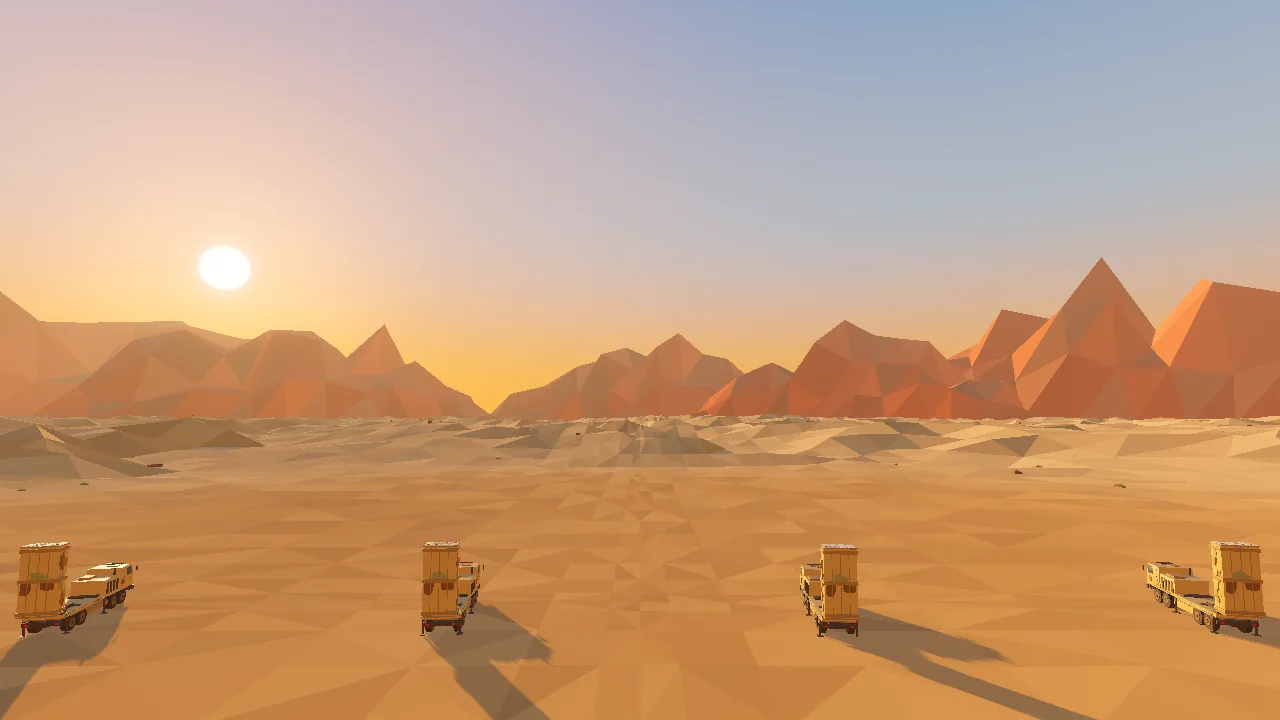 Figure 1. The screen at the end of step M2. Only the background and launchers are there, with no game rules yet (Godot run screenshot)
As in Figure 1, I checked the background and models before adding any game rules. If the feel of the screen had been off at this step, I would have fixed it before adding rules. The later you fix something, the more places you have to touch, so stopping to look at each step ends up faster.
4. How long it actually took
Here is what I did in one session on the night of October 10, 2026, and how long it took. Claude Code wrote all the code. I read the plan, made the decisions, and played the games.
| What I did | Time |
|---|---|
| First version of the air defense game (until one round ran) | About 1 hour |
| Tuning the air defense game | I played five times and said what to fix |
| Moving a rigged character | About 20 minutes |
| Penalty shootout | About 30 minutes |
| Whole session | About 3 hours (including waiting) |
Before starting, I estimated 5 to 7 hours. It took about half that. Do not copy these numbers as they are, though. The models and animations already existed, and the game had a single screen. If you need to make models from scratch, add that time on top. I did not record how many minutes each step took, so those are not listed here.
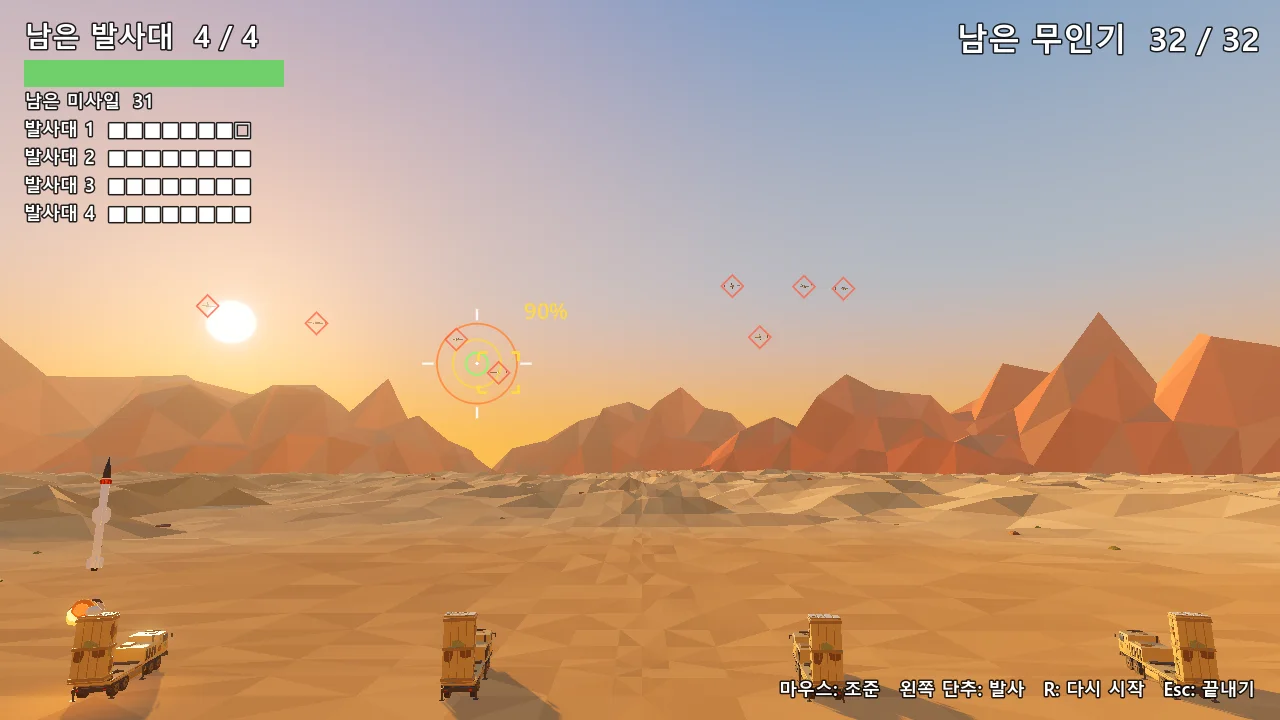
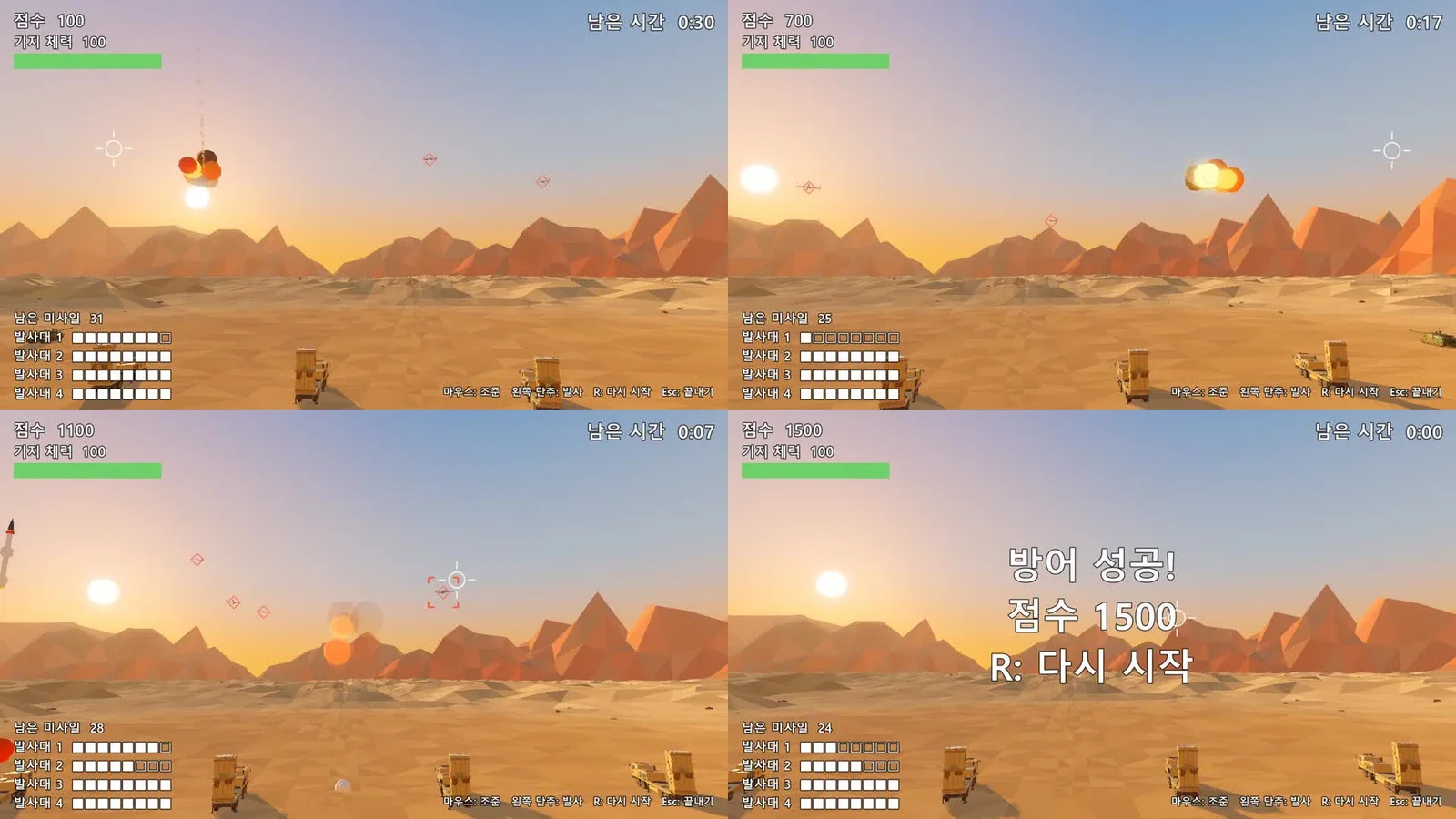 Figure 2. The first version, ready in about an hour. It has a score, base health, and time left, and missiles reload (Godot run screenshot)
Figure 2 is the first version. It already met the pass criterion "start → play → end → restart." Because the scope was small, the first version came fast, and after that most of the time went to playing and fixing.
5. How the scope changed
After the first version, I played five more times and the rules changed. What I said each round is in section 6 of Building Godot game scenes with Claude Code. Here, the only question is whether the scope grew.
| Round | Rule change | Did the scope grow |
|---|---|---|
| 1 | No reloading, 32 drones in a row | No. Only values and win conditions changed |
| 2 | Arcing missile paths, 2 to 4 drones at once, a three-ring aim circle | A little. More on-screen effects, still one screen |
| 3 | Spawn interval 2.5 s → 1.7 s, base health removed, a launcher is destroyed in one hit | Smaller. Base health was dropped |
| 4 | Target switching, size shrinks with distance, spawn distance 1,500 m | A little. One more drone rule |
| 5 | Score display removed, rules final | Smaller. The score was dropped |
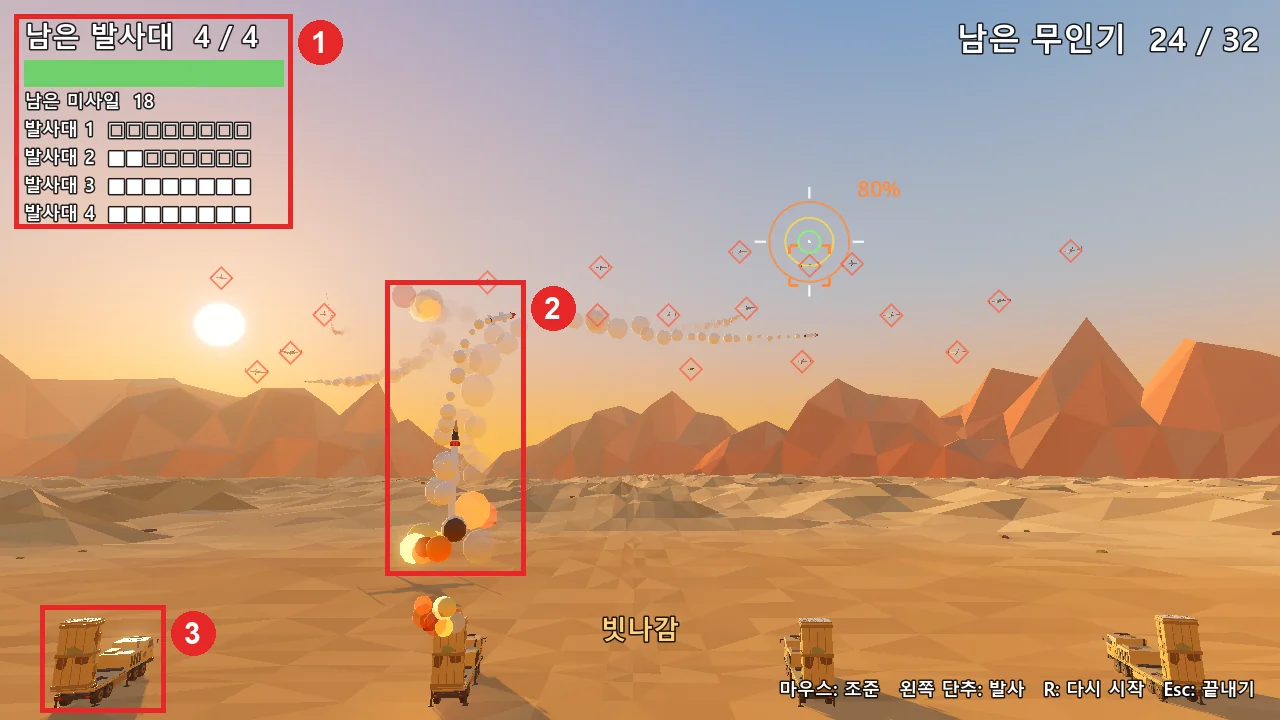
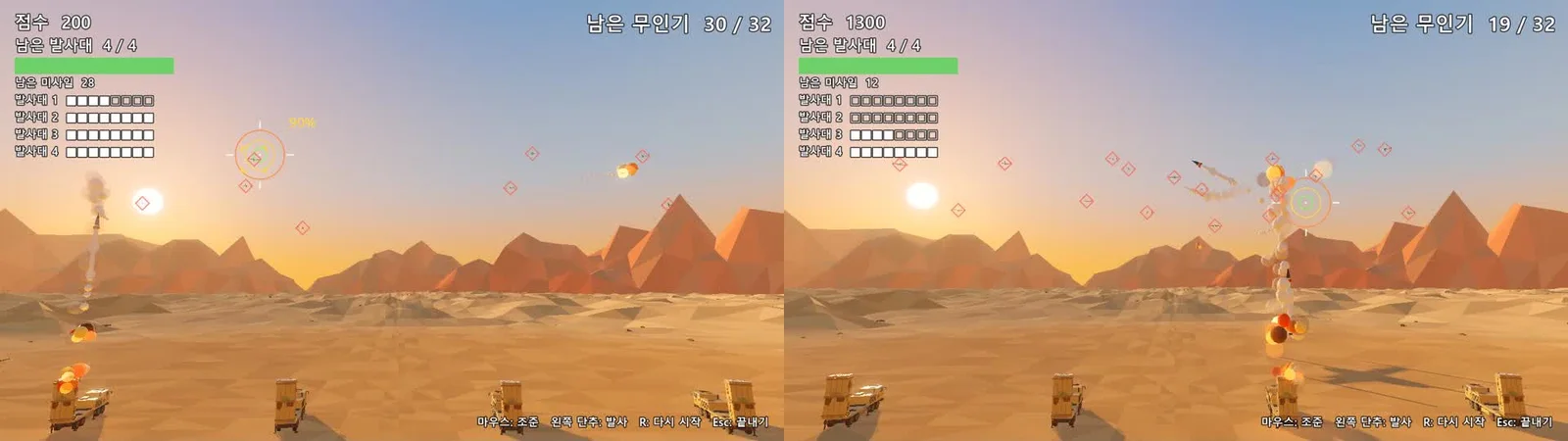 Figure 3. The air defense game partway through the fixes. Remaining drones replaced time left, and remaining launchers replaced base health. The score shown here was removed in the last round (Godot run screenshot)
Comparing Figure 2 and Figure 3 shows how the scope moved. "Survive 2 minutes 30 seconds" became "stop 32 drones," "reloading" became "no reloading," "base health" became "a launcher is destroyed in one hit," and in the end even the score went away. The rules changed a lot, but the size stayed the same: one screen, about 40 seconds per round. Keeping scope does not mean never changing the rules. It means not making the game bigger.
6. Where I got stuck
| Snag | Symptom | Fix |
|---|---|---|
| Exporting models | Five issues while moving the models and characters, such as missing colors, a floor plane coming along, and an empty file | The AI added handling to the export script (Moving Blender models into Godot) |
| First run | A "no main scene" error box | Set the project's main scene |
| Difficulty | Automatic play could not tell whether it was easy or hard | A person played it five times |
| On-screen text | Too many numbers, distracting | Removed the score, showed only "stop them from hitting the 4" |
| First penalty shootout | Probabilities shown on screen, and both teams' characters looked the same | Hid the probabilities and gave each side its own shirt color and name tag (Figure 4) |
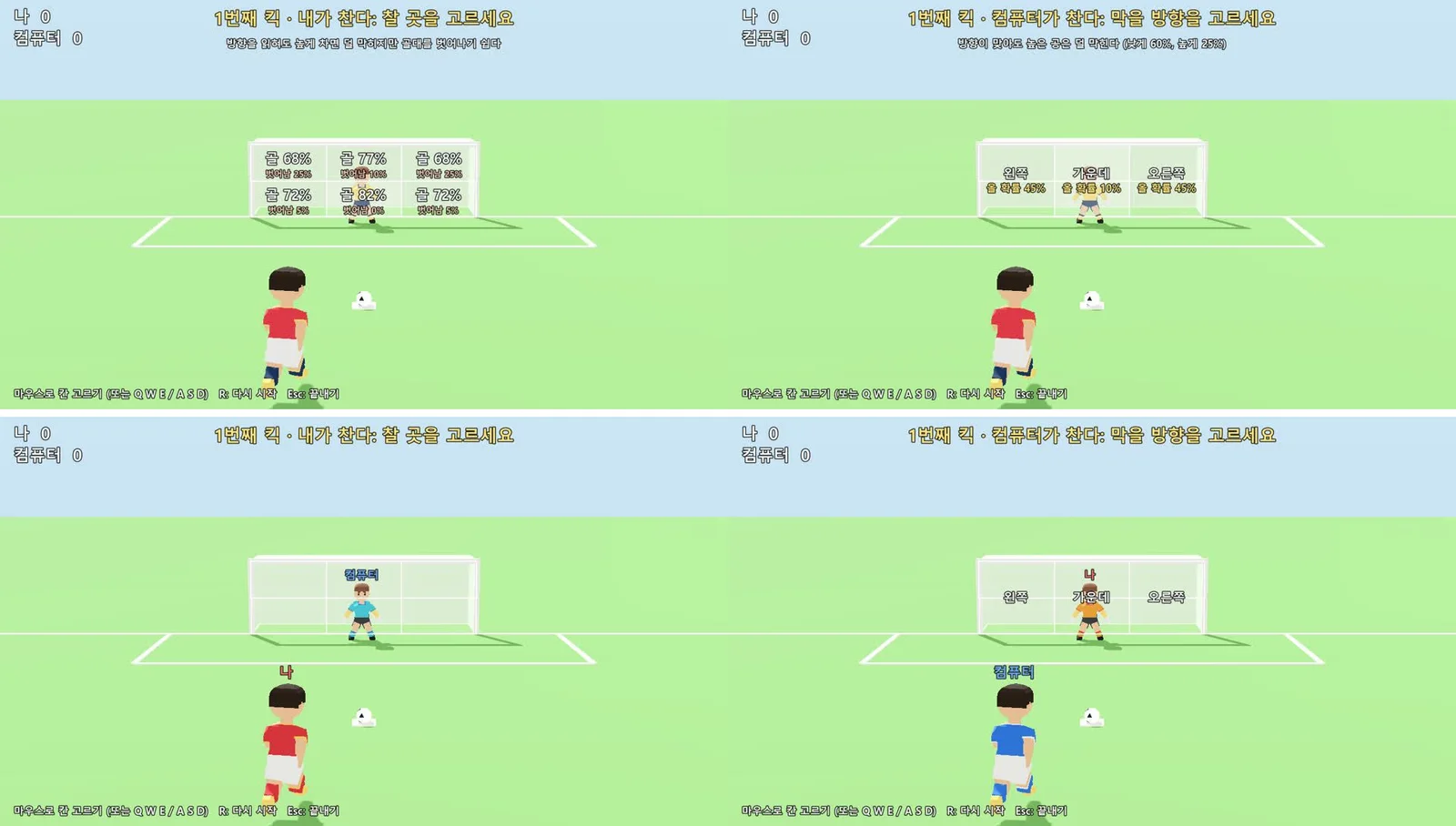 Figure 4. The first version (top) and fixed version (bottom) of the penalty shootout. The probability text is gone, and each turn uses shirt colors and name tags above the heads to tell the sides apart (Godot run screenshot)
Try it: When a fixed version comes out, as in Figure 4, put it next to the first version. You can see at a glance whether the fix actually reached the screen and whether something else broke along the way.
Of these snags, the AI solved the code problems quickly. What took long was a person playing and saying how it felt. That is why your schedule needs a separate slot for it.
Some things were also left for later in that session. The sound was only six sound effects made in code, the canister lid did not open, and no build (playable program file) was made. All of these were either out of scope from the start or pushed past the first version.
7. Making a schedule
Turning the notes above into a schedule gives these rules.
- Attach a check to every step. Write "put in models, check zero difference in dimensions," not just "put in models."
- Keep the path to the first version as short as possible. Menus, sound, and export come after the first version.
- Set aside time to play it yourself. Each round needs time to play once and say what to fix.
- Make export its own step. Running inside the engine and running as a program file are different jobs.
Here is an example schedule for a first-timer. These are not measured numbers. They are a suggestion that fits the rules above to someone with two or three hours a day.
| Day | What to do | Done when |
|---|---|---|
| 1 | One-page plan (one-line description, pass criteria, out of scope) | You can read the plan and say "go" |
| 2 | Put in models, background | The engine view and the Blender image match |
| 3 | First version | Start → play → end → restart |
| 4 to 5 | Play it and fix it (two or three times a day) | You hear yourself say "it feels right" |
| 6 | Sound, tidy up on-screen text | Nothing bothers you through a full round |
| 7 | Export | It runs outside the engine |
Export needs its own preparation. Godot uses export templates to build a program file. A template is the runtime shell that runs the game on each operating system, and you download it separately from the official site. In my notes, the downloaded template file was 1.2 GB, and the exported canyon flight game was 107 MB for Windows and 40 MB for the web. The web version only showed Korean text after the font was packed into the game, and it had lag whose cause I did not find. Things like this happen, so leave room in the export step.
8. A second game: when you widen the scope
When you widen the scope after a first game, the method stays the same. The canyon flight game I made three days later, on October 13, was planned from the start in steps A, B, C, and D, and for some steps I played and gave feedback before moving on. My notes have no verdict from me on the second round of step B or on step D. The first version, the exports, and all four steps A to D were done in one day, and all 18 automatic checks also passed on the exported Windows program.
The difference from the air defense game was more screens: a title screen, a countdown, continue, and a result card. The "menu screen" that was out of scope in the first game came in with the second. So the out-of-scope list is not a list of things to throw away. It becomes the to-do list for the next game. The steps are described in Building Godot game scenes with Claude Code.
Exercises
- Write the game you want to make in one line. Cut it down to one screen and one rule.
- Write three pass criteria. Each one has to be something you can see.
- Write an out-of-scope list with at least five items: things you want but will not do this time.
- Rewrite the example schedule in section 7 to fit your own daily time. Make sure the play-it-yourself days are still there.
Common mistakes and fixes
| Symptom | Cause | Fix |
|---|---|---|
| You have been working for weeks and see no end | No out-of-scope list, so features keep growing | Write an out-of-scope list in the plan and move new ideas to the next game's list |
| You get tired before the first version even runs | Started with menus, sound, and effects | Start with a first version that only does start → end → restart |
| Every rule change breaks something else | No check for each rule | Add an automatic check for each rule and rerun them after every fix |
| The schedule always slips | Playing time was never in the schedule | Set aside play time for each round |
| It works in the engine, but the exported file does not start | Export was tried for the first time on the last day | Make export its own step and leave room |
Summary
One screen, one rule, about a minute per round. Write the out-of-scope list first, attach a check to every step, set aside time to play it yourself, and make export its own step.
References
- Godot Engine 4.7 docs, Your first 2D game: https://docs.godotengine.org/en/stable/getting_started/first_2d_game/index.html
- Godot Engine 4.7 docs, Exporting projects: https://docs.godotengine.org/en/stable/tutorials/export/exporting_projects.html
- Godot Engine download: https://godotengine.org/download/
- Other parts of this series: A map of solo game development, What helps to know before solo game development, Splitting solo dev work with AI, Asset rules for games
- Figures: all real Godot run screens (test games I made)