Reading Higgsfield pricing and credits: what each plan buys and what we actually spent
Read Higgsfield's four individual plans by monthly and annual price, monthly credits, available models, and web-only unlimited generations, then use the real credit log from one sponsored video to estimate the cost of a single clip.
한국어English
ON THIS PAGE
- 011. Credits: a ticket that is used up each time you generate
- 022. The four individual plans
- 033. The price of one credit
- 044. How much each plan can make
- 055. Unlimited and free generations work on the web only
- 066. The credits we actually spent on one sponsored video
- 077. Choosing a plan, step by step
- 08Practice
- 09Common mistakes and fixes
- 10In one line
- 11Read next
- 12References
Based on: the official Higgsfield pricing page and help center (credits, plans, unlimited models, MCP). Checked on November 4, 2026. Images are real screenshots of the pricing page, taken without logging in, plus a still from a video we made. Prices change often, so check the pricing page again before you pay. AZTechnology was once paid by Higgsfield to make a sponsored video. That sponsorship has ended, and this post was written without any request or review from Higgsfield. The result still and credit log here come from making that sponsored video.
Higgsfield is a service where you pay each month, receive credits, and spend credits every time you generate something. The pricing page shows prices, credits, model names, "unlimited" and "free generations" all at once, so it is hard to know what to look at first. The same 1,200 credits can buy very different amounts depending on the model, the clip length, and the resolution.
This post explains how to read the pricing page column by column, what one credit costs on each plan, and the rules for web-only unlimited generations. Then it uses the real credit log from one sponsored video to estimate the cost of a single clip. What Higgsfield is and what to check in its terms are covered in Higgsfield introduction.
1. Credits: a ticket that is used up each time you generate
A credit is a ticket that only works inside Higgsfield. Think of a rechargeable theme park card. Your plan tops up the card every month, and each ride (model) takes some of it. Bigger rides take more.
The rules for spending credits are below.
| Rule | Details |
|---|---|
| What sets the price | Model, resolution, and length. Longer and sharper output costs more |
| When you see it | The exact cost is shown on the Generate button before you confirm |
| What costs credits | Every generation on the web, MCP, CLI, Canvas, and Supercomputer, including images, videos, re-rolls, and upscaling |
| Leftover credits | Subscription credits reset each billing cycle and do not roll over |
| Purchased credits | Credits from Credit Packs and Auto-Refill last 90 days from purchase |
| Failed generations | Usually refunded automatically within a few minutes. Some models do not refund |
The second row is the most useful one. If a price is hard to work out, look at the number on the Generate button first. No credits are taken until you press it.
2. The four individual plans
The individual plan cards sit under the Individual plans tab at the top of the pricing page. The Monthly/Annual switch at the top right changes the prices between monthly and annual billing.
Do this: Open the Higgsfield pricing page. If a cookie notice appears, close it with any button. Move the switch at the top right to Monthly, then read the credit line at the top of each card and the price in the middle.
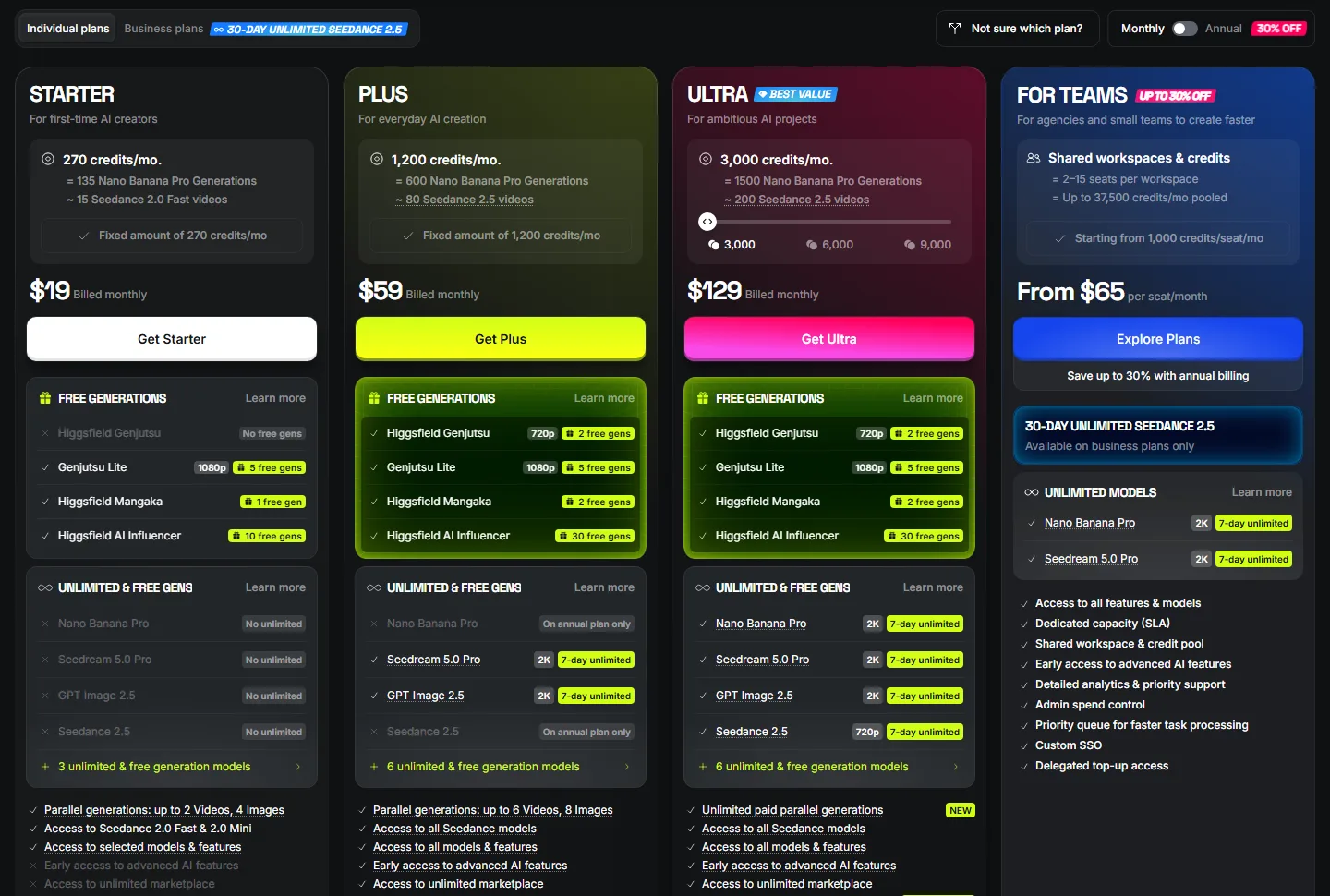 Individual plan cards on Monthly. Prices are in US dollars before tax (Higgsfield pricing page screenshot)
Now move the switch to Annual. With annual billing, the Plus and Ultra prices drop per month. Starter says "No difference compared to monthly", so its price stays the same.
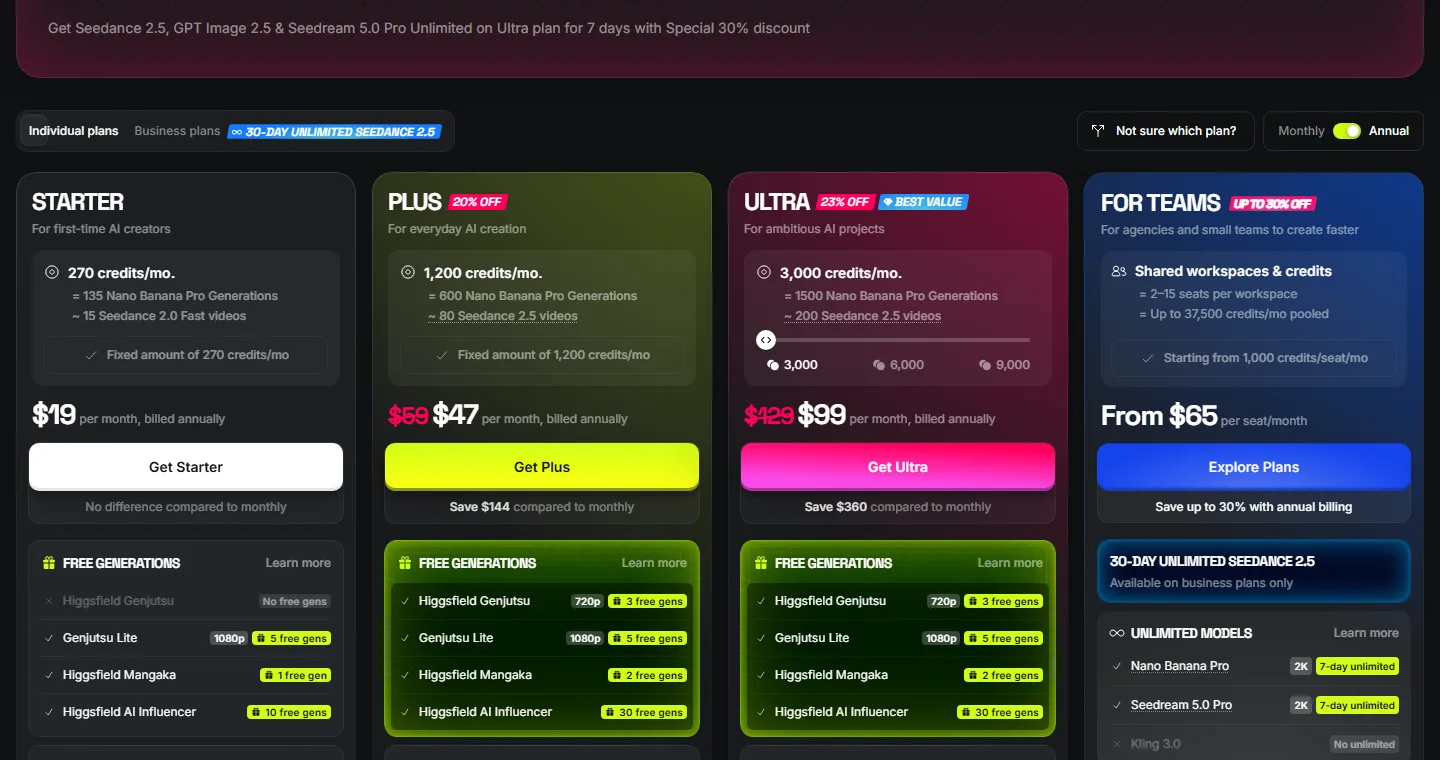 Cards on Annual. The price is per month, and you pay for the whole year at once (Higgsfield pricing page screenshot)
Here are both screens in one table.
| Plan | Credits per month | Monthly billing | Annual billing (per month) | Models (card wording) |
|---|---|---|---|---|
| Free | None | $0 | $0 | A small set of models. The comparison table says "Limited use" |
| Starter | 270 | $19 | $19 | Seedance 2.0 Fast and 2.0 Mini, selected models only |
| Plus | 1,200 | $59 | $47 | All Seedance models, all models and features |
| Ultra | 3,000 (6,000 or 9,000 also selectable) | $129 | $99 | All Seedance models, all models and features |
| For Teams | From 1,000 per seat, up to 37,500 pooled | From $65 per seat | Up to 30% off | All features and models, shared workspace |
- Prices do not include VAT or local taxes. These are added at checkout.
- On Ultra, moving the credit slider to 6,000 or 9,000 changes the price. This post lists only the default 3,000 price.
- Promotions such as the "30% OFF" banner at the top appear often. Promo prices change quickly, so compare them with the table.
3. The price of one credit
To compare plans, divide price ÷ credits to see how many cents one credit costs. These are calculated from the card prices (before tax, rounded).
| Plan | Monthly billing | Annual billing |
|---|---|---|
| Starter (270) | about 7.0 cents | about 7.0 cents |
| Plus (1,200) | about 4.9 cents | about 3.9 cents |
| Ultra (3,000) | about 4.3 cents | about 3.3 cents |
Bigger plans and annual billing make each credit cheaper. On the cards, only Ultra has "Lowest cost per credit" switched on. But credits you do not use within the month disappear (section 1), so picking a big plan only for the low price can cost you more.
4. How much each plan can make
Under the credit line, each card says what those credits can buy.
| Plan | Amount on the card |
|---|---|
| Starter | 135 Nano Banana Pro images, or about 15 Seedance 2.0 Fast videos |
| Plus | 600 Nano Banana Pro images, or about 80 Seedance 2.5 videos |
| Ultra (3,000) | 1,500 Nano Banana Pro images, or about 200 Seedance 2.5 videos |
The image numbers add up. Nano Banana Pro costs 2 credits per image, so 1,200 credits make 600 images. The card does not say how long or how sharp the "about 80 videos" are. For video, you need to estimate with the table below and with real records.
Do this: Scroll down the pricing page to Find the best plan for you. Pick what you make (for example, Social media videos), then use the two sliders in the second row to set how many videos and images you make per month. A suggested plan and the expected usage appear on the right.
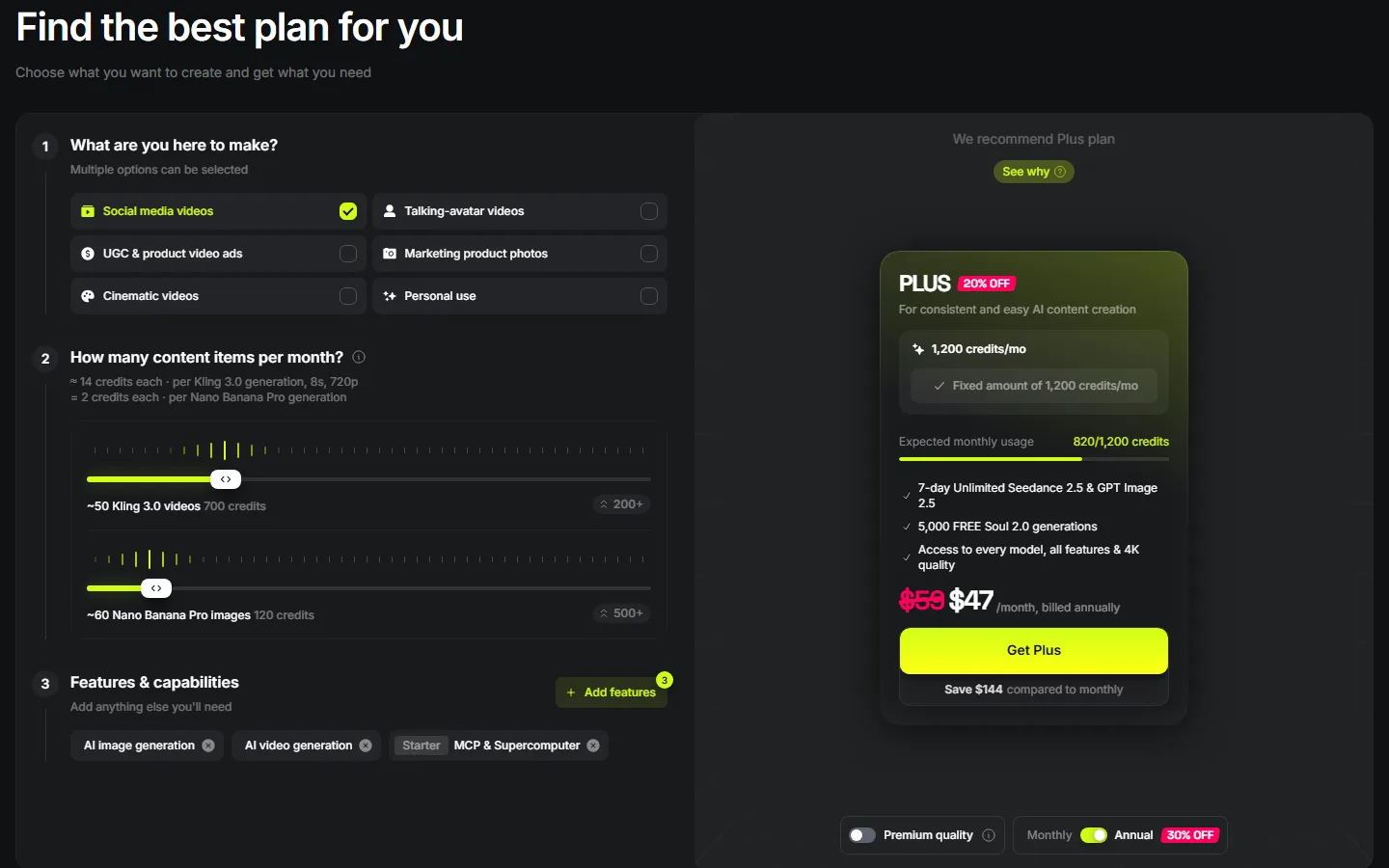 The plan finder. The note above the sliders says a Kling 3.0 video (8 s, 720p) costs about 14 credits and a Nano Banana Pro image costs 2 credits (Higgsfield pricing page screenshot)
Further down, the Compare features table lists the credits per 5 seconds for each model and resolution, and how many such videos each plan can make.
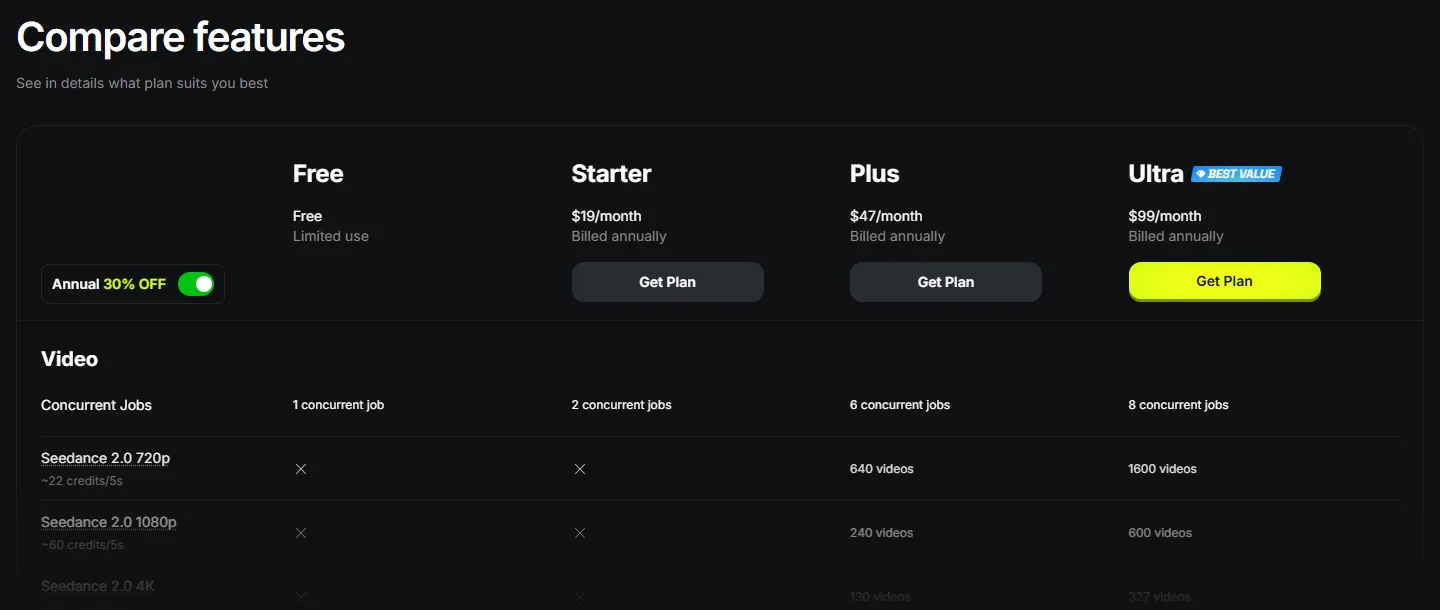 The Compare features table. The image is on Annual, and the × in the Free and Starter columns means that model is not available (Higgsfield pricing page screenshot)
A few rows from that table follow. Every value has "about" in front of it.
| Model and resolution | Credits per 5 seconds |
|---|---|
| Seedance 2.0 720p | about 22 |
| Seedance 2.0 1080p | about 60 |
| Seedance 2.0 4K | about 110 |
| Seedance 2.0 Fast 720p | about 12 |
| Kling 3.0 720p | about 7 |
| Kling 3.0 1080p | about 8 |
Even within Seedance 2.0, 1080p costs nearly three times as much as 720p. One step up in resolution multiplies the credits. The table has no row for Seedance 2.5, the model we used, so section 6 estimates it from our real records.
5. Unlimited and free generations work on the web only
The UNLIMITED & FREE GENS list in the middle of each card means "this model does not take credits for a set period." These are called unlimited models. Newly released flagship models get short windows, such as 7 days. The window starts when you turn it on and does not restart when you renew.
Do this: Find the three lines of small grey text below the cards and read them.
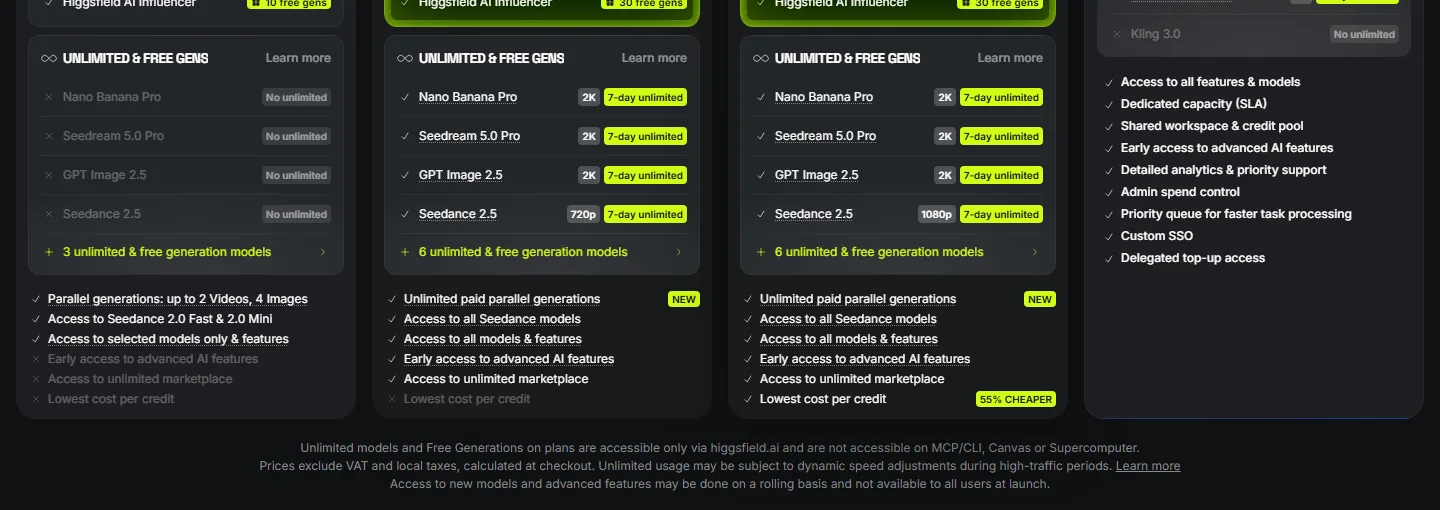 The unlimited lists and the note under the cards. The image is on Annual (Higgsfield pricing page screenshot)
The note at the bottom means this: unlimited models and free generations work only on the higgsfield.ai website. They do not work in MCP, CLI, Canvas, or Supercomputer. Unlimited is meant for people working by hand on the web. Anything made by an AI agent or a program always takes credits at the standard rate, whatever your plan.
The unlimited list also changes between monthly and annual billing (on the screens at the time of writing).
| Plan | Annual billing | Monthly billing |
|---|---|---|
| Starter | No unlimited | No unlimited |
| Plus | Nano Banana Pro, Seedream 5.0 Pro, GPT Image 2.5 (2K), Seedance 2.5 (720p), all 7 days | Only Seedream 5.0 Pro and GPT Image 2.5. The other two say "On annual plan only" |
| Ultra | All four for 7 days, Seedance 2.5 at 1080p | All four for 7 days, Seedance 2.5 at 720p |
Unlimited generations run in the standard queue, and at busy times their speed and the number you can run at once may drop for a while. Generations that use credits always run in the priority queue. So for urgent work, spending credits can be faster even when you have unlimited access.
6. The credits we actually spent on one sponsored video
From here on, these are our records, not the official table. We made a sponsored video that turns simple box scenes built in Blender (blockouts) into live-action-style video with Seedance 2.5 on Higgsfield. Every generation went through the Higgsfield MCP attached to Claude Code, and we logged the quote before each submission and the actual charge after it. Because we used MCP, every generation took credits with no unlimited benefit, as section 5 says.
 Left, the Blender blockout. Right, a still from the Higgsfield result. One 10-second 720p clip took 76 credits (sponsored video material)
First, the cost of each item.
| What we made | Settings | Actual charge |
|---|---|---|
| One image (GPT Image 2.5) | medium quality, 16:9 | 0.5 |
| One image (GPT Image 2.5) | high quality, 16:9 | 1.5 |
| Video edit (Seedance 2.5) | 480p, 12 s | 42 |
| Video edit (Seedance 2.5) | 720p, 12 s | 90 |
| Video edit (Seedance 2.5) | 720p, 10 s | 76 |
| Video edit (Seedance 2.5) | 720p, 10 s, sound on | 76 (sound added nothing) |
| 1080p upscale | one clip of a little over 5 s | 1.01 |
Converting 720p video with Seedance 2.5 cost about 7.5 credits per second (90 ÷ 12, 76 ÷ 10). At that rate, Plus's 1,200 credits cover about 15 ten-second 720p clips. Multiplied by the Plus monthly rate from section 3 (about 4.9 cents), one 10-second clip is about $3.70. We did not generate 1080p directly. We upscaled the 720p results, and upscaling all five scenes took 8.45 credits.
Next, the ledger for the whole sponsored video.
| Item | Credits |
|---|---|
| Credits left when the sponsorship started | 2,893.81 |
| Nine scenes (images, videos, upscales) | 1,856.45 |
| Source comparison test | 36.00 |
| Used for something unrelated to the sponsored video | 144.00 |
| Total spent | 2,036.45 |
| The 26 720p videos alone | 1,666.00 |
Five of the nine scenes made it into the finished video. We dropped three sea scenes partway through, so the 299.5 credits spent on them never reached the video. The first scene (a canyon chase) took seven video generations and 504.5 credits, and in the end we used it only as making-of material. Getting the right result in one try is rare. When you pick a plan, do not count "finished clips × cost per clip". Multiply by how many times you will redo each clip. Ways to cut down the redos are in Turning a Blender blockout into live-action-style video with Higgsfield.
7. Choosing a plan, step by step
- Decide what you will mostly make. Images or video, and if video, which model. The video models listed on the Starter card are Seedance 2.0 Fast and 2.0 Mini. Check first that the model you want is on the card.
- Decide between working by hand on the web and automating with an agent. If you plan to use MCP through an agent such as Claude Code, you can ignore the unlimited list. Credits will be taken anyway.
- Turn a month of use into credits. Clip length (seconds) × credits per second × number of redos. Credits per second is the Generate button number divided by the length.
- Use monthly billing for the first month. Once you know your real usage, switching to annual lowers the price per credit.
- If you run short, upgrade or buy Credit Packs. Upgrades take effect immediately with a prorated charge. Credit Packs must be used within 90 days.
Practice
- Switch the pricing page between Monthly and Annual and write down what changes in the UNLIMITED & FREE GENS list on the Plus card.
- Find the credits per 5 seconds for Kling 3.0 720p in the Compare features table, and work out how many 5-second videos Plus's 1,200 credits can make. Compare your answer with the count in the table.
- Say you make ten 10-second 720p videos a month and redo each one twice on average. Use 7.5 credits per second from section 6 to work out the monthly credits, then choose a plan.
Common mistakes and fixes
| Symptom | Cause | Fix |
|---|---|---|
| An unlimited model still took credits | It was made through MCP, CLI, Canvas, or Supercomputer | Unlimited works only on the higgsfield.ai website. Agents always use credits |
| Monthly Plus has no Seedance 2.5 unlimited | Plus gets Seedance 2.5 unlimited only on annual billing | Check for "On annual plan only" on the card |
| Last month's leftover credits are gone | Subscription credits do not roll over | Move to a plan that fits your usage, and use plan credits before Credit Packs |
| You cannot make the "about 80 videos" on the card | The card count is an estimate without length or resolution | Divide the Generate button number by the length and redo the math per second |
| The checkout price is higher than the card | Card prices exclude tax | VAT and local taxes are added at checkout |
| Credits ran out while redoing the same scene | You expected the right result in one try | Count redos from the start, and check at a lower resolution first |
In one line
Cost = model × resolution × length, unlimited is web-only, and plan with the Generate button number and your redo count. The workflow for turning Blender scenes into live-action-style video while saving these credits continues in Turning a Blender blockout into live-action-style video with Higgsfield.
Higgsfield posts: Higgsfield introduction · Blockout to live-action video · Using the Higgsfield MCP in Claude Code
Read next
- Higgsfield introduction: structure and the terms to check first
- Eight AI video models compared (October 2026)
- AI video generation basics
References
- Higgsfield pricing page
- Higgsfield help: How do credits work?
- Higgsfield help: How do Higgsfield plans work?
- Higgsfield help: What are Unlimited models, and which plans include them?
- Higgsfield help: What is Higgsfield MCP, and how is it different from the web?
- Image license: images 1–5 are screenshots of the Higgsfield pricing page. Image 6 is a still of a Blender blockout made by AZTechnology and the Higgsfield result.