Planning AI narration length: characters per second, spelling out numbers, and fitting each line to its shot
From a real 105-line ElevenLabs narration for an 8-minute explainer: why a script planned at 5 characters per second came out more than 30% short, how to set the rate, how to spell numbers the way they are spoken, how to make one file per line while passing the neighboring text, and how to re-time shots from measured speech.
한국어English
Based on: the ElevenLabs Text to Speech API docs (Create speech), checked on November 4, 2026. The numbers come from the narration of one explainer video, 105 lines in Korean. Figures 1, 2 and 4 are charts made from that record. Figure 3 is a screenshot of the official docs.
The first problem you hit when making narration with an AI voice is length. You write the script to fit each shot, then the speech ends much earlier and the picture keeps going in silence. Or the script runs long and the speech spills past the cut.
This guide uses the record of a 105-line narration made with ElevenLabs for an explainer of just over 8 minutes. The script was planned at "5 characters per second", and the real speech came out about a third shorter than planned. Here is why, how to plan next time, and how to make one line at a time and fit it to the shots. Checking pronunciation by transcribing the result is covered in Checking AI narration with faster-whisper.
By the end of this guide you can:
- Estimate script length from characters per second.
- Spell out numbers and Latin letters the way the voice should say them.
- Make one file per line while passing the text before and after it.
- Re-time shots from the measured speech length.
1. Narration that came out short
The script had 6 acts (A0–A5), 105 lines, and 3,177 characters including spaces and punctuation (Korean). Each shot had a planned speaking time, adding up to 671 seconds. Shot lengths were planned at 5 characters per second (0.2 seconds per character).
Adding up only the speech, the real total was 450.0 seconds, 67% of the plan. Figure 1 shows every act was short by about the same share, and not one of the 105 lines came out longer than planned.
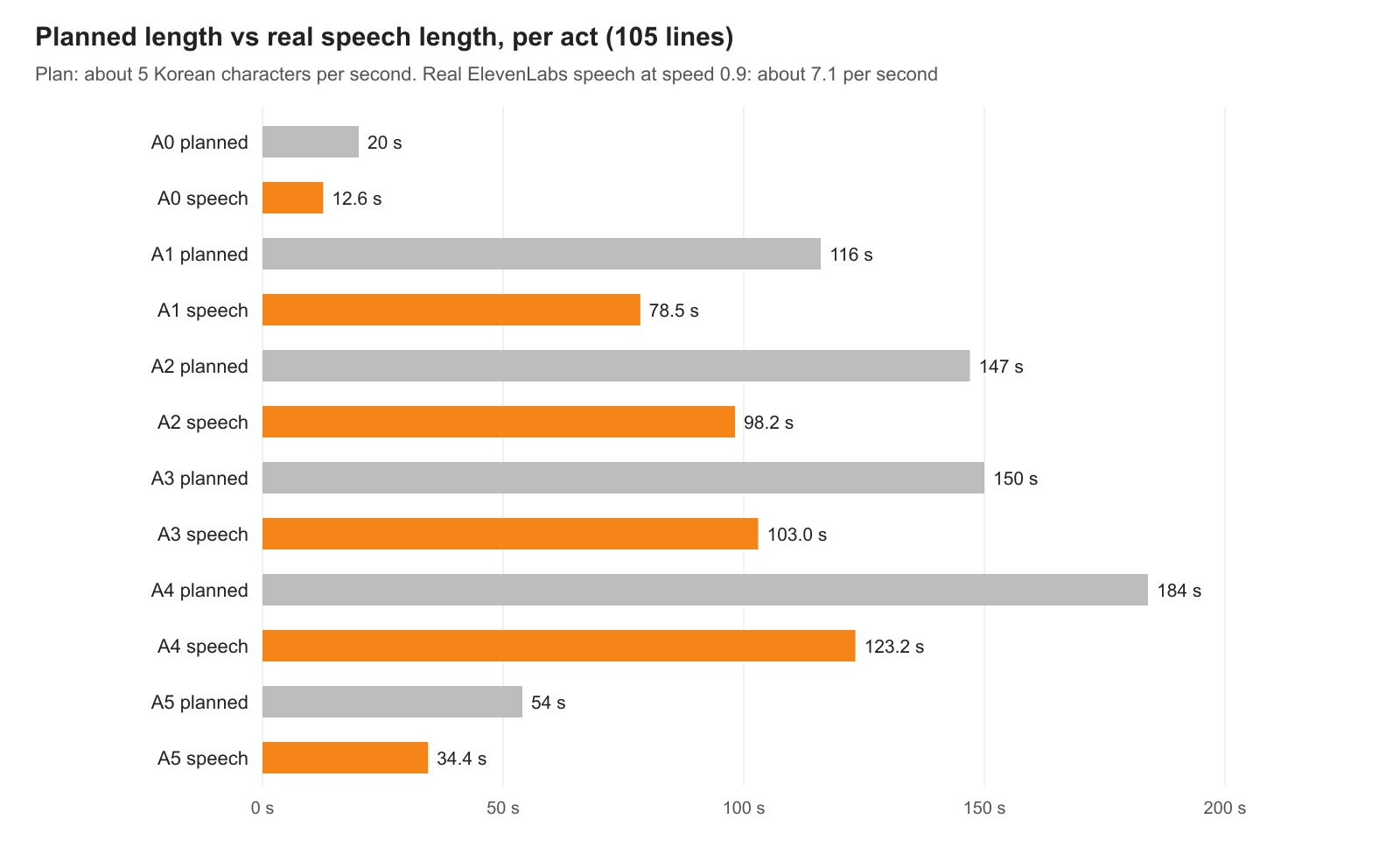 Figure 1. Planned length (grey) and real speech length (orange) for each act. Every act is about a third shorter (chart)
The real rate was about 7.1 characters per second. The narration was first made with a cloned voice and later remade with a different voice. The two versions totaled 446.4 and 450.0 seconds of speech, almost the same. Changing the voice did not change the pace much.
Figure 4 zooms into one line. A 30-character line was given 6 seconds; the speech ended at 4.55 seconds. For the remaining 1.45 seconds the picture runs with no voice.
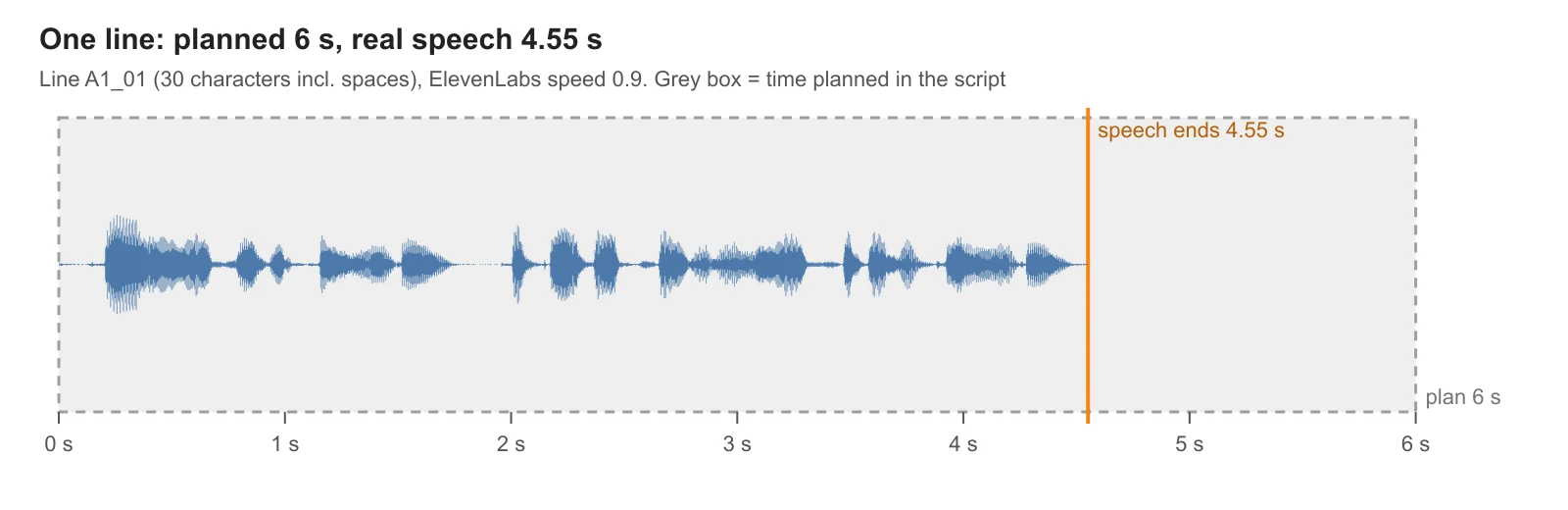 Figure 4. Waveform of one line (30 characters). The grey box is the 6 seconds planned in the script; the orange line is where the speech ends, 4.55 s (chart)
2. Setting characters per second
Characters per second is the exchange rate between script length and time. Get it wrong and the whole script is off by the same ratio. Here, a script planned at 5 was read at 7.1, so the length became 5 ÷ 7.1 ≈ 0.70 of the plan.
| Planned rate | Expected length of the 3,177-character script | Compared with the real 450 s |
|---|---|---|
| 5 per second | about 635 s | 41% too long |
| 6.5 per second | about 489 s | 9% too long |
| 7 per second | about 454 s | about right |
The expected lengths in this table are calculated from the script's character count (3,177).
The formula is "characters ÷ characters per second". Count characters including spaces and punctuation; most editors and word counters show a "with spaces" count.
For this voice and this setting (speed 0.9), 6.5–7 characters per second was the right plan for Korean. Other languages, voices, speaking styles and sentence lengths give different rates. The surest way is to make about three lines first and time them before writing the rest. Like measuring before tailoring a suit, time the voice with three lines, then write the remaining script.
3. Matching with the speed setting
ElevenLabs voice settings (voice_settings) include speed. The docs say 1.0 is the default and values below 1.0 slow the speech down. The same three lines at 1.0 and 0.9 came out about 10% longer at 0.9 (Figure 2).
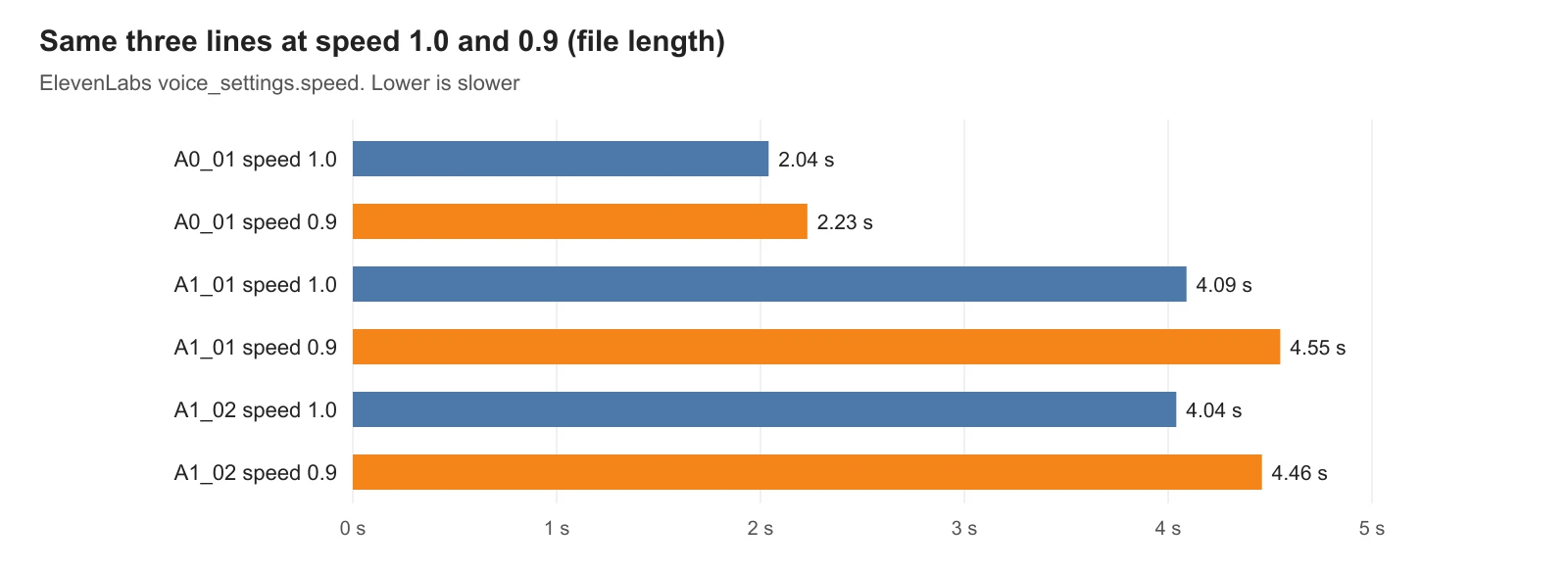 Figure 2. File length of the same three lines at speed 1.0 (blue) and 0.9 (orange) (chart)
For a calm explainer, 1.0 felt slightly fast, so we chose 0.9. But slowing to 0.9 is nowhere near enough to close a 33% gap. Going down to about 0.8 adds roughly another 12%, but the voice can start to drag and sound less like itself. It is best to treat speed as a knob for tone, not for fixing length; its useful range is narrow.
When the speech came out shorter than planned, there were three choices:
| Choice | What you do | Things to weigh |
|---|---|---|
| ① Shorten shots | Cut shots to the measured speech length | The video gets shorter. This record took this path (section 5) |
| ② Slow down | Speed around 0.8 | About 12% longer. The voice may drag |
| ③ Add to the script | Add explaining sentences | More content; regenerate and re-measure |
4. Write numbers the way they are spoken
An AI voice decides by itself how to read what it sees. Leave it to guess how to read "3" next to a counter word, or how to say "GPU", and it will sometimes get it wrong. So we kept two texts per line: the script (text) and the text sent to the voice (tts_text). The on-screen subtitle uses the script; the voice uses the spelled-out text. The example sentences below are new ones made up for this guide; the rules on the right are the ones we actually used for the 105 lines.
| Script (subtitle) | Text sent to the voice | Rule |
|---|---|---|
| "bought 3 apples" | "bought three apples", in the native Korean number word | Korean uses native number words before counters like items, rounds and animals |
| "uses two GPUs" | the letters written as they are said ("ji-pi-yu") | Latin letters and abbreviations written as spoken |
| "25 meters high" | "twenty-five meters high", in the Sino-Korean number word | Units like meters and tons take Sino-Korean numbers |
| "2.5 meters" | "two point five meters" | Decimal point spelled as "point" |
| "1.5 times the start" | "one point five times the start" | Same for ratios |
Spelling everything out made the 105 voice texts 3,299 characters, 4% longer than the script (3,177). Because spelled-out numbers add characters, section 2's length estimate is more accurate when you count the voice text.
The API also has apply_text_normalization (auto, on, off), which rewrites things like numbers into readable form. Even so, for languages where number words depend on context, as in Korean, spelling out important numbers yourself is the safer choice.
5. One file per line, fitted to shots
We did not make all 105 lines at once; we made one file per line. That way, fixing one line means regenerating only that line. The catch is that separate files can break the flow between lines. The fields for that are previous_text and next_text.
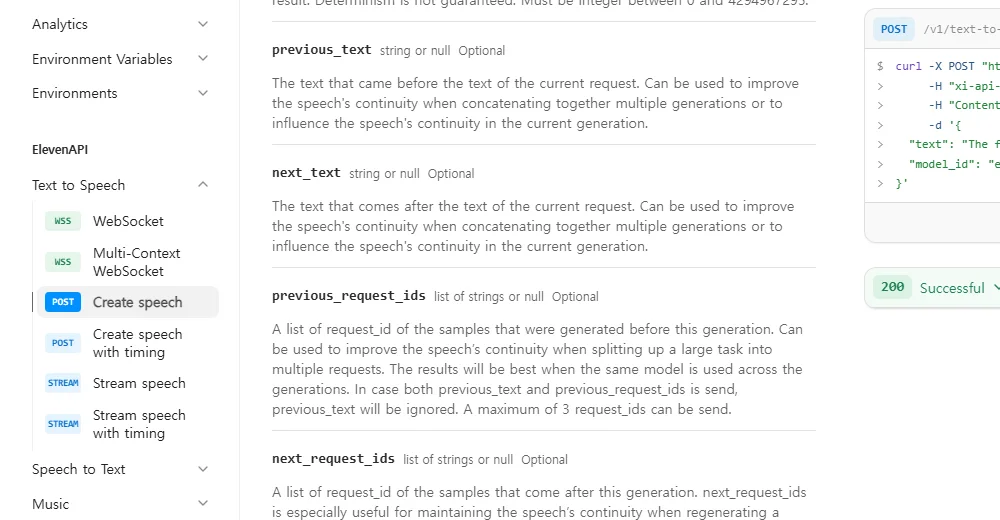 Figure 3. The previous_text and next_text fields in the Create speech docs (ElevenLabs docs screenshot)
Put the sentence just before this line in previous_text and the one just after it in next_text. It is like playing an actor the lines around theirs and asking them to read only their own. A line after a question then sounds like an answer, and the last line of a paragraph sounds like an ending. In this record we passed neighbors only within the same act. Where an act changes, the picture changes too, so a fresh start in tone does not sound odd.
The other settings:
| Setting | Value | What it does |
|---|---|---|
| speed | 0.9 | Speaking speed (default 1.0) |
| stability | 0.5 | Lower means a wider emotional range and more variation between takes |
| similarity_boost | 0.85 | How closely to follow the original voice |
| style | 0.15 | How much to exaggerate the original style |
| use_speaker_boost | on | Closer to the original speaker |
| seed | 1234 | A fixed number so the same text gives a similar result |
seed is a fixed number used instead of rolling dice. The docs say the system makes a "best effort" to be deterministic, so the same result is not guaranteed. Still, when you remake one line, it drifts less from the others.
Follow along:
- Split the script into lines, and give each line an ID (for example A1_01) and a voice text.
- Make the first three lines only, time them, and check characters per second (section 2).
- Make the remaining lines. Within the same act, pass the neighbors in previous_text and next_text.
- Measure the speech length of each line: leave out the short silence at the start and end of the file and count only from first sound to last.
- Set each shot length to the measured speech plus a little room to breathe.
- Use transcription to find misread lines and remake only those.
In step 5 of this record, the plan of 126 shots and 680 seconds became 497.0 seconds (8 min 17 s) based on speech length. Of those, 31 shots fell under 3 seconds, and the shortest was 2.23 seconds. Many shots under 3 seconds make the picture change too fast, so the next job is merging two short shots or picking shots that can hold longer.
6. Terms to check first
If you plan to earn money from videos with an AI voice, check the plan's terms first. On the ElevenLabs pricing page, the commercial license starts at the Starter plan and is not listed for the free plan. Cloning your own voice is fine; cloning someone else's voice without permission is not. Copyright questions about AI output are covered in AI content and copyright.
Exercises
- Pick three lines from your script, count characters including spaces, and work out the length at 5 and at 7 characters per second.
- Rewrite "2 drones flew 1.5 km in 30 minutes." as text for the voice. (Example answer: "Two drones flew one point five kilometers in thirty minutes.")
- Make one line at speed 1.0 and 0.9, and measure the length difference as a percentage.
Common mistakes and fixes
| Symptom | Cause | Fix |
|---|---|---|
| Narration ends before the shot and the picture runs silent | Characters per second planned too low | Time the first three lines and re-plan (section 2) |
| Numbers are read oddly | Left the reading to the voice | Spell numbers out in the voice text (section 4) |
| Tone breaks between lines | Lines made separately without neighbors | Pass previous_text and next_text (section 5) |
| One remade line sounds different | Results vary a little each time | Keep a fixed seed and the same settings |
| Very low speed makes the voice drag | Using the speed knob to fix length | Keep speed for tone; fix length with shots or the script (section 3) |
Summary
Measure characters per second with the first three lines (about 7 here), spell numbers as spoken, make one file per line and pass the neighbors, and re-time shots from the measured speech.
Whether the narration matches the script is checked by transcription in Checking AI narration with faster-whisper.
References
- ElevenLabs API docs, Create speech (previous_text, next_text, seed, voice_settings, apply_text_normalization): https://elevenlabs.io/docs/api-reference/text-to-speech/convert
- ElevenLabs pricing (commercial license by plan): https://elevenlabs.io/pricing
- Read next: Checking AI narration with faster-whisper, AI content and copyright, Rendering Blender for YouTube Shorts
- Image license: Figures 1, 2 and 4 are charts of our own narration record. Figure 3 is part of the official docs, shown for explanation.