Making a 3D character with Claude Code, part 2: IK rig, motions, and separate scoring
Add an IK rig and motions to the part 1 model with Claude Code scripts, have a separate reviewer score the show video while you fix it, and finish with two files you edit and dress up by hand.
한국어English
Based on: Claude Code, Blender 5.2 (English UI, default keymap), Mixamo, and the Blender 5.2 manual (October 2026). All screen images are real Blender 5.2.1 screens. The red numbers and outlines were added for explanation.
In part 1, scripts written by Claude Code turned one drawing into a model with separate parts (01_model.blend). Every number went into one place, character.json.
In part 2 you add an IK rig to that model and make motions. Then you make a show video and hand the scoring to a separate reviewer, test whether the kit is really easy to edit, and finish with two files you edit and dress up by hand. As in section 4 of part 1, send the prompts one stage at a time and look at each result before moving on. The stage numbers in the headings (stage 3 rig to stage 8 scene files) are the numbers from the flow table in section 1 of part 1.
By the end of this part you will be able to:
- Tell apart what deform bones, control bones, IK, and poles each do.
- Write a prompt that makes one motion into one Action.
- Separate the builder from the scorer and fix the work round by round.
- Have Claude Code make two files for building scenes yourself.
1. Stage 3: building the IK rig
Try it: Send the text below.
Make the deform bones with Mixamo names (mixamorig:*),
and on top of them make control bones with hand and foot IK plus knee and elbow poles.
Show me a rig test pose sheet.
A rig is the armature inside the model together with the handles that move those bones. Think of the wire inside a cloth doll: bend the wire (the bones) and the cloth on the outside (the mesh) bends with it.
The rig has 78 bones: 42 deform bones that actually bend the body, and 36 control bones that a person grabs by hand. The deform bones keep their Mixamo names (in the form mixamorig:Hips), so motions downloaded from Mixamo attach without any remapping.
IK (inverse kinematics) means you grab the end and drag, and the joints in between bend on their own. It is like grabbing the toe of a wire doll and lifting it: the knee bends by itself. Drag the foot control bone, and the knee bends. A pole bone (pole target) is a signpost that tells the knee or elbow which way to bend. The skirt is split into 14 panels (7 per side), with one bone per panel so the panels move out of the way of the legs. The hair, ribbon, and scabbard have bones of their own too.
Try it (check it yourself): Select the armature and press Ctrl+Tab to enter Pose Mode. Click the box-shaped control bone under the foot (in this file, ik_foot.L) and drag it up with G → Z. As the foot rises, the knee bends forward. When you're done, press Esc or Ctrl+Z to undo.
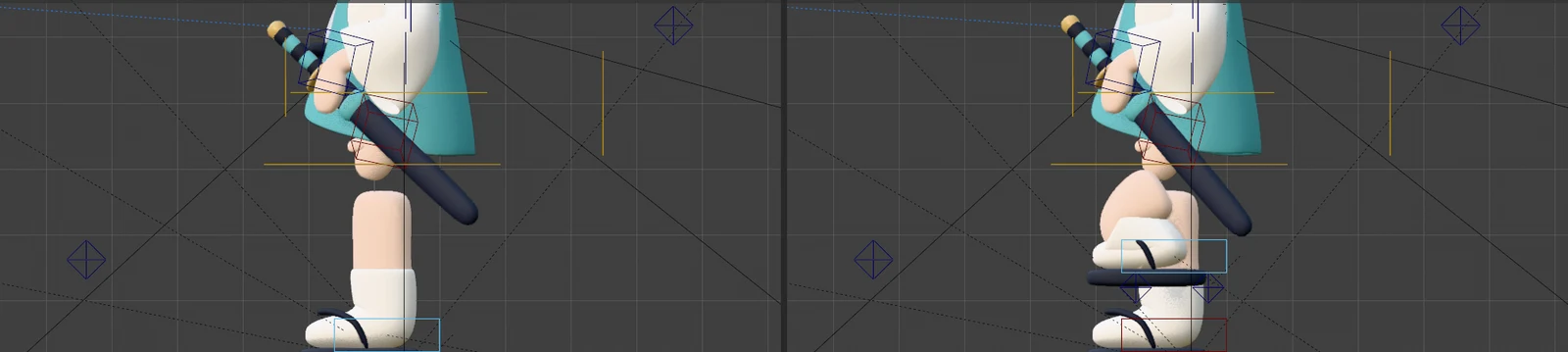 Left: the starting pose. Right: after raising the foot control bone (light blue box) by 12 cm. The image is a side view with the skirt hidden so the knee is easy to see (screenshot, Blender)
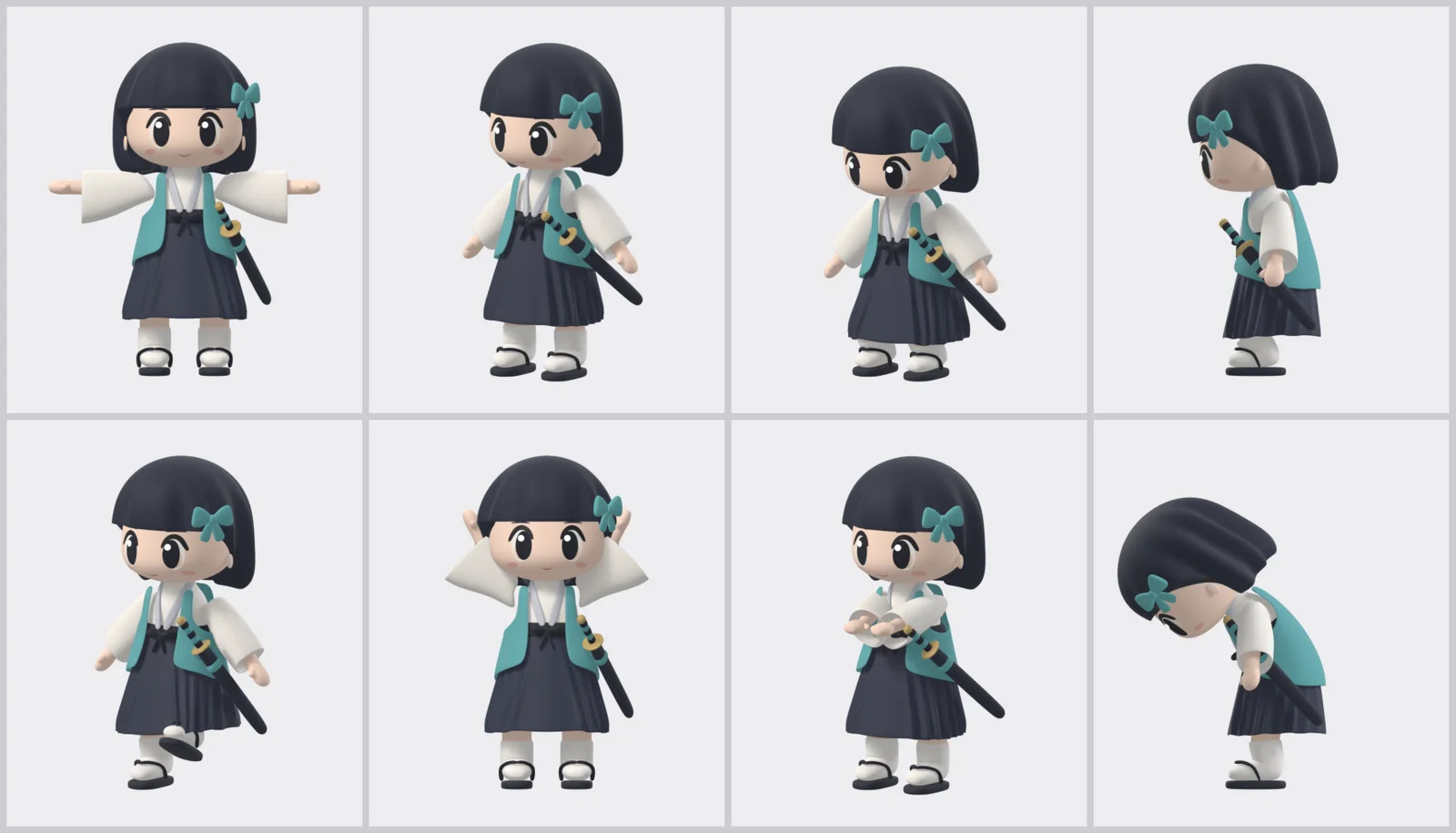 Rig test poses. The sheet shows whether clothes stretch or poke through when the arms go up, a foot lifts, or the waist bends (Blender render)
Things to watch out for when you set up IK:
| What to watch | Why |
|---|---|
| Add bones with knees and elbows slightly bent | If they are straight, IK cannot decide which way to bend |
| Set the bend direction with a pole | Stops knees from folding sideways or backward |
| Keep deform bones and control bones separate | You can change the handles and the body bone names stay the same |
| IK chain length 2 | For a leg, only the two segments (thigh and shin) bend |
| Set the weights where clothes overlap explicitly | Automatic weights make the skirt follow the legs and poke through |
What to check: On the test pose sheet, see whether clothes stretch or poke through the body when the arms and legs bend. If they do, point at that panel and have it fixed.
Later the author asked, "For the chibi style, you didn't use Mixamo or Auto-Rig Pro and Claude Code did it all on its own, right? Including the rigging?" (translated from Korean). The answer was: "The model, rig, and motions were done by Claude Code in Python; only the walk is a Mixamo clip." An Auto-Rig Pro rig was also tried on this character, but comparing bone count (78 vs. 217) and the weights where the clothes overlap, the hand-built rig came out better. How to move Mixamo motions onto another armature is covered in a separate Auto-Rig Pro retargeting guide.
2. Stage 4: making motions
Try it: Send the text below.
Make one motion into one Action.
Key the wave, bow, and draw-the-sword-and-slash poses directly; attach a Mixamo clip for the walk.
Measure foot sliding and poke-through as numbers.
An Action is a record inside the file that holds one motion. It is like one song in a music app: save songs separately and you can put them into any playlist; keep motions as Actions and you can pull them into other scenes. The movement inside a motion is made of keyframes (keys for short). A keyframe is a mark that says "at this frame, this pose," and Blender fills in between the keys. If you have never set a keyframe, see Blender beginner chapter 12 first.
The wave, the bow, and drawing the sword and slashing were made directly by setting a few pose keys on the control bones. The slash goes anticipation → strike → follow-through: the body winds up once before swinging the sword, then unwinds.
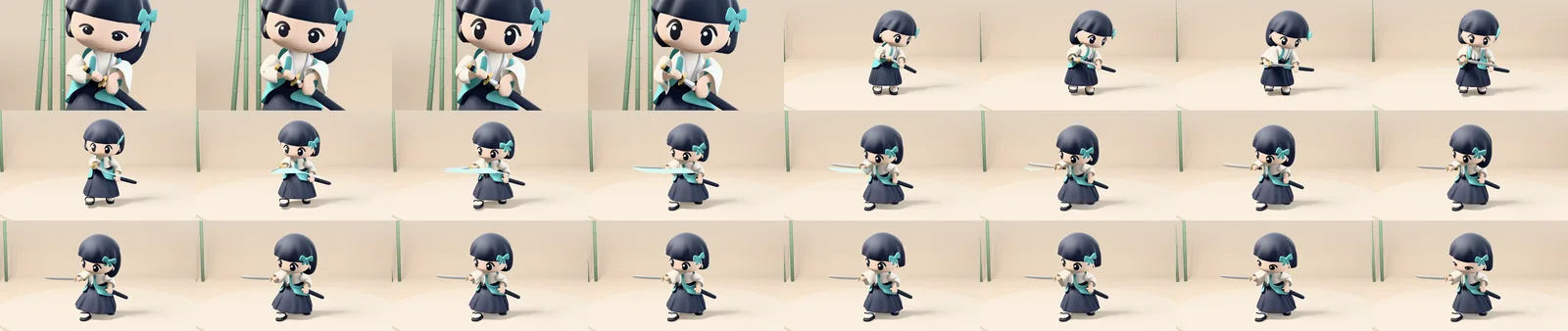 Frames from drawing the sword and slashing, in time order from top left to bottom right (Blender render)
Only the walk uses a Mixamo motion, corrected so the feet don't slide. A Mixamo wave was also tried, but the hand got buried in front of the chin, so the hand-made wave was used.
When you use Mixamo motions: Log in to the Mixamo site (mixamo.com) with an Adobe account, pick a motion, and use Download to get the FBX file. The FBX you download and any .blend file containing that motion are for your own use. Don't redistribute or upload them. That is also why no such files are included with this guide.
What to check: Claude Code reports foot sliding in mm per frame and whether deep poke-through is 0. If a number is large, point at that range and have it fixed.
3. Stages 5 and 6: the show video and separate scoring
Try it: Send the two texts below, one after the other.
Chain the motions in NLA into a 960x540 30fps show video.
Set up the stage so only the lights and camera need changing.
Score it with a separate reviewer, not the builder.
Turn the notes into number fixes and make the next round. Keep going until it scores above 8 or I tell you to stop.
The NLA (Nonlinear Animation) in the first text is an editor where you lay motion bars along a timeline and chain them. It is like laying out clips in a video editing program. Using it directly in the UI is covered in part 3.
At first, render small (960x540) at 30 fps. That way you find the things to fix quickly. When the builder scores its own work, the scores run generous. So the scoring was done by a separately called reviewer agent (a different Claude Code from the builder), which looked at frames pulled from the video and scored out of 10.
| Version | v02 | v03 | v04 | v07 | v08 | v09 | v10 | v11 |
|---|---|---|---|---|---|---|---|---|
| Average score | 5.1 | 5.9 | 6.4 | 6.9 | 7.4 | 7.5 | 7.7 | 7.7 |
v01, v05, and v06 were not scored. Each round fixed things like the skirt structure, the eyes, the sword length, the bow camera, and the sword trail. At the end, the author played the version with the closed eyes changed to smiling eye shapes (v11b) and called it done: "Watched the video. Nicely done" (translated from Korean). Even when the score doesn't reach 8, the final call belongs to a person.
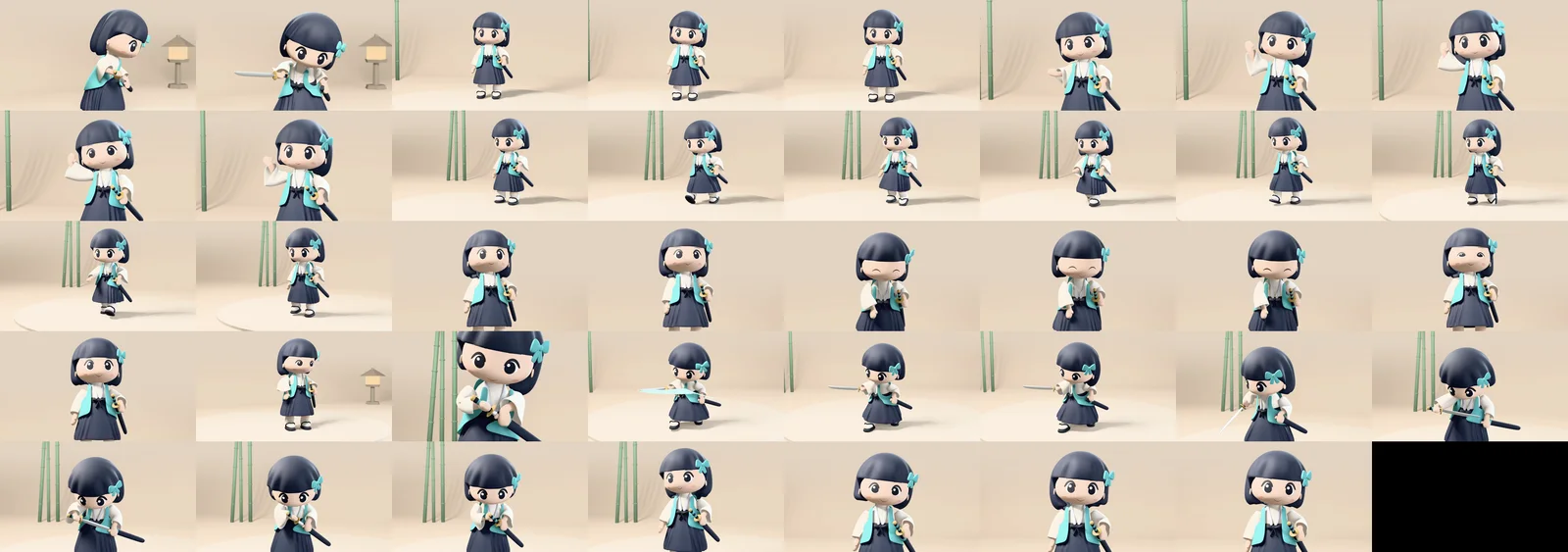 Frames from the 11.4-second show video (v11b), in time order from top left to bottom right. The black cell at the very end is empty (Blender render)
4. Testing whether it is easy to edit
Four tests checked whether the kit is really easy to edit.
| Test | What was changed | Result |
|---|---|---|
| ① Vest color | One color line in character.json | Run again and only the color changes |
| ② Skirt length | One length line in character.json | The skirt and skirt bones follow together |
| ③ Keeping a hand-edited part | A "lock" mark on the part | The part survives when the script runs again |
| ④ Bow depth | One key in the bow motion | The bow goes deeper |
Test ③ was done by imitating a person's Edit Mode change with a script. Editing by hand and then running again has not been tried yet.
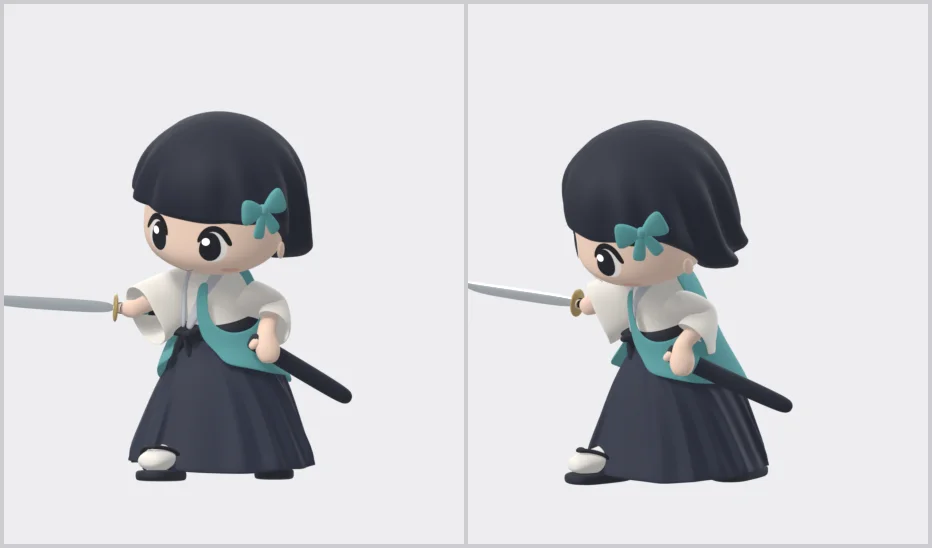 ② Skirt length test. Left: the original length. Right: rebuilt after changing one number (Blender render)
Try it: Do the same with your own kit. Open character.json in a text editor such as Notepad or a code editor, make the skirt length value a little larger, and save. Then send Claude Code "I changed the skirt length; rebuild it." Entering the same prompt again does not give you the same character. What comes out the same every time is the scripts and the data file.
5. Stages 7 and 8: two files you edit by hand
A few days after the show passed, the author opened the finished file to adjust the pose and camera by hand.
What was actually sent (translated from Korean): "I'm looking at the finished Blender file and I want to freely change the rig myself, but right now it's constrained."
Bones snapped back when the frame changed, even after being rotated. Claude Code found four reasons.
| Why it was stuck | What was going on |
|---|---|
| ① Motion keys | The show motion keyed every control bone. Changing frames returns them to the keyed values |
| ② Camera keys | The camera has a key for every shot too |
| ③ Control bone setup | The Mixamo-named bones are tied to follow the control bones, so rotating them directly does nothing |
| ④ IK influence | The value that turns IK on and off is tied to a property on another bone |
So two more files were requested.
Try it: Send the stage 7 and stage 8 texts, one after the other.
I want to freely change the pose and camera in the finished 04_show.blend.
Find what is blocking that now, and make a separate static pose file with no keys. Don't touch the original.
Make two files per character.
One is the file with the animation applied; the other is the rest pose with an NLA action library (muted tracks) and pose assets.
For each motion, split a body track (LIB_<motion>) and a face track (LIB_<motion>_face). Explain how to use it in an md guide.
A pose asset in the second text is a saved one-frame pose. It is like a single photo; in part 4 you pick them from the Asset Shelf (the pose shelf). The track names were added to match the exercises in this series. In reality, body and face were first built into one track, and turning on just the two show tracks moved the face as well. So the author asked again:
What was actually sent (translated from Korean): "Split the body track and the face track so that while the body track plays a motion, I can set the face track however I want."
These are the resulting files.
| File | What it is | When to open it |
|---|---|---|
04_show.blend | The finished file with the show animation applied | To watch or re-render the finished show |
05_pose.blend | A static pose with no keys. Circle and box handles on the 28 control bones you grab | To set a single-shot pose by hand |
05_scene.blend | Rest pose + NLA action library + pose assets | To build your own scene |
05_scene.blend holds 16 muted tracks whose names start with LIB_: 8 body tracks (neutral standing pose, wave, bow, slash, idle, walk, walk in place, Mixamo wave), 4 face tracks, 3 short faces (blink, smile, surprise), and 1 manual face. Open the NLA and you also see 6 muted tracks starting with show_ that hold the whole show. This series doesn't use them. The motions from Mixamo never had face keys, so they have no face tracks. With only the wave body track turned on and compared with the original show, the bone position difference was 0 mm and the face change was 0.
Parts 3 and 4 are written against this 05_scene.blend. The numbers and names are from the series' file as well. The file you make with the stage 8 text may have different track and pose names and different motion lengths. Check the track names and strip lengths in the NLA first and adjust.
6. Cost and time
| Item | Value |
|---|---|
| Generation credits for model, rig, motions | 0 (script runs) |
| Rebuild | Model, rig, and motions about 10 seconds; show render about 1 minute |
| Show video rounds | v01 to v11b, within the same day as the first request |
| Scoring rounds | Average 5.1 (v02) → 7.7 (v10, v11) |
7. Common mistakes and fixes
| Symptom | Cause | Fix |
|---|---|---|
| The same prompt gives a different character | A prompt gives a slightly different result every time | Keep the data file and scripts, and rebuild from those |
| The knee folds sideways or backward | The bend direction of the knee was never set | Have a pole set the bend direction (table in section 1) |
| The skirt pokes through the legs | Automatic clothing weights make the skirt follow the legs | Have the weights where clothes overlap set explicitly (table in section 1) |
| Turning on only the two show tracks moves the face too | Body and face are in one track | Ask again to split body and face tracks (section 5) |
8. Wrap-up
In part 2 you added bones to the model, made the motions as Actions, fixed the work through a separate reviewer's scoring, and finished with 05_scene.blend for building scenes.
In one line: rig and motions by script too, scoring kept separate, and one more file for building scenes.
Next: From Part 3: building a scene with NLA tracks on, you don't hand the work to Claude Code. You do it yourself in the Blender UI: turn on, move, and blend the muted tracks in 05_scene.blend to make a scene without setting a single key.
References
- Blender 5.2 manual, Inverse Kinematics: https://docs.blender.org/manual/en/5.2/animation/armatures/posing/bone_constraints/inverse_kinematics/introduction.html
- Blender 5.2 manual, Nonlinear Animation: https://docs.blender.org/manual/en/5.2/editors/nla/index.html
- Claude Code official docs: https://code.claude.com/docs/en/overview
- Mixamo: https://www.mixamo.com/
- Keymap: Blender 5.2 default keymap
- Images: Blender renders and Blender screenshots.
The full guide, with the reusable kit and pose library, is a book on Gumroad: https://azblender.gumroad.com/l/lowpoly_character