Making a 3D character with Claude Code, part 1: from one drawing to an easy-to-edit model
Start from one drawing and build an easy-to-edit character model with Blender Python scripts written by Claude Code: the overall flow, what you need, and the kit, drawing, and model stages.
한국어English
Based on: Claude Code, Blender 5.2 (English UI, default keymap), the Higgsfield image model, and the Blender 5.2 manual (October 2026). All screen images are real Blender 5.2.1 screens. The red numbers and outlines were added for explanation.
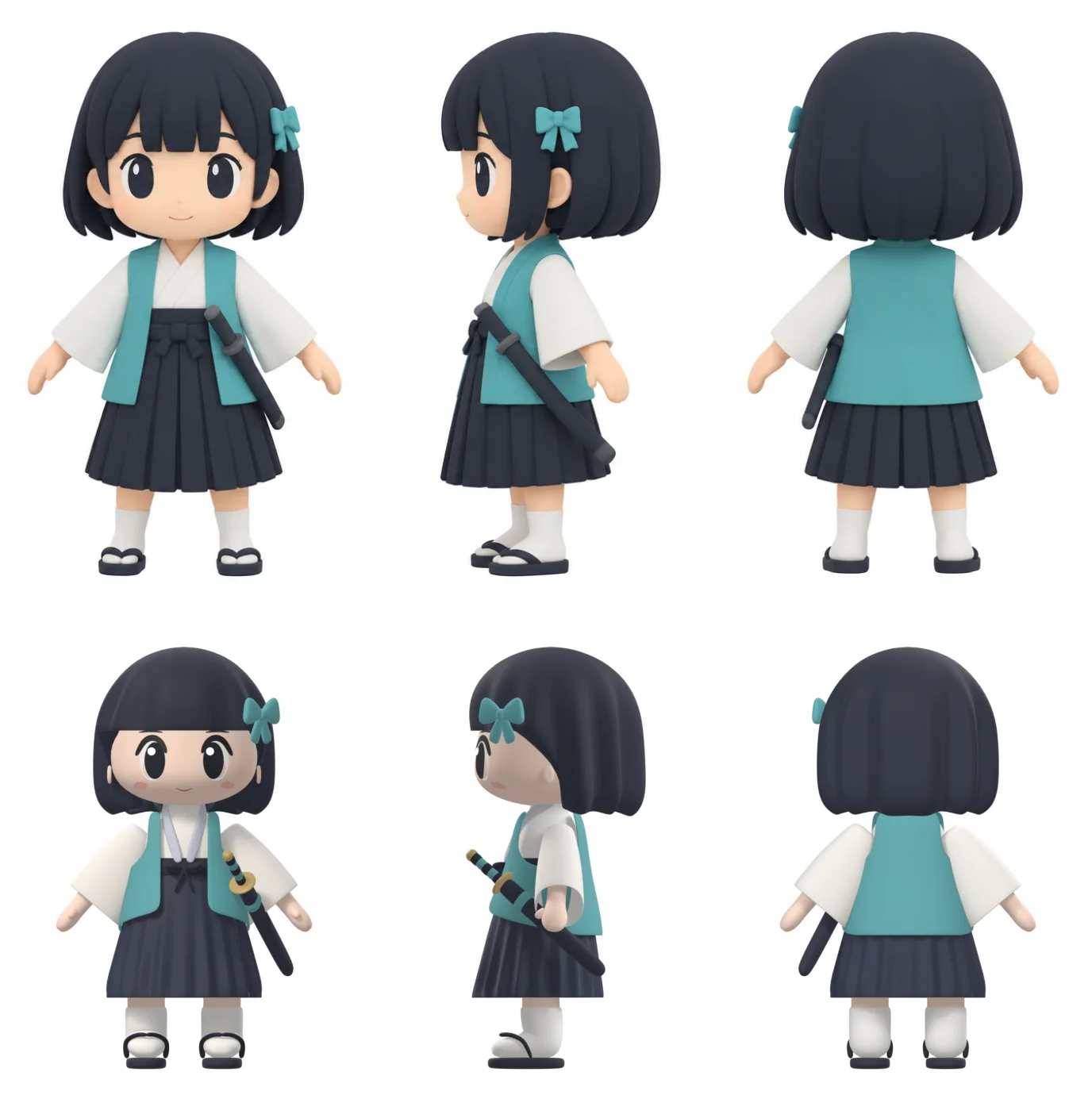 Top row: the drawing (AI-generated illustration, Higgsfield). Bottom row: the model built by a script that Claude Code wrote (Blender render). Measured by overlap, the front matches 87.41%, the side 88.54%, and the back 87.94%.
The character in the bottom row above started from one drawing. It was built by telling Claude Code what to do in plain words, using only the Blender Python scripts Claude Code wrote. No part of it was modeled by hand with the mouse. From the drawing, the work went on to add bones, then a wave, a bow, and drawing a sword and slashing.
The goal was not "one good-looking character." It was an easy-to-edit character: one where changing the skirt length does not mean starting over. Once it was done, the author dressed up a scene of their own in the Blender UI with the NLA Editor and the Asset Shelf.
This series has four parts. Part 1, this one, covers the overall flow, building the kit, and getting from one drawing to a model. Part 2 covers the IK rig and motions, part 3 builds a scene with NLA tracks, and part 4 chains Asset Shelf poses and renders.
By the end of this part you will be able to:
- Write prompts that hand Claude Code a character-building kit one stage at a time.
- Tell apart what each stage does: drawing → model → IK rig → motions.
- Check how closely the model matches the drawing with a silhouette overlap percentage.
1. The whole flow at a glance
| Stage | What it does | Who does it | Output file (example) |
|---|---|---|---|
| 0 Kit | Set up per-stage scripts and a data file | Claude Code | character.json, scripts folder |
| 1 Drawing | Concept sheet with front, side, and back on one image | Higgsfield image model | One image |
| 2 Model | Low-poly model with separate parts | Claude Code script | 01_model.blend |
| 3 Rig | Bones and IK control bones | Claude Code script | 02_rigged.blend |
| 4 Motions | One Action per motion | Claude Code script (walk only from Mixamo) | 03_actions.blend |
| 5 Show | Short video that chains the motions | Claude Code script | 04_show.blend, video |
| 6 Scoring | A separate reviewer scores, then fixes are made | A separately called reviewer agent (a different Claude Code from the builder) | Score per round |
| 7·8 Scene files | Files you edit and dress up by hand | Claude Code script | 05_pose.blend, 05_scene.blend |
| 9 Your scene | Build a scene with NLA and the Asset Shelf | You | Your own scene video |
The only stage that cost money was stage 1, one image. It took about 2.25 credits. From stage 2 on, Blender runs scripts that Claude Code wrote, so there were no generation credits. What Claude Code itself costs depends on your plan.
2. Why you want an easy-to-edit character
Some AI tools turn a drawing straight into a 3D model. They are fast, and the result looks fine. Open the file, though, and the body, clothes, and hair are one single-piece mesh. A mesh is a 3D shape made of points, edges, and faces. If you only want a shorter skirt, you cannot cut it out of the lump, so your only option is to generate again. When an auto-rig tool was used to add bones to that same one-lump mesh, it took 3 hours 17 minutes, and the result was not usable.
Compare clay and LEGO. Once a clay figure sets, changing one arm is hard. With LEGO you pull out the arm brick and swap it. The character in this series is the LEGO kind.
| Principle | What it means | Why it helps |
|---|---|---|
Numbers live in character.json only | Height, skirt length, sleeve width, colors, and so on in one file | Change one line, run again, and bones and clothes follow |
| Each part is its own object | Body, head, hair, clothes, shoes, and props are separate | You can change one piece of clothing alone |
| No sculpting, no voxel remesh | Low poly + Mirror + Subdivision modifiers | Vertex numbers stay the same, so hand edits survive |
| One file per stage | 01_model → 02_rigged → 03_actions | Fixing a later stage does not rebuild earlier ones |
| One motion = one Action | Wave, bow, and slash are stored separately | You can pull them into other scenes |
character.json is the character's blueprint. The script is a machine that reads the blueprint and assembles exactly what it says. Edit the blueprint, run the machine again, and you get the new character. Rebuilding the model, rig, and motions took about 10 seconds; rendering the show video as well took about 1 minute.
3. What you need
| Item | Where it is used | Notes |
|---|---|---|
| Claude Code | Every stage | For installation, see the Claude Code install guide or the official docs in the references |
| Blender 5.2 | Running scripts, building scenes | Written for the English UI |
| Image generator | Stage 1 | This series used the Higgsfield image model. A drawing of your own works too |
| Mixamo (optional) | Walk motion | Downloaded with an Adobe account. Don't redistribute the files you download |
Before you start: Make a new working folder and open Claude Code in it. Claude Code reads and edits the files in that folder. Don't open it in a folder that holds another project.
4. Stage 0: building the kit
The first request was a long message with eleven questions packed into it. Here is the start of what was actually sent (translated from Korean):
What was actually sent: "I've drawn a character by hand and tried modeling, rigging, and animating it all the way through. I like the character itself, but it's hard to edit. … 3. Modeling in Blender itself seems more meaningful, but should it be Sculpt Mode or Edit Mode? 4. How to do IK rigging and what to watch out for 5. How to animate, and whether I can save motions as Actions and reuse them later 6. Whether using Mixamo for animation is a lot easier."
Claude Code made a plan, then asked back with three question prompts (Claude Code's multiple-choice question panel): whether to make an original character, the video format, and the proportions. After picking the answers, the author left the message "I'll be away for about 6 hours, so use your own judgment and do it well" (translated from Korean) and stepped away.
When you follow along, don't ask everything at once. Send one stage at a time. Looking at each result before moving on is more reliable. The prompts from here on are stage-by-stage rewrites based on the real requests, translated from Korean. They were not run exactly as written here, and the result varies a little every time. Replace <your character> with your own character.
Try it: Send the text below to Claude Code, opened in the new folder.
Build a kit that makes a character with Blender Python scripts: model → IK rig → motions.
Keep every number in character.json only, and make each part (body, head, hair, clothes, shoes, props) a separate object.
Don't use sculpting or voxel remesh; use low poly + Mirror + Subdivision.
Save each stage as 01_model / 02_rigged / 03_actions.blend.
What to check: See that a folder structure and character.json were created. Ask Claude Code for the command that runs the stages in Blender background (headless) mode, and it will tell you. The command looks roughly like blender -b --python build.py -- --char <your character> --stage all, and the file names depend on the kit Claude Code built.
5. Stage 1: one drawing
Try it: Send the text below.
Make one concept sheet of an original character with Higgsfield.
Three views: front, side, back. A-pose, white background, no text.
The character is <your character> (hair, clothes, props, colors).
Don't include any marks that identify a character from an existing work.
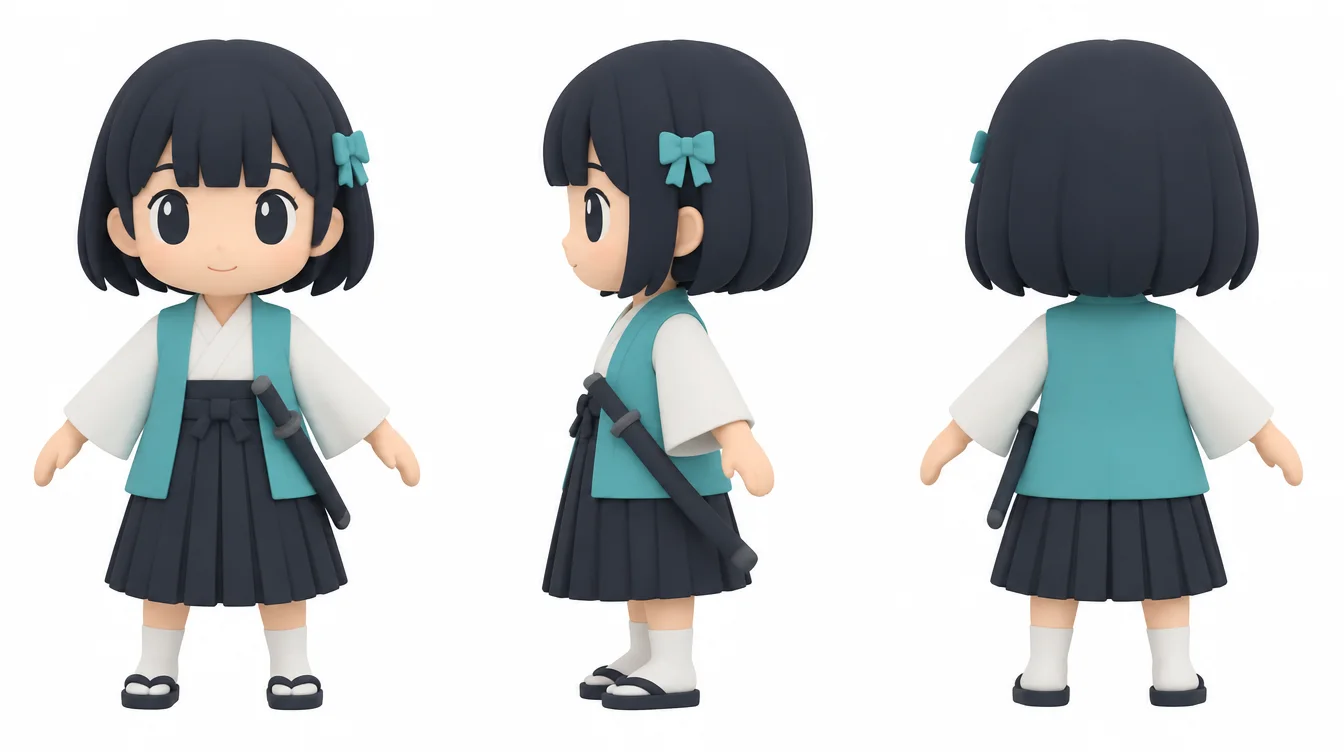 Concept sheet with front, side, and back on one image (AI-generated illustration, Higgsfield). The side view faces left.
Nobody wrote the image prompt in English by hand. The author asked in Korean, and Claude Code turned that into an English prompt and sent it. It included about three heads tall, A-pose, white background, and no text, with "ORIGINAL" in the first sentence. An A-pose holds the arms out from the body at a slant. The armpits don't touch, which makes adding bones easier.
What to check: See that the height and foot level are the same in all three views. This drawing is cut into front, side, and back and used as the modeling reference. The prompt said the side view faces right, but the drawing faced left. When that happens, match the drawing when modeling.
6. Stage 2: building the model with a script
Try it: Send the text below.
Build the model from this drawing, and show me a comparison sheet that overlays the drawing and model silhouettes.
Where the overlap (%) is low, fix it by changing the numbers.
Only half of the model was built; a Mirror modifier fills in the other half. A modifier is an effect layered on top without changing the original shape, like a photo filter. Mirror adds the mirrored half, and Subdivision Surface (shown as Subdivision in the panel) splits angular faces into smaller ones so they look smooth.
The model is split into 14 parts, such as the body, hair, ribbon, top, vest, skirt, sash, sandals, and sword. Before modifiers, it has 1,492 vertices. That is a size you can easily handle by hand.
Try it (check it yourself): Open the file in Blender and click a part (for example saya_head) in the Outliner at the top right. Click the Modifier Properties tab (wrench icon) in the Properties editor, and you see the stacked effects in order from the top.
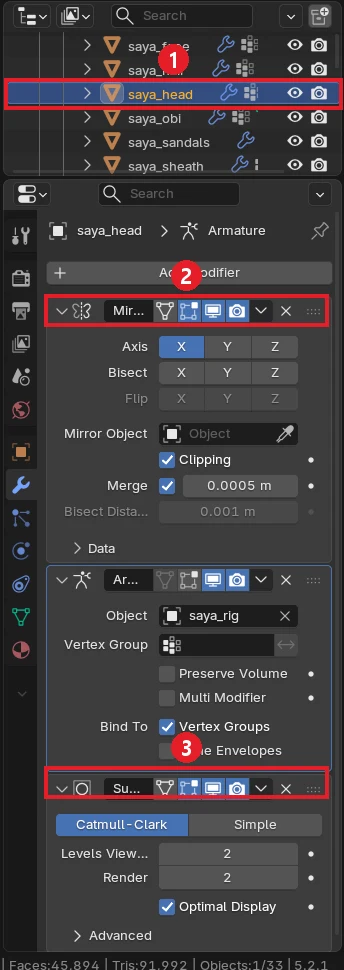 ① Part selected in the Outliner (saya_head) ② Mirror (copies the half in a mirror) ③ Subdivision (smooths). The Armature modifier in the middle makes the part follow the bones. The panel is narrow, so the ends of the names are cut off (screenshot, Blender)
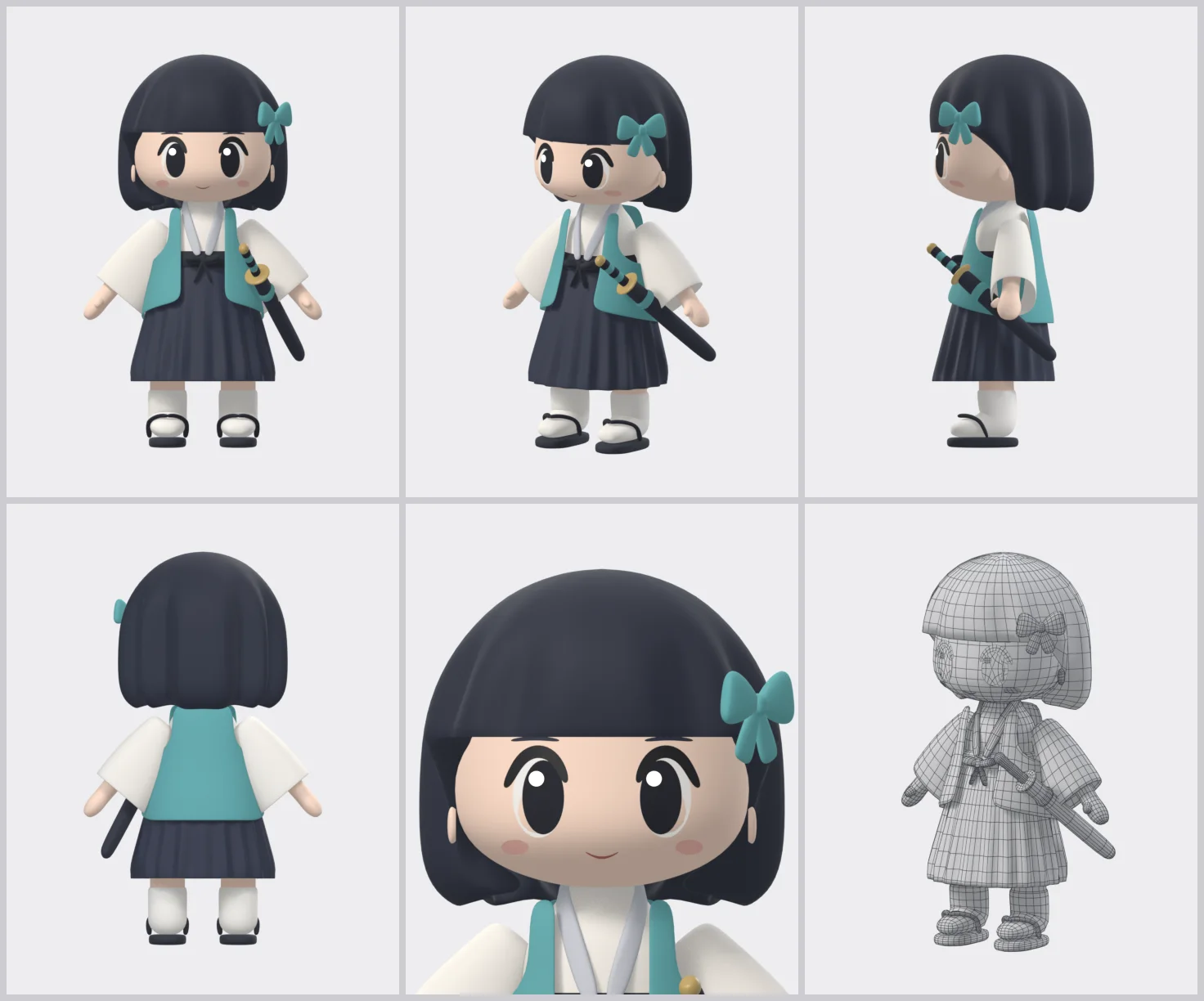 ① Front ② Three-quarter front ③ Side ④ Back ⑤ Face close-up ⑥ Wireframe (Blender render)
How well the model matches the drawing was measured with a silhouette overlap percentage, not by eye. The outlines of the drawing and the model are scaled to the same size and laid on top of each other, and the matching area is counted as a percentage. Starting from the first version and adjusting the numbers, the 22nd sheet reached the values in the top image (front 87.41%, side 88.54%, back 87.94%).
What to check: See that the comparison sheet and the overlap % come out. If one view has a low number (for example, the side), point at it and send again, for example "The back of the head is too small in the side silhouette; fix it."
7. Cost and time
| Item | Value |
|---|---|
| Image generation | One image, about 2.25 credits |
| Generation credits for model, rig, motions | 0 (script runs) |
| Rebuild | Model, rig, and motions about 10 seconds; show render about 1 minute |
8. Wrap-up
In part 1 you went from one drawing, a data file (character.json), and scripts to a model with separate parts.
In one line: one drawing + a data file + scripts = an easy-to-edit model.
Next: In Part 2: IK rig, motions, and separate scoring, you add bones to this model and make the wave, bow, and slash motions. You make a show video, hand the scoring to a separate reviewer, and finish with two files you edit by hand.
References
- Blender 5.2 manual, Mirror modifier: https://docs.blender.org/manual/en/5.2/modeling/modifiers/generate/mirror.html
- Blender 5.2 manual, Subdivision Surface modifier: https://docs.blender.org/manual/en/5.2/modeling/modifiers/generate/subdivision_surface.html
- Claude Code official docs: https://code.claude.com/docs/en/overview
- Images: the concept sheet and the top row of the comparison sheet are AI-generated illustrations made with Higgsfield; the rest are Blender renders and Blender screenshots.
The full guide, with the reusable kit and pose library, is a book on Gumroad: https://azblender.gumroad.com/l/lowpoly_character